Leak Detection Menu is not appearing under jobs in Unity 2022.2 Beta

Hi there

Im using Job System heavily without entities, and I’m seeing this error
A Native Collection has not been disposed, resulting in a memory leak. Enable Full StackTraces to get more details.

How do I enable full stack trace? There is no Leak Detection Menu under Jobs

Please Advise

Edit->Preferences->Jobs

There is no Jobs option there either,
Just so you know, I’m using Collection Package and not Entities
8566361--1146521--upload_2022-11-6_20-17-51.png

You need to have Jobs package installed to see that menu.

thats the issue, if i install jobs package it says its deprecated and jobs is now part of collections package which i already have it

UPDATE 2
I see collections package 1.2.4 and there doesnt seem to be any update option, however if i go to package manual i see 1.4.0 as latest

Hi @jGate99 ,
i am getting the same error message like you and so I am trying to enable Leak Detection too. In Unity 21.3.14f I am also not able to install Jobs package, but I have the collections package installed like you.
Did you find a solution yet?

@jGate99 Did either of you find a solution?

No, unfortunately I didn’t find any.

These options are not available with only Jobs & Burst package installed, and collection package gave an error on Unity 2022.2.7f1

error CS0006: Metadata file 'Library/PackageCache/com.unity.ext.nunit@2.0.3/net35/unity-custom/nunit.framework.dll' could not be found

I don’t understand why something so crucial for using/debugging Jobs is not in the Jobs package itself.

Jobs package has been folded into Collections since 1.4.0. Do not install Jobs separately, it is obsolete.
Install Collections 1.4.0 or 2.1.0-pre.11.
Errors like you posted are just indicating a DLL from the previous compilation is missing. Just restart the editor.

I have the same error message. Did you find a solution yet?
Leak Detected : Persistent allocates 2 individual allocations. To find out more please enable ‘Jobs/LeakDetection/Full StackTraces’ and reproduce the leak again.
Unity version : 2022.3.0f1

I’ve been having this error message since the start of the project. I left unity open and it gobbled up almost 50GB of RAM on a small 2D game.

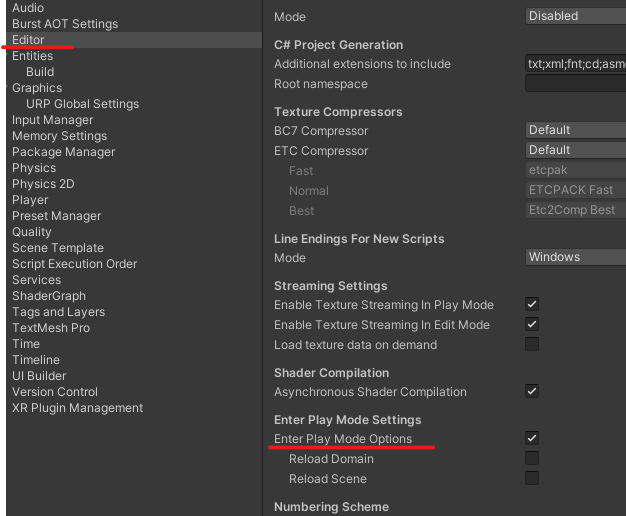
Apparently, you have to check the Enter Play Mode Options
9076120--1256074--upload_2023-6-13_7-59-49.png

They actually mention it on the documentation IIRC. Tho this one time I decided not to check it, hence I go to this forum.

I’m not sure that is related to the issue at hand. I’ve had the option selected the whole time, and I’m getting this error

Edit->Preferences->Jobs->Leak Detection Level

Why hide an often used toggle like this? The previous location under the menu was much more useful.

Thank you, I looked in project settings, and stupidly didn’t check preferences.

I second the question. Why did you remove that from upper menu?

How do i enable this in Unity 2021? There is no “Jobs” in preferences. Yes, i have the collection package installed.