Hello,
I am facing a problem using an LPPV in my scene.
Here a brief description:
In my scene I use static lightmaps, light probes and now I added an LPPV.
I need the LPPV because I have some pipes which I dont want to add to the lightmaps and light probes will not light them properly.
I have placed five short pipes next to each other to form a long pipe . Each of them references the same LPPV which encompasses all five pipes. See picture below:
When I generate the lighting the result looks like this:
The lighting in the image above is not correct.
Therefore I tried somethig else. Rather than having five instances of the short pipe I merged them in Blender into one mesh. That mesh references the same LPPV. The result becomes correct, see image below:
To summerize:
In both cases it is the same LPPV. The difference is that in case 1 there are five instances (5 gameobjects) of the short pipe in the scene to form a long pipe. In the second case I combined them in Blender into one long pipe (one mesh).
Is there an obvious reason for the differences lighting.
Any help would be greatly appreciated.
Thank you!
1 Like
Hi!
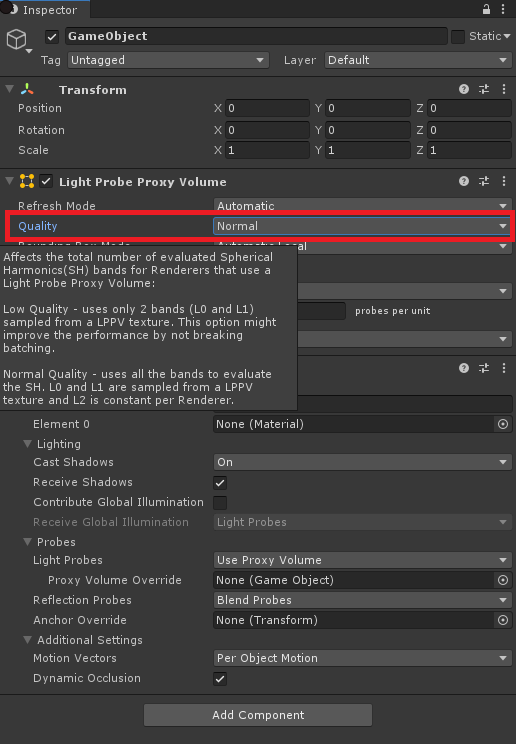
LPPVs can provide only L0 and L1 bands (4 coefficients / color channel) since it’s using a 3D texture to read the coefficients in the pixel shader. The SH coefficients for the L2 band are constant / object. If you have 5 objects then each object will have a different L2 set of coefficients which are evaluated at the center of each object which might explain the difference in lighting vs when only 1 object is used. After fetching all the SH coefficients (from LPPV 3D texture + shader uniforms) the lighting is computed in the pixel shader. All this happens when LPPV quality setting is Normal.
When the quality is Low, only the coefficients in the LPPV 3D texture are used to compute the lighting. This might cause some lighting to be lost since the lighting encoded by the L2 coefficients will not be used. In this case you shouldn’t notice any difference between 5 or 1 object. This will improve shading performance and setup on the CPU.
4 Likes
Hi,
Thank you for the detailed explanation. I set the LPPV to low but it does not make any difference. My observation is that when using the configuration with 5 short pipes there is a rapid change of brightness of neighboring pipes, the same issue as with using blend probes instead of LPPV, see image below,
but the long pipe gives me a gradient, see image below:
Here is the result of the long pipe with LPPV set to low (correct result):
Here the full image of the wrong result with five pipes (LPPV low):
Here another image without LPPV/BlendProbes (5 pipes) thus the pipes are affected by the two point lights (mixed lighting) and a reflection probe.
I was hoping that LPPV set to low will solve the issue because I was thinking that the L2 coffs vary from pipe to pipe a lot and thus cause this effect. But there is no difference. When my first test failed I also recreated the LPPV with quality set to low but same result. My Unity version is 2019.2.8f1 I am using the progressive GPU lightmapper.
Regards
1 Like
Then must be something else. How’s the LPPV setup in your Mesh Renderers (the 5 short pipes)? Are they using the same LPPV through Proxy Volume Override field?
Yes I use the Override field.
Meanwhile I found a solution.
It works when I change the “Bounding Box Mode” of the LPPV to “Automatic”.
Before I used “Custom” and set the bounding box by editing. I restructured my scene i.e. now I have a parent node with my pipes attached to it. The parent node has the LPPV component and calculates the Bounding Box of its children when set to Automatic. But as soon as I switch the Bounding Box mode to custom, the same problem occures. The bounding box in the custom mode has the correct size and position.
Here again some images, I set one light to red the other to green to make it more apparent.
First image with Automatic Bounding Box Mode. Lighting is coorect.
Corresonding LPPV
When I switch to Custom mode something is shifted, the pipe in the middle is almost entirely red which is wrong:
Again the corresponding LPPV Bounding Box
1 Like