Hi Unity,
I’m having issues with the ListView adding phantom elements (not shown, hard to reproduce), not showing elements properly when added and hiding elements when re-ordering.
I have included a default inspector at the bottom to show what it should look like.
Firstly, Add/Remove:
- Sometimes it looks correct.
- Sometimes it only shows one line.
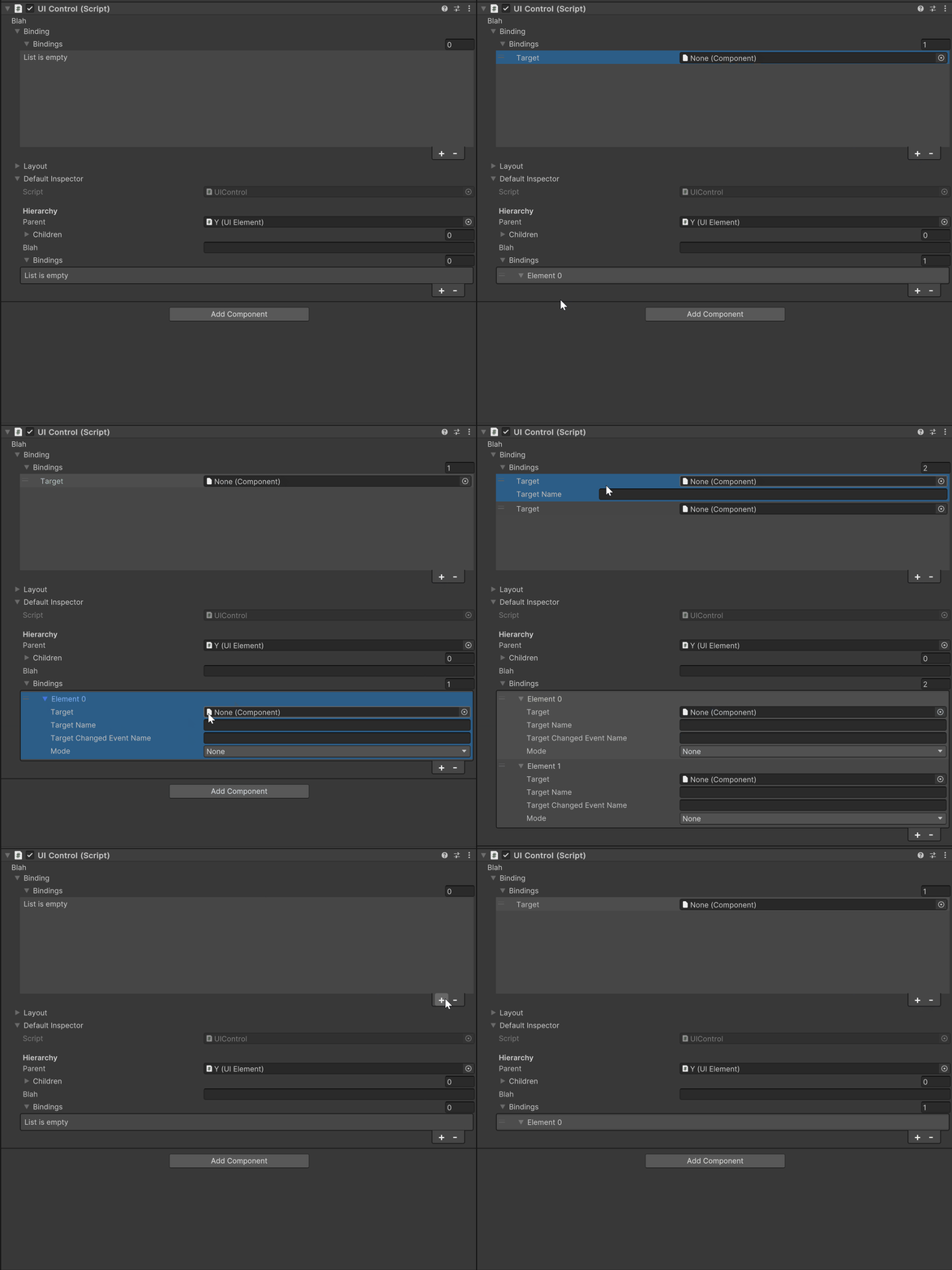
Now re-ordering
- Items dissapear from the list.
- Collapsing/expanding the list fixes the issue.
- Same issue occurs in the default inspector.

Unity Version: 2023.1.5f1
The ListView set-up is very straightforward in the editor class:
var listView = inspector.Q<ListView>("BindingListView");
listView.makeItem = bindingTreeAsset.CloneTree;
Likewise, the elements that we’re binding to are pretty straightforward. They’re from a runtime UI system that I’m maintaining. UIElement is a MonoBehaviour.
public class UIControl : UIElement
{
   [SerializeField] private string blah = "X";

   [SerializeField] private List<UIBinding> bindings = new List<UIBinding>();
}

[Serializable]
public class UIBinding
{
   public Component Target;
   public string TargetName  = "Test";
   public string TargetChangedEventName = string.Empty;
   public BindingMode Mode = BindingMode.ToView;
}
And here’s the UXML files:
Editor:

<ui:UXML xmlns:ui="UnityEngine.UIElements" xmlns:uie="UnityEditor.UIElements" editor-extension-mode="True">
    <ui:Label tabindex="-1" text="Blah" display-tooltip-when-elided="true" />
    <ui:Foldout text="Binding" name="BindingFoldout">
        <ui:ListView name="BindingListView" virtualization-method="DynamicHeight" reorder-mode="Animated" show-add-remove-footer="true" header-title="Bindings" binding-path="bindings" show-foldout-header="true" style="height: 200px;" />
    </ui:Foldout>
    <ui:Foldout text="Layout" name="LayoutFoldout">
        <ui:smile:ropdownField label="Layout" index="-1" choices="System.Collections.Generic.List`1[System.String]" name="LayoutDropdown" />
    </ui:Foldout>
    <ui:Foldout text="Default Inspector" name="DefaultInspectorFoldout" />
</ui:UXML>

List Item:

<ui:UXML
  xmlns:ui="UnityEngine.UIElements"
  xmlns:uie="UnityEditor.UIElements"
  editor-extension-mode="True">
    <uie:PropertyField binding-path="Target" />
    <ui:TextField picking-mode="Ignore" label="Target Name" value="filler text" binding-path="TargetName" />
</ui:UXML>
Any help appreciated.