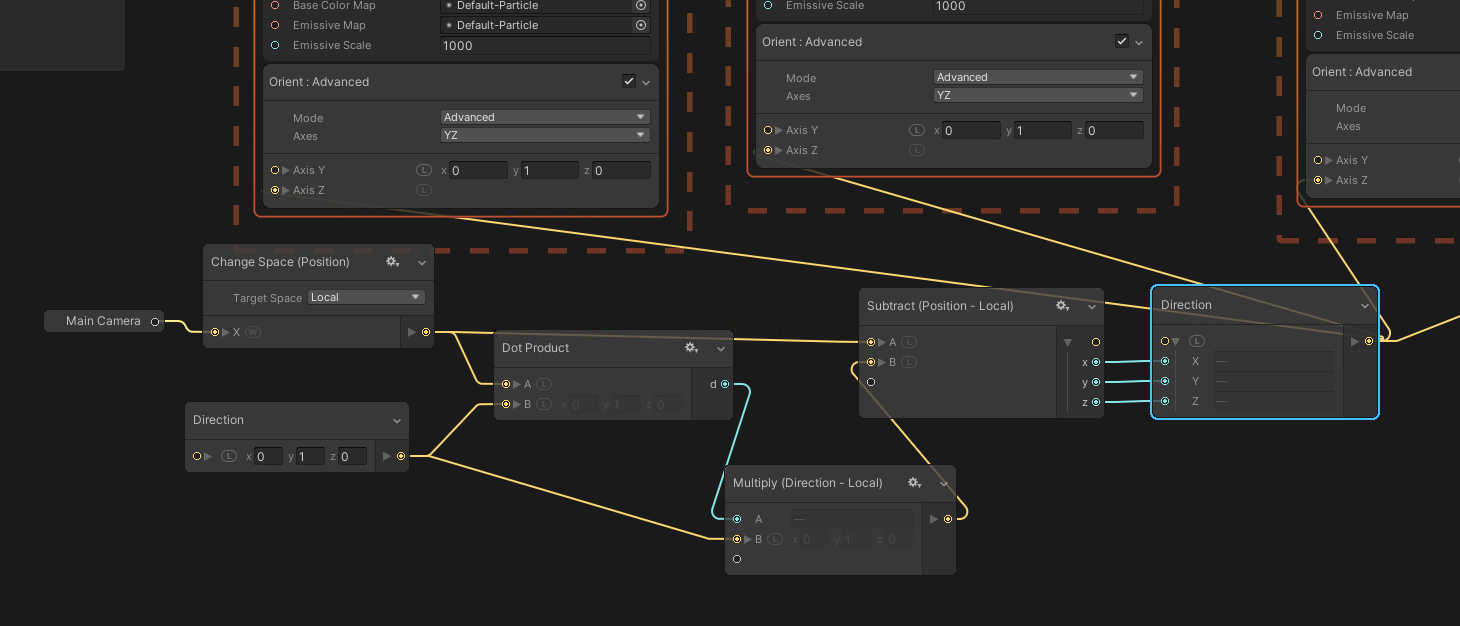
I’m trying to make a laser, and the game is made in DOTS so there is a lot of stuff that I cannot use.
But I’m not trying to make a line that can extend with several points. Just one line that points in one direction but always faces the camera. I can’t seems to find any tutorials or points on how to make this in an elegant way purely in Shader Graph.
Anyone that have any pointers? Is it possible without pushing in the camera position every frame or stuff like that?
You probably want to start with quad shape. And e able to stretch it. Technically you can position and stretch entities mesh, which is easier, or use shader graph. Then of course for either method, you need apply rotation toward camera.
If you need many lines (in thousands or tens of thousands) I would pass that data in texture to VFX Graph and render the lines there. Or generate meshes like Antypodish suggested.
[GenerateAuthoringComponent]
public struct LineSegment : IComponentData
{
    public float3 oldTranslation;
    public float lineWidth;
}
This is the system applying the correct non uniform scaling from start to end (since I render a moving line, it’s from oldTranslation to translation). Also, my game is top down orthographic, so the camera direction is just up, which is why I use up. But maybe it helps…
System.cs
protected override void OnUpdate()
{
    var up = new float3(0, 1, 0);

    Entities.
        ForEach(
                (
                    ref LineSegment lineSegment, ref Rotation rotation, ref NonUniformScale nonUniformScale,
                    in  Translation translation) =>
                {
                    var trans    = translation.Value;
                    var oldTrans = lineSegment.oldTranslation;

                    if (math.any(float3.zero != oldTrans))
                    {
                        // Calculate the line (oldTranslation -> translation).
                        var worldDiff       = trans - oldTrans;
                        var worldLineLength = math.length(worldDiff);

                        if (worldLineLength > 0)
                        {
                            var worldBackwardUnit = worldDiff / worldLineLength;
                            rotation.Value = quaternion.LookRotation(
                                                                     worldBackwardUnit,
                                                                     up
                                                                    );
                            nonUniformScale.Value = new float3(
                                                               lineSegment.lineWidth,
                                                               lineSegment.lineWidth,
                                                               worldLineLength
                                                              );
                        }
                        else
                        {
                            // In cases where trans == oldTrans (worldForwardUnit == NaN).
                            nonUniformScale.Value = new float3(
                                                               lineSegment.lineWidth,
                                                               lineSegment.lineWidth,
                                                               0f
                                                              );
                        }
                    }

                    // Write the current translation as the old translation.
                    lineSegment.oldTranslation = trans;
                }
               ).
        ScheduleParallel();

    commandBufferSystem.AddJobHandleForProducer(Dependency);
}
This does a simplified point to vector projection, with the camera as the point and the laser direction at the vector. Then points the Z axis from the projected point to the camera.
My problem is that this laser will be deep into a DOTS hierarchy and lots of them, so I really don’t want to user VFX and thus a hybrid solution. So now that leaves shader graph…
And it’s in HDRP btw. Since I think HDRP is rendered in view space, there should be a way of making the vertices all align along a plane that is facing the world Z axis, and there by turned towards the camera that is origo.