Matrix4x4 multilication. I'm going crazy :)

from the guide: Unity - Scripting API: Matrix4x4.operator *

public static Matrix4x4 operator *(Matrix4x4 lhs, Matrix4x4 rhs);
should perform lhs * rhs.

but why it doesn’t work? the * operator, compute rhs * lhs.

Example:
Matrix4x4 a =newMatrix4x4();

a.m00 =1; a.m10 =0; a.m20 =0; a.m30 =0;

a.m01 =0; a.m11 =1; a.m21 =0; a.m31 =0;

a.m02 =0; a.m12 =0; a.m22 =1; a.m32 =0;

a.m03 =2; a.m13 =2; a.m23 =2; a.m33 =1;

Matrix4x4 b =newMatrix4x4();

b.m00 =1; b.m10 =0; b.m20 =1; b.m30 =0;

b.m01 =0; b.m11 =1; b.m21 =0; b.m31 =0;

b.m02 =1; b.m12 =0; b.m22 =1; b.m32 =0;

b.m03 =0; b.m13 =0; b.m23 =0; b.m33 =1;

Matrix4x4 c = a * b;

at the end, c is:

when it should be:

in order to have the correct result, I have to do

c = b * a

which is a non-sense.

**** EDITED IN ORDER TO FIX THIS TYPING MISTAKE
Matrix4x4 store values in [column|row] instead of the standard [row|column]format. I know this, and I set the Matrix accordingly… but it seems that something goes wrong.


any help?
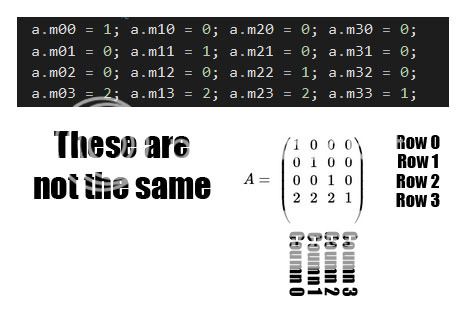
You have said that the values are row/column, but in your code, you have laid out the values as column/row, so the external test you did is not using the same matrices

1 Like

why not?
I’ve inverted the “index” of the properties.

instead to have m10 as column 1 and row 0 (like in any other 3d engine), I used m01 as column 1 and row 0.

m10 is row 0, column 1 in unity, is it right?

(even beacuse if I use matrix4x4.SetTRS(transl, rot, scale) the resulting Matrix4x4 is correct)

EDIT:
a ok, I did a mistake while writing the first post. thanks :slight_smile:
anyway, the problem still present :frowning:

no, m10 is ROW 1 COLUMN 0, this is matrix indexing and is correct for general matrix maths (not just unity)
you have m03 = 2
thats row 0 column 3, which should be the top right corner, but in the image, the 2 is in the bottom left

You are wrong :slight_smile:

Matrix4x4 test =Matrix4x4.TRS(newVector3(6, 7, 8), Quaternion.identity, Vector3.one);

produce this output:

2289772--153981--Senza nome.png

as you can see:
m03 is COLUMN 0 and ROW 3 (number 6, as it should be → translation.X)
m13 is COLUMN 1 and ROW 3 (number 7, as it should be → translation.Y)
m23 is COLUMN 2 and ROW 3 (number 8, as it should be → translation.Z)

Unity works with a “transposed” version rapresentation of the Matrix.

You’re still confusing m[row,column] with m[column,row]
It says quite clearly in the docs that its [row column]

    public Matrix4x4 matrix;

    void Start () {
    matrix = Matrix4x4.TRS( new Vector3( 6, 7, 8 ),
                 Quaternion.LookRotation( new Vector3( 1, 1, 0 ), new Vector3( 0, 0, 1 ) ),
                 new Vector3( 2, 3, 4 ) );


        for ( int row = 0; row < 4; row++ ) {
            Debug.Log( "Row " + row + ": " + matrix.GetRow( row ) );
        }
    }

    void OnGUI () {
        for ( int row = 0; row < 4; row++ ) {
            GUILayout.BeginHorizontal();
            for ( int column = 0; column < 4; column++ ) {
                GUILayout.Label( row + "," + column + ": " + matrix[row, column].ToString( "0.000" ), GUILayout.Width( 80 ) );
            }
            GUILayout.EndHorizontal();
        }
    }

Probably my bad english doesn’t allow me to explain in a better way :slight_smile:

forgot Unity.

3d Math:

and:
2290784--154078--matrix2.png

are we aligned on this?
every 3d engine, or book about 3d math, use the first notation (left-to-right and then top-bottom, as you normally read a text)
Unity use the second one, BUT this is not an issue. it’s just a different notation.

why Unity use the second one, BOH.
anyway, if you use the internal Matrx4x4.TRS function, as I did before, and watch the result, you have the proof that Unity use the second one.

Matrix4x4 test =Matrix4x4.TRS(newVector3(6, 7, 8), Quaternion.identity, Vector3.one);

produce a Matrix which represent:

  • scale 1, rotation none, translation at (6,7,8)

now, independently from the notation internally used by the Matrix structure, math is math.
so that the translation information has to be stored in the right position.
TX: row 3, column 0
TY: row 3, column 1
TZ: row 3, column 2

and if you look at the test variable, 6,7,8 are stored in m03, m13, m23. [like in your last screenshot, also].

with this in mind, we return to the issue that I wrote.

Matrix4x4 a =newMatrix4x4();
a.m00 =1; a.m10 =0; a.m20 =0; a.m30 =0;
a.m01 =0; a.m11 =1; a.m21 =0; a.m31 =0;
a.m02 =0; a.m12 =0; a.m22 =1; a.m32 =0;
a.m03 =2; a.m13 =2; a.m23 =2; a.m33 =1;

Matrix4x4 b =newMatrix4x4();
b.m00 =1; b.m10 =0; b.m20 =1; b.m30 =0;
b.m01 =0; b.m11 =1; b.m21 =0; b.m31 =0;
b.m02 =1; b.m12 =0; b.m22 =1; b.m32 =0;
b.m03 =0; b.m13 =0; b.m23 =0; b.m33 =1;

c = a * b

return an unexpected result.

2 Likes

m03, is where Unity store the TX value (from Matrix4x4.TRS result)
this mean that Unity store the TX value in row 0, col 3 instead of row 3, col 0 as expected from the standard math representation of a Matrix.

Unity follows the OpenGL notation/structure, so that it use a “transposed” version of the standard math representation.

2291355--154147--gl_anglestoaxes01.png

No this is wrong!
Did you even look at my image? I used Matrx4x4.TRS and the position 6,7,8 comes out in COLUMN 3
Unity uses matrix[row, column]; this is confirmed in the documentation, and in my example, and in using the GetRow and GetColumn functions
If you create a matrix with Matrx4x4.TRS and then call GetColumn(3) you will see your position, in the COLUMN

Not quite right. There is a subtle difference that I think you are tripping over.

Consider your matrices A and B have rows x and columns y.

A = [x0y0  x0y1  x0y2  x0y3
     x1y0  x1y1  x1y2  x1y3
     x2y0  x2y1  x2y2  x2y3
     x3y0  x3y1  x3y2  x3y3]

Multiplication looks like this:

C= A×B
C = [Ax0·By0  Ax0·By1  Ax0·By2  Ax0·By3
     Ax1·By0  Ax1·By1  Ax1·By2  Ax1·By3
     Ax2·By0  Ax2·By1  Ax2·By2  Ax2·By3
     Ax3·By0  Ax3·By1  Ax3·By2  Ax3·By3]

Reversed looks like this

C' = B×A
C' = [Bx0·Ay0  Bx0·Ay1  Bx0·Ay2  Bx0·Ay3
      Bx1·Ay0  Bx1·Ay1  Bx1·Ay2  Bx1·Ay3
      Bx2·Ay0  Bx2·Ay1  Bx2·Ay2  Bx2·Ay3
      Bx3·Ay0  Bx3·Ay1  Bx3·Ay2  Bx3·Ay3]

Unity uses a transposed matrix, so let’s say that columns are x and rows are y. However, matrix multiplication does not change (it is still Arow dot Bcolumn), so we can take our formula for multiplying C and switch x and y.

C = [Ay0·Bx0  Ay0·Bx1  Ay0·Bx2  Ay0·Bx3
     Ay1·Bx0  Ay1·Bx1  Ay1·Bx2  Ay1·Bx3
     Ay2·Bx0  Ay2·Bx1  Ay2·Bx2  Ay2·Bx3
     Ay3·Bx0  Ay3·Bx1  Ay3·Bx2  Ay3·Bx3]

Now, since vector dot product is commutative, we can rewrite as:

C = [Bx0·Ay0  Bx0·Ay1  Bx0·Ay2  Bx0·Ay3
     Bx1·Ay0  Bx1·Ay1  Bx1·Ay2  Bx1·Ay3
     Bx2·Ay0  Bx2·Ay1  Bx2·Ay2  Bx2·Ay3
     Bx3·Ay0  Bx3·Ay1  Bx3·Ay2  Bx3·Ay3]

Which is actually the same as C’ when rows are represented as x and columns are represented as y! So you can see that by using a transpose form of matrix, you are also reversing the order of matrix multiplication. True, you could change the definition of matrix multiplication to get the result you wanted but I think that is more confusing than just choosing the non transposed representation (which is not what Unity did.)