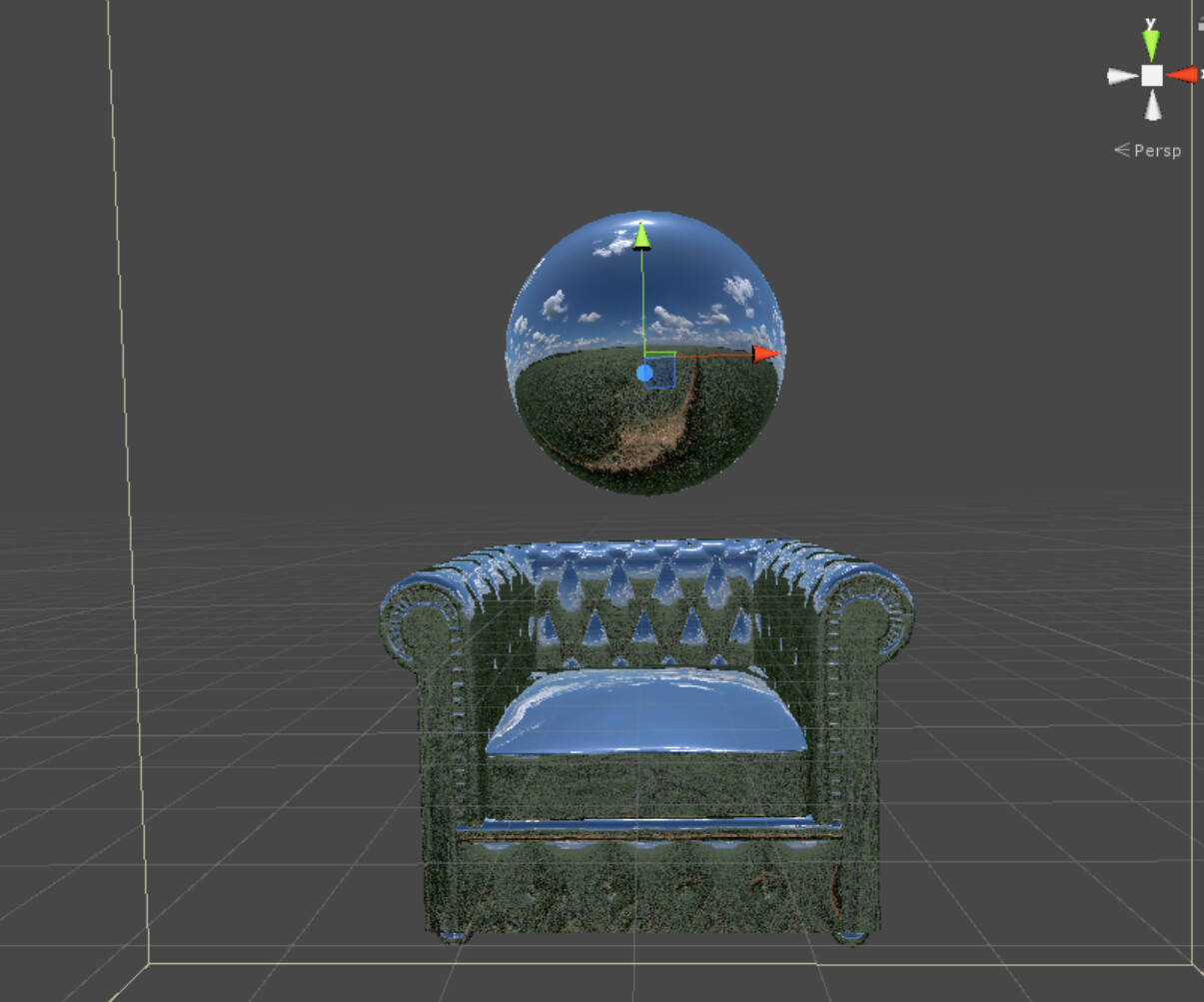
The screenshot is when I zoom in really close into the corner of the armchair.
And this happens only when there is normal map. If there is no normal map (using vertex normal come from the object), there is no visible seam.
I guess there is some problem with the way that Unity does the normal map sampling, and then cause some issue with the calculation of reflect direction?
It’s not a Unity specific problem so much as a problem with 8 bit per channel normal maps in general. The problem is a normal map is a representation of a normalized vector direction, with x and y being represented with the red and green color channels. A each component has a range of -1.0 to 1.0 stored as values 0/255 and 255/255 in the texture. 0.0 is usually stored as 127/255, but that’s not actually half way between 0/255 and 255/255, but neither is 128/255, they’re ~0.498 and ~0.502. Unfortunately a normal map with “no direction” should be float3(0.0, 0.0, 1.0), but the closest a normal normal map can store is float3(-0.0039, -0.0039, 1.0), which is close, but not quite the same. It’s not something you’d usually notice, except in something like what you’re looking at.
Modern graphics APIs actually have special “signed” texture formats that are supposed to handle this better, but Unity doesn’t expose them. Unreal Engine 4 doesn’t either afaik btw, nor does Cryengine to the best of my knowledge. I only know of some custom engines that use it.
Thanks for the reply! I try to use world space normal calculated from normal map as the final shader color, and there is the seam! That means all normal maps will have the same seam issue? Wow I never noticed that before. Maybe because usually normal map is bumpy, so it’s hard to see.
So I guess the only way to work around is to cut the uv in the hidden place and hide the seam?
Just out of curiosity, I know Unity does not support 16-bit map, but will16-bit normal map be able to solve the issue?
Yep, there’s always a seam. Just usually it’s not noticeable.
I know some people have done their own 16 bit normal map support by using LoadRawTextureData, but that requires you to manually parse the texture data. For Unity 5.5 and beyond you can manually set them to use RGBA Half, or possibly BC6H (though I haven’t tested that). You’ll need to write your own shaders that don’t use Unity’s UnpackNormal() function as that always assume a DXT5 on PC and consoles, or manually pack your normal maps into the same packed layout (put the red channel of the normal map in the alpha channel).
Nothing to do with PBR itself, it’s not even really a real-time issue either. It’s just that UV seams can be accentuated by the use of normal maps, which has been the case since normal maps became a thing 20 years ago.
Since 5.6, Unity has much better handling of 16 bpc input textures and seem to give better results even when compressing to the usual formats. Doesn’t mean the really obvious seams will go away completely though, they’ll just slightly better.