I see that we can get a device id through the InputAction.CallbackContext, but that seems awfully clunky, and the id seems to be based on the connection number, so disconnecting and reconnecting the same controller won’t give the same id.
var player1 = _input.GamePlay;
var player2 = player1.Clone();

player1.ApplyBindingOverridesOnMatchingControls(deviceForPlayer1);
player2.ApplyBindingOverridesOnMatchingControls(ceviceForPlayer2);

player1.Move.performed += Move;
player2.Move.performed += Move;
API is still clunky. Also, ATM you have to manage allocating devices to player yourself. I expect there ultimately will be APIs to help you with that. Overall, there’s still various bits to improve around local multiplayer.
But anyway, the central idea is that you have an action map with general bindings (say, for gamepad) and clone it so that each player gets a copy and then you “specialize” each copy on the specific device allocated to the player.
Just a quick aside. I found an issue, when I call:
_input.GamePlay.Disable();
…and the system gets input events I get spammed with errors. I have to call Disable() on every InputAction in _input.GamePlay, I’m pretty sure that negates the point of being able to call GamePlay.Disable(). Is this a known issue or should I get the error messages and post an issue to github?
Ok, that’s not right indeed Not a known issue and I gave it a quick go and couldn’t reproduce. Opening a ticket on GitHub with the errors would be great.
public SkyHunters_Inputs inputsMap;

    public List<InputDevice> devicesInput = new List<InputDevice>();

    public List<SkyHunters_Inputs> inputsMaps = new List<SkyHunters_Inputs>();
    // Start is called before the first frame update
    void Awake() {
        inputsMap.SpaceShip.Join.performed += ctx => {
            var currentDevice = ctx.control.device;
            if (devicesInput.Contains(currentDevice)) return;
            var playerClone = new SkyHunters_Inputs();
            playerClone.SetAsset(ScriptableObject.Instantiate(inputsMap.asset));
            var Intvalue = InputActionRebindingExtensions.ApplyBindingOverridesOnMatchingControls(playerClone.SpaceShip, ctx.control);
            Debug.Log($"Some index return on Override Binding {value}");
            inputsMaps.Add(playerClone);
            playerClone.SpaceShip.Shoot.performed += xControl => {
                PlayerShooting();
            };
            PlayerJoining(currentDevice);
        };
    }
@GilbertoBitt Could you show me the binding for Spaceship.Join and a Debug.Log of the ctx.control.path? Not yet sure whether it’s the setup or whether it’s a bug at work here that prevents the override from succeeding.
BTW there’s an easier way to do this now by just setting the devices property on the InputActionAsset. This way you don’t have to go into overrides. Instead, you can just tell the actions to only bind to a specific set of devices.
There’s also InputUser which can handle most of the user/action management for you. We have some high-level MonoBehaviours in the pipeline that should make using this functionality a breeze (well, hopefully :)). This includes player join support with no custom scripting required.
i still don’t know howto pair device to input action asset! and inputUser i want to learn how to user on plataform that suport account pairing like xbox and on pc or others that don’t have this funcion and how to attach more than one device like mouse/keyboard and other just one like gamepad.
here is the project uploaded is a small project for testing this things.
using System.Collections;
using System.Collections.Generic;
using System.Linq;
using UnityEditor.Graphing;
using UnityEngine;
using UnityEngine.Experimental.Input;
using UnityEngine.Experimental.Input.Interactions;
using UnityEngine.Experimental.Input.Plugins.Users;
using UnityEngine.Experimental.Input.Utilities;

public class MB_InputSystem : MonoBehaviour {
    public SkyHunters_Inputs inputsMap;
    // Start is called before the first frame update
    private InputDevice _keyboardInput;
    private InputDevice _mouseInput;
    void Awake() {
        _keyboardInput = Keyboard.current.device;
        _mouseInput = Mouse.current.device;
        inputsMap.SpaceShip.Join.performed += ctx => {
            var currentDevice = ctx.control.device;
            foreach (var device in InputUser.GetUnpairedInputDevices()) {
                Debug.Log(device);
            }
            if (!InputUser.GetUnpairedInputDevices().Contains(currentDevice)) return;
            var input = new SkyHunters_Inputs();
            input.SetAsset(ScriptableObject.Instantiate(inputsMap.asset));
            var user = InputUser.PerformPairingWithDevice(currentDevice, options:InputUserPairingOptions.ForcePlatformUserAccountSelection);
            if (currentDevice == _mouseInput) {
                user = InputUser.PerformPairingWithDevice(_keyboardInput, user, options:InputUserPairingOptions.None);
            } else if (currentDevice == _keyboardInput) {
                user = InputUser.PerformPairingWithDevice(_mouseInput, user, options:InputUserPairingOptions.None);
            }
            user.AssociateActionsWithUser(input);
            input.SpaceShip.Shoot.performed += context => ShootStarted();
            input.Enable();
        };

        foreach (var user in InputUser.all) {
            user.actions.Enable();
            SkyHunters_Inputs input = (SkyHunters_Inputs) user.actions;
            input.SpaceShip.Shoot.performed += context => ShootStarted();

            user.actions.Enable();

            //First Enable All than Disable it.
            input.SpaceShip.Join.Disable();
        }
    }

    public void ShootStarted() {
        Debug.Log("Shooting");
    }

    /*(bool, InputDevice, int) HasPlayerDevice(InputDevice currentDevice) {
        return devicesInput.Contains(currentDevice) ? (true, currentDevice, devicesInput.IndexOf(currentDevice)) : (false, currentDevice, -1);
    }

    void PlayerShooting(InputDevice controlDevice) {
        var index = devicesInput.IndexOf(controlDevice);
        Debug.Log($"Player Shooting using {index}");
    }

    void PlayerJoining(InputDevice currentDevice) {
        Debug.Log("Player Just Join the Party!");
        devicesInput.Add(currentDevice);
        Debug.Log(currentDevice);
    }*/

    private void OnEnable() {
        inputsMap.SpaceShip.Join.Enable();
        foreach (var user in InputUser.all) {
            user.actions.Enable();
        }
    }

    private void OnDisable() {
        inputsMap.SpaceShip.Join.Disable();
        foreach (var user in InputUser.all) {
            user.actions?.Disable();
        }
    }
}
the only problem with it is that when using Xbox One Gamepad i’m not able to shoot unless i disconnect from pc and then reconnect again! then without the need to join again it start recoganizing the shooting action the keyboard and Mouse input work like a charm but has u r able to see i need make then current to get a copy/reference of InputDevice from keyboard and Mouse to then compare it inside the context callback without making then current! how i can solve the problem with Xbox One GamePad? it’s becouse i use
ForcePlatformUserAccountSelection on option? i will try change the option to see if work on pc without the need to reconnect the xbox one gamepad! maybe this will happen to any device but for now i only have xbox one to test it.
My initial suggestions are somewhat outdated by now. While the suggested setup is still doable, there are better ways now.
The simplest way to set this up these days is PlayerInput. It will automatically take care of cloning actions and restricting them to controllers for specific players. Simply have multiple PlayerInputs in your game (either instantiated by you or through PlayerInputManager; see documentation).
For doing it manually, there is a “devices” property on both InputActionAsset and InputActionMap now. Setting that will automatically restrict the given actions to just those devices. It’s what PlayerInput does internally but is accessible as a general API.
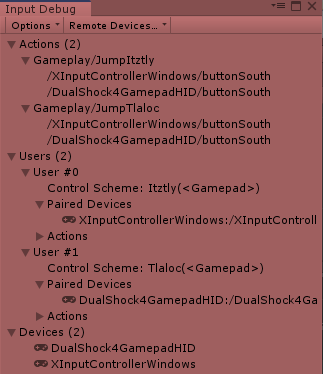
Hey, I have 2 prefabs with separate PlayerInputs set up. It automatically detects the controllers and assigns a unique one to each which is wonderful. However, when I try to assign the input actions to generic gamepad south button, they apply to both characters for some reason. I’m using separate scripts and my unity version is 2019.2.5f1. Am I forced to use two different inputs specific to the controller? (for example cross instead of south button) Here is the input debugger:
Judging from the input debugger, it appears that those two actions are not associated with either player. They will thus go and bind to everything in the system. For actions to automatically be restricted to the devices of a player, they must belong to the same InputActionAsset as that assigned to the player (PlayerInput may duplicate the asset instance so it really must be the same asset instance used by a particular player).
I’m having the problem you described, where every device controls every player. I have a Player Input on each player object and this in my code.
inputAction = new PlayerInputActions();
inputAction.Player.Jump.performed += _ => PlayerJump();
}```

Any time I press jump on any device, all players jump. What am I missing here? From the documentation, it sounds like it should assign a different device to each Player Input automatically, but I'm clearly breaking that functionality somehow.
I added a PlayerInputManager, joining players manually because I already had my spawning system all setup with the old input manager, and input debugger looks like the devices are correctly assigned, but it’s still behaving the same way.
I see two things there that make me think something is wrong that may be related to my problem, but I’m not sure how:
50 actions per user. It should only be 10, but they’re all being duplicated four times
You’re mixing code-generated input actions with PlayerInput. ATM the two don’t yet go together. The code you posted will end up creating a set of input actions independent of PlayerInput. The code-generated path ATM has no support for control schemes and device pairing. So it ends up grabbing every possible device for every player. Thus the all-players-jump issue.
PlayerInput, when instantiated more than once, will duplicate actions. With 10 actions in the asset and 4 players in the game, you should see 40 actions.
From your shot it appears that you probably still have the “new PlayerInputActions” code in there. Removing that should result in the right amount of actions getting created.
Not sure about that one. Would need more information.
Ah ok, that makes sense. Removing “new PlayerInputActions” does get rid of all of those actions. So then if I’m not instantiating the component in my script, how would I go about mapping those controls in my script? Every example I’ve seen from someone using this system has had that in there. Or do I just need to map them through the component in the editor with Send Messages etc?
The Quick Start Guide may be of use. But yes, you can map them through Send Messages or individually through UnityEvents.
There will be an updated tutorial released soon that demonstrates this. The fact the tutorial posted on the blog showed the C# generation workflow was due to an internal communication mishap.
Hello everyone,
I do not understand and need help.
I want to have 2 characters that move every 1 with a single controller and I don’t know how to do it.
could you give me a guide or something that explains it in a simple way
(or a script, and then I can use it to learn)
Thank you.
Here is a script in which I would like it to work:
 Not a known issue and I gave it a quick go and couldn’t reproduce. Opening a ticket on GitHub with the errors would be great.