I have a Visual Effect which spawns 3 particles at a certain position with certain effects.
Attached to the “Spawn Start” node, I have a SpawnEvent called “SpawnBlood”. If I call it via script once, it works and spawns the 3 particles at the given position.
Now I have a “List filter” of different Vector3 positions, and I want to run through the list with a foreach loop and spawn the 3 particles at each location via the event “SpawnBlood” like so;
 foreach (var point in filter)
        {
            vfx.SetVector3("SpawnPosition", point);
            vfx.SendEvent("SpawnBlood");
            Debug.Log("Spawned blood once");
        }
Unfortunately only the first 3 particles at the first location get spawned, for the rest of the Vector3 locations in the list “filter” I get no particles whatsoever.
What could be the issue? Do I need to use a completely new Visual Effect each time?
FYI, the list is definitely bigger than one and my capacity for the particles is set to 200.
Edit: Also, all the Debug.Log’s are being called so the loop works as expected. Im guessing its some limitation on the VFX Graph’s side?
Right now the way you’re sending events will not unfortunately not work, mainly for two reasons.
Events and property sets are not consumed synchronously when you call them from C# : instead, they are accumulated and consumed after all script execution. So your loop will set consecutively the Vector3 but only the last iteration’s value will stay set at the time when all your events will be consumed by the effect.
Another limitation right now is that events are also consumed in one frame. You could have used eventAttributes (Visual Effect Component API | Visual Effect Graph | 7.2.1) instead of setting vfx properties to send every event. But the spawn context will cache by default every last event that started it. So if started three times with different “position” eventAttribute, only the last one would be cached. You could cache all three eventAttributes using a custom VFXSpawnerCallbacks (Unity - Scripting API: VFXSpawnerCallbacks) but this method would require you to defer all spawns on different frames as you can only output one single payload of spawnEvent attributes at a time. (Right now this is the behaviour but this could change in the future)
In the meantime here’s a way to go if you want to output multiple values at the same frame:
in your effect, instead of exposing a Vector 3, you should expose both an int and a Texture2D properties. Bascially the Texture2D will hold a list of positions and the int property will tell how many items of this list we need to use this frame.
In your C# allocate a Texture2D object where you will be storing all your positions (Use Floating point 16 bit or 32 bit for pixel precision. For instance a 256x1 if you need to have 256 maximum blood spawns for a given frame. You can do it in the OnEnable or Awake.
In your foreach loop, set the positions values into the pixels of the texture.
At the end of the foreach loop perform Apply() on your texture (do not recompute mipmaps), then set the texture to a property
Also set an int property that tells the count in your filter list (how many pixels were set)
in VFX use the count int property as a multiplier of the burst.
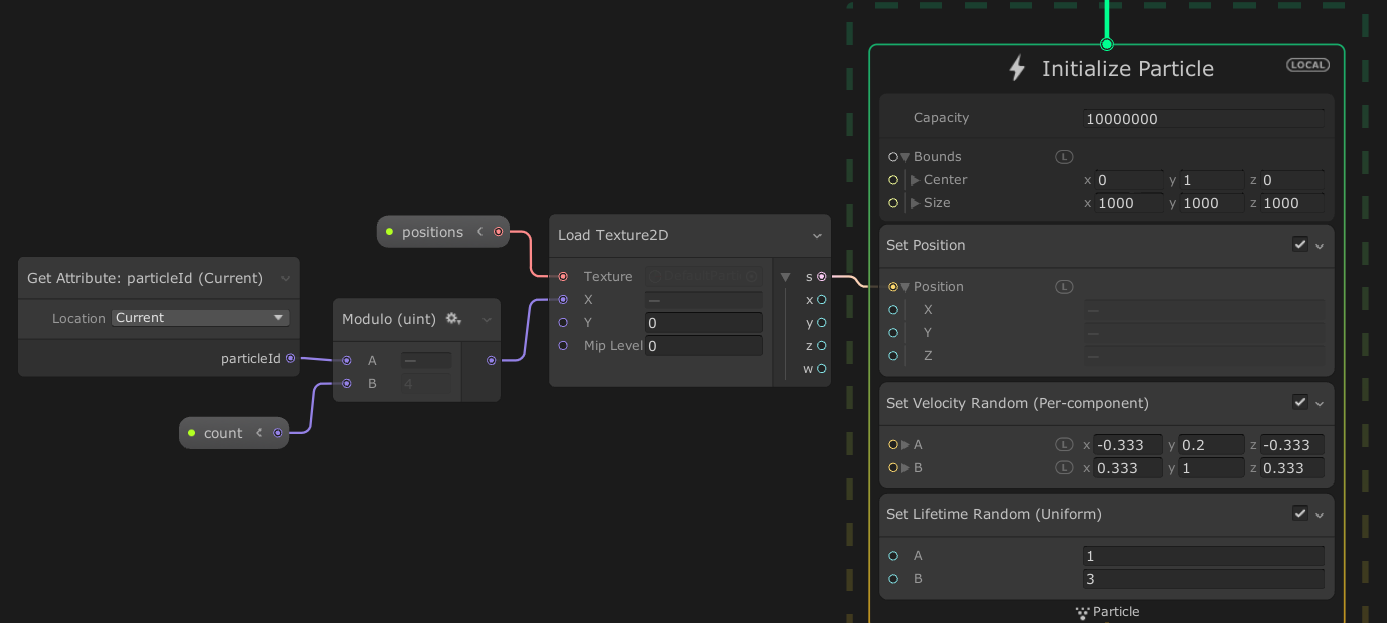
in Initialize, use either a Texture Load Operator to read values from the Texture Exposed. If you want to balance equally the spawned particles you can use Get ParticleID modulo your int property (how many sources were sent this frame)
Thank you for your detailed response, @ThomasVFX .
I will look into your proposed solution, but maybe I"ll find a different workaround that doesnt involve VFX Graphs.
Anyway, thanks for the insightful comments on how VFX Graph works! Cheers
This is awesome. But it’s been 3 hours and 15 crashes, I feel like I’m doing something wrong :V. Would it be possible to show a picture of what the graph would look like? Otherwise, I don’t fully understand how to use the Int property, neither how to link the texture to the position. (I did it, nothing changed).
And this is my test code:
    public VisualEffect effect;
    private int positions;
    private int count;
    private Texture2D texture;

    void Start()
    {
        //Get property nameID
        positions = Shader.PropertyToID("positions"); // Texture2D field
        count = Shader.PropertyToID("count"); // int field

        texture = new Texture2D(10000, 1 , TextureFormat.RGBAFloat, false);

        //Set the values in start to test
        int counter = 0;
        for (int j = 0; j < 100; j++)
        {
            for (int i = 0; i < 100; i++)
            {
                texture.SetPixel(counter, 0, new Color(i, 0, j));
                counter++;
            }
        }
        texture.Apply();

        //Set values in VFX
        effect.SetTexture(positions, texture);
        effect.SetInt(count, 10000);
    }

    void Update()
    {
        effect.Play();
    }
Thanks
EDIT
I think I have something (Updated the code above):
No worries about the delay, the screenshot I posted actually worked and you can see at the end of the post that I linked a video showing the result.
The result was honestly quite surprising and with the right settings, I could render over 50 millions particles before going under 30fps.
I haven’t really followed VFX Graph since that project, but I hope they added some sort of Emit() function since then. If not, this method worked great and is not that hard to implement!
Anyway thanks for your input, and it’s never to late to help
Thanks man! I grew from this example, the one below is slightly gentler on the CPU
        // bake positions and lifetime to texture
        var positionsLifetimes = _tex.GetRawTextureData<Vector4>();
        Vector4 tmp = new Vector4();
        for (var i = 0; i < count; i++)
        {
            var e = VFXEventEmitter.emitters[groupID][i];
            tmp.Set(e.transform.position.x, e.transform.position.y, e.transform.position.z, e.lifetime);
            positionsLifetimes[i] = tmp;
        }
        _tex.Apply(false);
        vfx.SetTexture(positionsID, _tex);
Sorry for necromancing this thread, but is this (The texture workaround) still the way to go in current Unity versions?
I’m using 2021.3.16f and there it seems to be that way.
I mean, the whole standard way of doing in things in Unity (or any other component based system) is to use pooled fire and forget GameObjects out of prefabs that will have VisualEffect instances on it that should play a desired effect upon activation and then disables itself, so it gets free for pooling again. In that way, you have multiple small VFX Systems that do exactly a specific amount of things. If you use small effects like Flashes or Muzzle Fire, there can be easily hundreds to thousands of them, all referencing the same VFX assets.
Using this workaround and using one VFX System for all effects is a totally different und unintuitive way of doing things in Unity.
I have read, that there seems to be some batching in newer versions, how would that effect my concerns? Is it still the OneToRuleThemAll approach? Or is it even considered best practices to do so?
If so, I think there should be a better way than baking positions into textures to do “a standard thing”! At least an good example how to include that in the default Prefab / Pooling way. Thank you in advance!
The best way to find out is to try it and test the difference, since it might be better/worse for your use case. It might also not matter if you don’t use many VFX (don’t optimize too early).
But I reduced my VFX graph CPU usage for 1ms to 0.2ms by only having 1 VFX GameObject with multiple effects. I use a graphics buffer per effect and not a texture, seemed to me to be easier to set the needed data. So this might be an alternative to the textures. I am developing for Dx11 PC, so I don’t know what platforms support buffers or if the gain is less for Dx12/Vulcan.
Pre- Optimization is a good point, but the difference between one system and say 50 - 100 is quite noticable.
But i guess my main point is, that i find it rather inconvenient to work with the system in the described ways, it is just no good usablity and the documentation is lacking.
What about the people that buy VFX Graph assets in the store, use them as usual and running into performance problems because nobody tells them that it might be problematic to use in a distributed, MonoBehavioury- way. Since that are predefined assets it would be rather complicated to change them to the one system approach.
To me it seems a little bit like:
“Here is a system that supports millions of particles with little performance impact, IF you use it in a specific way, but we don’t tell you what that way looks like. You have to find out yourself. Hint: Use texture data to provide your positions and don’t ask why we don’t provide an interface that is more convenient than that. Or try as long you are happy.”
Don’t want to get too negative, I will try a few possibilities and ideas, but it would have been nice if there were some docs that would describe different approaches on the implementation level. If you have any good sources, let me know!
If you want the best results you will need to figure out how to get them. Luckily even the basis stuff works so poorly the forum is littered with useful work arounds from smart people. And the asset store would also have a lot less useful assets if base unity would work better.
(these are from my notes on this, I have not checked how useful they currently are)
“Luckily even the basis stuff works so poorly the forum is littered with useful work arounds from smart people. And the asset store would also have a lot less useful assets if base unity would work better.” -
Hi, could you dive a bit deeper into how you handle those different effect, I know we could use one master vfx object but what if I want the effects spawned with their own rotation, scale, color accordingly? is that even achieveable with only one master vfx node?
Yes because you supply all the information per ‘rendered particle’ with the graphics buffer. So it will contain all the position, rotation, other data your particles might need. I think my current setup is fire and forget, so updates to the particles would be driven without new information from the CPU. In an ideal world Unity would do this for you without you knowing about it, but a workaround is worth more than a feature on the roadmap I guess.
To give an idea about the setup, my master VFX graph has 1 of these for every different effect (Currently I have 6 effects here, 2 shown on image). In this case the explosions only need a position in worldspace to be rendered correctly. The count gets updated in script to inform the VFX how many to spawn. And the SubGraph is basically your normal effect with extra input for data like position/rotation ect. Each of these effects can itself spawn many instances. So the ‘muzzelFlashMasterBuffer_subgraph’ can create 100 muzzle flashes all across the game (this is already a big win compared to having a VFX component per muzzle flash, the master combining these is just the icing on the cake.)
I’ve not invented any of this, its mostly from the other forum posts, which go into more detail.
Thank you, I’m making an ECS game with like 1000 ~ 10000 enemy count, VFX with single instance seems to be the only viable solution, I’ll definitely have more research into this!
I am also using it in combination with ECS. Connecting it to work with ECS data is not a big issue compared to setting up the VFX graph part. Its been a while since I worked on this, but if you have a specific problem I can have a look how I did it.
I just tried, the performance boost is amazing, but there’s one limitation I haven’t figured out a good solution yet:
my enemies can have status effects, I can set them on fire / frozen / poisoned or something. Problem is enemies have different looks so my vfx effects spawned this way won’t fit them perfectly, if possible I wish I could pass meshes into the graph, but mesh is too complex a type for graphic buffer or vfxeventAttribute. I can set mesh on vfx, but this won’t allow me to trigger it multiple times.
Did you ever encountered a situation like this? my current solution is to simply not use mesh and keep the effects simple, but if there’s a workaround I’ll definitely try
Hmms I currently only use simple VFX. projectiles, trails, explosions.
There are 2 things I could think of, 1 put the 'output particle mesh; of VFX graph on Mesh but I guess this only gives a copy and would be useless for a ‘over the unit hiteffect’
So the seconds thing that might work is using a Signed Distance Field (SDF) in VFX graph, Unity has a tool to generate a SDF from a Mesh. VFX graph has some nodes to apply force to particles from a SDF. (SDF as an input variable its a Texture3D)
I’ve not used these in the master graph, only as separate VFX, but don’t know why it should not work.
I use the ‘conform to signed distance field’ node to make particles float on the surface of a human hand mesh. (as seen here at 27 second mark. The green stuff are particles that try to stick to a ‘hand’ SDF, when you move the particles trail behand the mesh. When not moving the particles form a hand shape)
Does anyone know if this is still relevant in terms of performance with the Effect Instancing feature?
@Arnold_2013
Would you mind sharing one of your subgraphs? Your subgraph takes a single position, shouldn’t it take more than one or is it the type a buffer?
What does the “Position Only Buffer” node do? Just accessing the buffer using the spawnIndex as the index?
I’ve not toughed this for a long time. I do still use it though.
The position only buffer forwards a buffer with only position data. Its the most common data I guess, other vfx might need more data depending on use case.
The node just samples the buffer and passes the positions to the vfx subgraph. I don’t know how the sub-graph can work with only 1 position input and being passed a buffer. I don’t actively walk over indexes in the subgraph. I guess the PositionOnlyBuffer node with “sample graphics buffer” node does the magic here. Or maybe it never draws more than 1 in a frame and I’ve just never noticed (I think it works, but at this time I cannot be sure).
I also don’t know if Unity’s effect instancing makes this obsolete… would be nice to know.
All this stuff was already on the forums somewhere, I don’t think I was smart enough to think of any of this.