I know I’ve made a forum about this before but it didn’t have any answer. So in the meantime, I decided to completely rewrite my PBR shader and following this guy’s video (with some tweaking), I was able to create a PBR shader except that there’s one small issue that I haven’t figured out yet. When I set the value of roughness in the shader to 1, while at the same time having a value of 1 for metallic, the material goes completely black. As far as I’m aware, this should only occur if the roughness is 0 and metallic is 1. What this should have done is darken the surface instead of making it completely black. Also, changing the Roughness lower won’t any specular highlight to appear and it’ll just stay black.
Here’s what it should look like, comparing it to the standard shader:
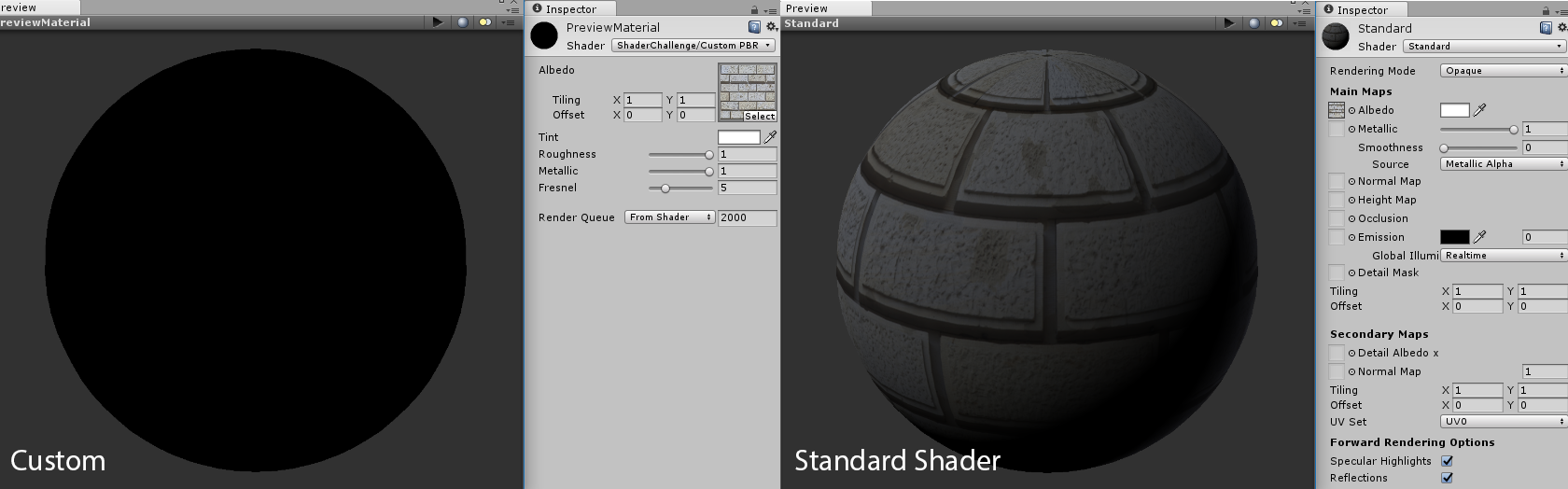
The only difference other than how it looks is that the standard shader use a Smoothness value rather than Roughness. Mine is basically an invert of that so think of Smoothness at 0 as being a completely rough material. Other than that, I believe the shader is working so anyone who have any idea regarding this issue, please let me know.
The code:
Shader "ShaderChallenge/Custom PBR"
{
    Properties
    {
        _Albedo("Albedo", 2D) = "white" {}
        _Tint("Tint", Color) = (1.0, 1.0, 1.0, 1.0)
        _Roughness("Roughness", Range(0.0, 1.0)) = 1.0
        _Metallic("Metallic", Range(0.0, 1.0)) = 0.0
        _Fresnel("Fresnel", Range(1, 18)) = 5.0
    }
    SubShader
    {
        Pass
        {
            CGPROGRAM
            #pragma vertex vert
            #pragma fragment frag
            #include "UnityStandardBRDF.cginc"
            #include "UnityStandardUtils.cginc"

            sampler2D _Albedo;
            float4 _Albedo_ST;
            float4 _Tint;
            float _Roughness;
            float _Metallic;
            float _Fresnel;

            struct v2f
            {
                float4 pos : SV_POSITION;
                float2 uv : TEXCOORD0;
                float3 normal : TEXCOORD1;
                float3 worldPos : TEXCOORD2;
            };

            v2f vert(appdata_base v)
            {
                v2f o;
                o.pos = mul(UNITY_MATRIX_MVP, v.vertex);
                // Convert vertex position to world space
                o.worldPos = mul(unity_ObjectToWorld, v.vertex);
                // Macro used to tile and offset texture
                o.uv = TRANSFORM_TEX(v.texcoord, _Albedo);
                // Transform normal vector position from object space to world space
                o.normal = UnityObjectToWorldNormal(v.normal);
                return o;
            }

            // Oren-Nayar
            float OrenNayar(float3 n, float3 v, float3 l)
            {
                float nl = dot(n, l);
                float nv = dot(n, v);

                float anglenl = acos(nl);
                float anglenv = acos(nv);

                float alpha = max(anglenv, anglenl);
                float beta = min(anglenv, anglenl);
                float gamma = dot(v - n * nv, l - n * nl);

                float a2 = pow(_Roughness, 2.0);

                float A = 1.0 - 0.5 * (a2 / (a2 + 0.57));

                float B = 0.45 * (a2 / (a2 + 0.09));

                float C = sin(alpha) * tan(beta);

                float result = max(0.0, nl) * (A + B * max(0.0, gamma) * C);

                return result;
            }

            // Trowbridge-Reitz GGX
            float GGX(float3 h, float3 n)
            {
                float a2 = pow(_Roughness, 2);
                float nh2 = pow(dot(n, h), 2);
                float denom = (nh2 * (a2 - 1.0) + 1.0);

                const float pi = 3.14159265359;
                denom = pi * pow(denom, 2);

                return a2 / denom;
            }

            // Cook-Torrance
            float CookTorrance(float3 n, float3 h, float3 v, float3 l)
            {
                float nh = dot(n, h);
                float nv = dot(n, v);
                float nl = dot(n, l);
                float vh = dot(v, h);


                float f0 = (2.0 * nh * nv) / vh;
                float f1 = (2.0 * nh * nl) / vh;

                float m = min(f0, f1);

                float result = min(1, m);

                return result;
            }

            // Schlick's Approximation
            float FresnelSchlick(float3 n, float3 v, float3 albedo)
            {
                float cosTheta = dot(n, v);
                float3 F0 = 0.04;
                F0 = lerp(F0, albedo, 1.0 - _Metallic);

                return F0 + (1.0 - F0) * pow(1.0 - cosTheta, _Fresnel);
            }

            float Microfacet(float3 n, float3 h, float3 v, float3 l, float3 albedo)
            {
                float f = FresnelSchlick(n, v, albedo);
                float g = CookTorrance(n, h, v, l);
                float d = GGX(h, n);

                float nl = max(dot(n, l), 0.0);
                float nv = max(dot(n, v), 0.0);

                float result = (f * g * d) / 4 * nv * nl + 0.001;

                return result;
            }

            float4 frag(v2f i) : SV_TARGET
            {
                const float PI = 3.14159265359;
                // Get the first light color
                float3 lightCol = _LightColor0.rgb;

                // Normalize the normal
                float3 n = normalize(i.normal);
                // Light vector from mesh's surface
                float3 l = normalize(_WorldSpaceLightPos0.xyz);
                // Viewport(camera) vector from mesh's surface
                float3 v = normalize(_WorldSpaceCameraPos - i.worldPos.xyz);
                // Halfway vector
                float3 h = normalize(l + v);

                // Albedo of the material
                float3 albedo = tex2D(_Albedo, i.uv).rgb * _Tint.rgb;
                float3 specularTint;
                float oneMinusReflectivity;

                albedo = DiffuseAndSpecularFromMetallic(albedo, _Metallic, specularTint, oneMinusReflectivity);

                // Fresnel using Schlick's Approximation
                float fresnel = FresnelSchlick(n, v, albedo);

                // Ambient lighting
                float ambient = unity_AmbientSky * fresnel;
                // Diffuse reflection using Oren-Nayar BRDF
                float diffuse = OrenNayar(n, v, l) * fresnel;
                float specular = Microfacet(n, h, v, l, albedo);

                float3 color = albedo * (ambient + (diffuse * lightCol) + (specular * lightCol));
                color = float3(pow(color.x, 1.0 / 2.0), pow(color.y, 1.0 / 2.0), pow(color.z, 1.0 / 2.0));

                return float4(color, 1.0);
            }

            ENDCG
        }
    }
}