Hang onto your netcoding hats, v2.3.0 includes a gargantuan number of fixes and some notable additions and changes to improve your netcode development experience.
NetworkTransform provides you with interpolator type selection, two new interpolator types, and the ability to enable, disable, or modify the lerp smoothing. This also includes some BufferedLinearInterpolator performance improvements.
Next in line is that this update also includes an in-scene NetworkObject parenting fix. NetworkSceneManager now organizes serialized NetworkObject based on their parenting hierarchy (like the initial client synchronization does).
There is also a new NetworkManager.OnPreShutdown event that allows you to handle any last minute tasks (i.e. saving state of a session or the like) prior to the NetworkManager shutting down, and a whole bunch more!
Happy Netcoding!
Fixed
Fixed issue where in-scene placed NetworkObjects could fail to synchronize its transform properly (especially without a NetworkTransform) if their parenting changes from the default when the scene is loaded and if the same scene remains loaded between network sessions while the parenting is completely different from the original hierarchy. (#3387)
Fixed an issue in UnityTransport where the transport would accept sends on invalid connections, leading to a useless memory allocation and confusing error message. (#3382)
Fixed issue where the time delta that interpolators used would not be properly updated during multiple fixed update invocations within the same player loop frame. (#3355)
Fixed issue when using a distributed authority network topology and many clients attempt to connect simultaneously the session owner could max-out the maximum in-flight reliable messages allowed, start dropping packets, and some of the connecting clients would fail to fully synchronize. (#3350)
Fixed issue when using a distributed authority network topology and scene management was disabled clients would not be able to spawn any new network prefab instances until synchronization was complete. (#3350)
Fixed issue where an owner that changes ownership, when using a distributed authority network topology, could yield identical previous and current owner identifiers. This could also cause NetworkTransform to fail to change ownership which would leave the previous owner still subscribed to network tick events. (#3347)
Fixed issue where the MaximumInterpolationTime could not be modified from within the inspector view or runtime. (#3337)
Fixed ChangeOwnership changing ownership to clients that are not observers. This also happened with automated object distribution. (#3323)
Fixed issue where AnticipatedNetworkVariable previous value returned by AnticipatedNetworkVariable.OnAuthoritativeValueChanged is updated correctly on the non-authoritative side. (#3306)
Fixed OnClientConnectedCallback passing incorrect clientId when scene management is disabled. (#3312)
Fixed issue where the NetworkObject.Ownership custom editor did not take the default “Everything” flag into consideration. (#3305)
Fixed DestroyObject flow on non-authority game clients. (#3291)
Fixed exception being thrown when a GameObject with an associated NetworkTransform is disabled. (#3243)
Fixed issue where the scene migration synchronization table was not cleaned up if the GameObject of a NetworkObject is destroyed before it should have been. (#3230)
Fixed issue where the scene migration synchronization table was not cleaned up upon NetworkManager shutting down. (#3230)
Fixed NetworkObject.DeferDespawn to respect the DestroyGameObject parameter. (#3219)
Fixed issue where a NetworkObject with nested NetworkTransform components of varying authority modes was not being taken into consideration and would break both the initial NetworkTransform synchronization and fail to properly handle synchronized state updates of the nested NetworkTransform components. (#3209)
Fixed issue with distributing parented children that have the distributable and/or transferrable permissions set and have the same owner as the root parent, that has the distributable permission set, were not being distributed to the same client upon the owning client disconnecting when using a distributed authority network topology. (#3203)
Fixed issue where a spawned NetworkObject that was registered with a prefab handler and owned by a client would invoke destroy more than once on the host-server side if the client disconnected while the NetworkObject was still spawned. (#3200)
Fixed issue where NetworkVariableBase derived classes were not being re-initialized if the associated NetworkObject instance was not destroyed and re-spawned. (#3181)
Changed
Changed the scene loading event serialization order for in-scene placed NetworkObjects to be based on their parent-child hierarchy. (#3387)
Changed the original Lerp interpolation type to LegacyLerp. (#3355)
Changed BufferedLinearInterpolator<T>.Update(float deltaTime, NetworkTime serverTime) as being deprecated since this method is only used for internal testing purposes. (#3337)
Changed error thrown when attempting to build a dedicated server with Unity Transport that uses websockets to provide more useful information to the user. (#3336)
Changed root in-scene placed NetworkObject instances now will always have either the Distributable permission set unless the SessionOwner permission is set. (#3305)
Changed the DestroyObject message to reduce the serialized message size and remove the unnecessary message field. (#3304)
Changed the NetworkTimeSystem.Sync method to use half RTT to calculate the desired local time offset as opposed to the full RTT. (#3212)
Added
Added NetworkManager.OnPreShutdown which is called before the NetworkManager cleans up and shuts down. (#3366)
Added Lerp interpolation type that still uses a lerp approach but uses the new buffer consumption logic. (#3355)
Added property to enable or disable lerp smoothing for position, rotation, and scale interpolators. (#3355)
Added NetworkTransform.InterpolationBufferTickOffset static property to provide users with a way to increase or decrease the time marker where interpolators will pull state update from the queue. (#3355)
Added interpolator types as an inspector view selection for position, rotation, and scale. (#3337)
Added a new smooth dampening interpolator type that provides a nice balance between precision and smoothing results. (#3337)
Added NetworkTimeSystem.TickLatency property that provides the average latency of a client. (#3337)
Added FastBufferReader(ArraySegment<byte> buffer, Allocator copyAllocator) constructor that uses the ArraySegment.Offset as the FastBufferReader offset and the ArraySegment.Count as the FastBufferReader length. (#3321)
Added FastBufferReader(ArraySegment<byte> buffer, Allocator copyAllocator, int length = -1) constructor that uses the ArraySegment.Offset as the FastBufferReader offset. (#3321)
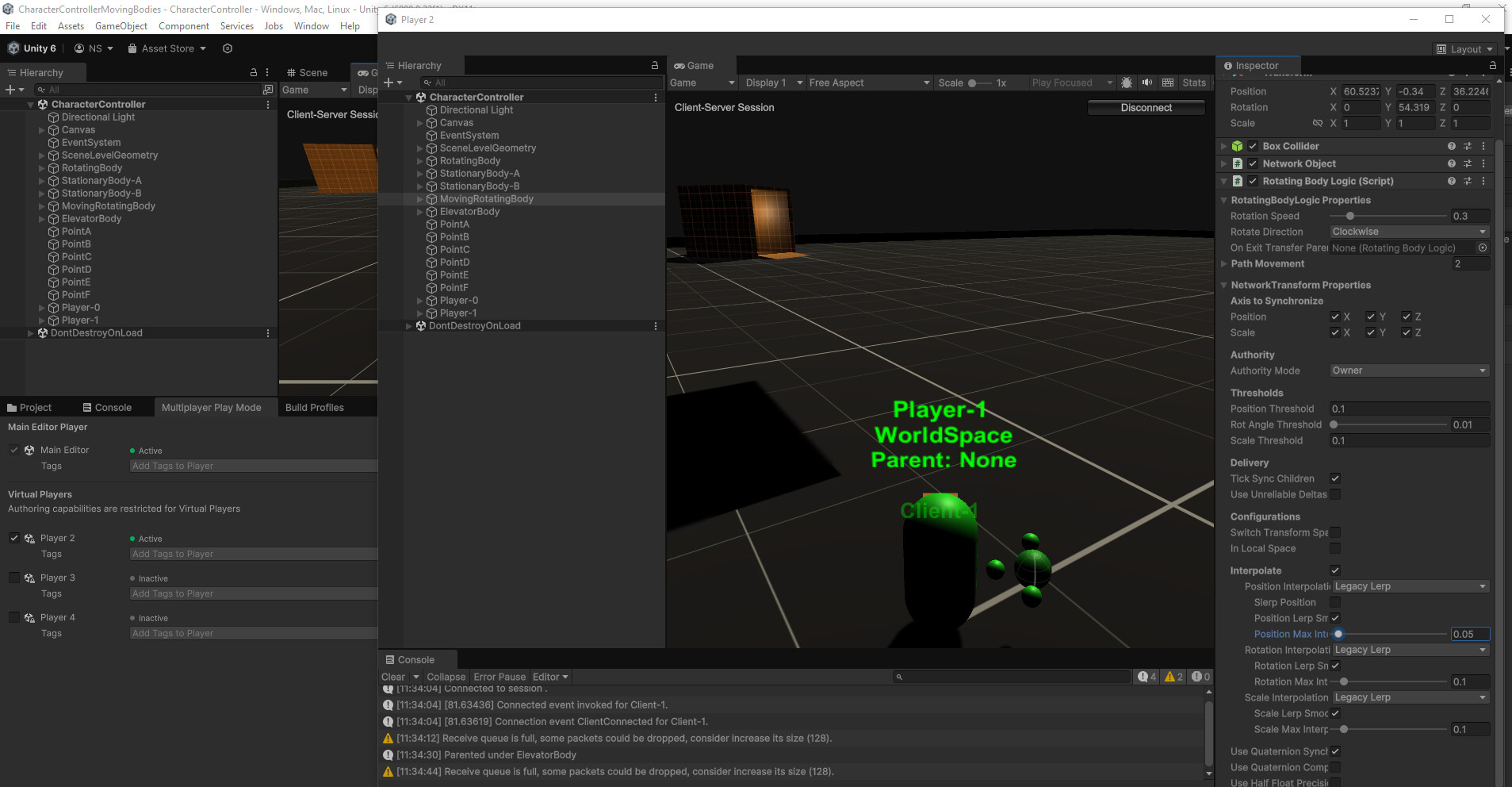
I’m seeing no effect when tweaking interpolation settings in inspector on NetworkTransform with Multiplayer Play Mode. Ticking the main on/off Interpolate toggle works though. Can you confirm the lerp speed should change when live tweaking Position Max Interpolation from host in editor ?
Hi @anthonov,
The maximum interpolation time for smooth lerp is not synchronized between the authority and the non-authority instances since it really is a non-authority only setting. So, as long as you are modifying the non-authority instance (where interpolation is being applied) then it should update it when changed.
Here are the places where it is checked against the last know value and updated when changed:
Hi,
Yes I tweak it from inspector and the inspector can only show the host scene with Multiplayer Play Mode, so it make sense if it does nothing. But the on/off settings is effective, so there is ambiguity.
For a new test I setup a simple test script to tweak Maximum Interpolation Time in a Start() method, but no effect visible. (tested 1 and 0.1)
Can I have a quick setup to see the effect ?
I noticed that ownership is randomly assigned to connected players each time they join — is this behavior documented somewhere?
Upd: Ah, I see now. For objects placed in the scene, we’re now limited to session owner or random. Previously, we could use transferable mode and ownership would stay unassigned (on the server side) until a client connected. That option seems to be gone now — looks like a breaking change.
There was a need to be able to have both session owner specific in-scene placed NetworkObjects while also having generalized distributable NetworkObjects.
If root in-scene placed NetworkObjects (i.e. not a child of an in-scene placed NetworkObject) are marked as transferable then their default owner will be the original session owner (i.e. client that started the session) until their ownership is transferred.
If root in-scene placed NetworkObjects have the distributable ownership flag, then they will be distributed amongst clients as they connect and disconnect.
If in-scene placed NetworkObjects with the transferrable permission flag set are parented under other root in-scene placed NetworkObjects with the distributable permission flag set, then they will follow their parent (in regards to ownership changing) if the owner is the same when redistributed.
If in-scene placed NetworkObjects have the session owner permission flag set, then their ownership will change when a new session owner is promoted.
Are you experiencing something different than the above?
Sort of, but there’s a limitation in 2.3 that makes that setup no longer possible. The behavior described in the quote is no longer possible in version 2.3 — it’s now impossible to create an in-scene object with only the transferrable flag enabled unless it also has the distributable flag. You can no longer create objects that are transferrable but not distributable.
As a result, ownership is either randomly reassigned when clients connect, or fixed to the session owner — there’s no in-between. In version 2.2, it was possible to create a scene with the distributable flag disabled, but this is no longer supported in 2.3.
In the attachment is an example where the distributable flag is set and cannot be unset, causing objects to randomly change ownership when a new client connects.
Well, it looks like some in-scene placed parenting rules is the root cause of this issue.
While I know this sounds ridiculous and not a very good work around, placing your in-scene objects under a generic GameObject with no components on it will allow you to set your in-scene placed NetworkObject to be just transferrable.
Yes, we also noticed that issue with overriding the flags yesterday — placing objects under the root does allow the flag to be changed, so the workaround does work. Thanks a lot for pointing it out!
What worried me most was the possibility that transferable objects without distributables were no longer supported and had been deprecated. In a way, I’m actually relieved it turned out to be a bug rather than an intentional API change.
This is what I’m tweaking, yes. I’m seeing the difference now, but I have to go super low (0.01) to make something quite snappy (with legacy. others I can’t find something fast that does not stutter).
I want a fast interpolation from quick physics, and I think the default behavior is too slow even for a regular capsule character.
The behavior I would like is lerping between the previous tick position/rotation, and the new one. Like with Vector3.Lerp(). I did not dig how the buffer interpolation works, but I would like to try this, a regular lerp between two ticks.
There are a few other things you should contemplate:
Legacy Lerp does not always reach its final target (i.e. Lerp “t” averages around 0.60-0.75 before moving on to the next pending state in the queue).
Lerp and SmoothDampening will get much closer to each state’s value (i.e. Lerp “t” averages around 0.90-0.98).
If you are trying to get better physics related results then you should also consider:
Increasing your tick rate.
The default is 30 (i.e. 30 states per second).
Increasing this value will increase the resolution of the motion being interpolated.
It will increase bandwidth consumption, but that is the trade off here.
Position is most likely going to be your primary focus, and as such you should make sure you have a low enough position threshold delta that you will almost always generate a state update when the object moves.
This is helpful for “bouncing” off of and colliding with things where there could be a parobolic-motion.
On the actual Rigidbody:
Set the interpolate property to “Extrapolate”.
This will make non-authority instances use “Interpolate” (for the Rigidbody itself).
Set the Collision Detection (if collision is your focus) to be “Continuous Dynamic”.
This will yield better results on both the authority and non-authority instances.
This is a bit more expensive processing-wise.
In a script on all clients/server, you can adjust the NetworkTransform.InterpolationBufferTickOffset. This basically will offset all non-authority instances (the ones interpolating) by (n) network ticks.
With lerping you want to have a constant stream of data points while an object is moving.
If there is a gap (i.e. the non-authority side exhausts the inbound state queue) then you can end up with a “jump/jitter” upon receiving the next state updates.
Basically think of the buffer like a bucket and the more “tick offsets” you have the more you will have in your bucket before it begins processing things from the bucket.
Of course, if you set it too high then things run/lag behind by that amount of time (i.e. seconds = 1/Tick Rate).
There is a tool I will hopefull have time to post in the develop-2.0.0 repository examples section that will let you visually adjust some of these newer values and provides a custom runtime network stats monitor to provide you with some metrics to see what all is happening. Until then, I would look into the above suggested areas.
I get pretty good results using the newer Lerp with a maximum interpolation time setting of 0.33 - 0.66 (depending on what kind of reaction time you are looking for).
Also remember that you can adjust the maximum interpolation time during runtime.
I’m running the physics only on the host side. the client just have visual feedback. I don’t get why this implementation of interpolation is that complex. What I need is an interpolation that lerp between the actual position on client, and the last tick position update from the host. happening each frame with a Vector3.Lerp(t).
This way maybe it should have the best ratio snappy/stutter possible? (in my case?)
When lerp smoothing is disabled, it should stop interpolating past the last state update once it has reached the final target value… of course if you are using a TickRate of 30 then you will see some stutter. If you increase the TickRate to 60 you will see less stutter (i.e. more samples = less stutter).
However, maybe you could provide more details on how you have things setup and/or send me a direct message with a replication project (only would need the Assets, Packages, and Project Settings folders zipped) of the issue you are having?
@anthonov
Here is a video of a physics ball being moved around based on where I am clicking (left is authority).
The right side is the interpolated results. I change some of the values and the interpolation type to show the various settings.
If you are experiencing something that has more stutter on the non-authority/client side then I would recommend you send me a replication project zipped as a direct message. You only need to include the Assets, Packages, and Project Settings folder in the zip file.
 Netcode for GameObjects v2.3.0 is now publicly available!