New input system, auto switch doesn't seem to actually switch control scheme

I have a PlayerControl in which I have two control schemes, one named Gamepad and one named KBM, inside each scheme i have mapped controls and haveticked the box for each mapping to associate it with the scheme.

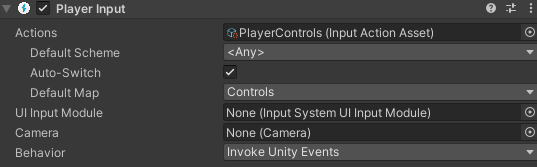
A Player Input component attached to my character that looks like this (note auto-switch is selected)
9285931--1301386--upload_2023-9-11_10-48-40.png

The movement for my character seems to work as intended regardless of which scheme is being used, meaning i can easily switch between keyboard and gamepad for x/y movement of my character (i’m working in 2d here)

The problem comes when i need to be able to adjust my aiming code to acomodate for the difference between mouse aim (using the main camera WorldToScreenPoint) and Gamepad left stick (using simple x/y vectors

I’ve tried the following, none of which actually display a change in control scheme:

The following method:

public void OnDeviceChange(PlayerInput controller)
{
    Debug.Log("Switching Device...");
    isGamepad = controller.currentControlScheme.Equals("GamePad") ? true : false;
}

and in the UI, under my Player Input → events → controls changed event looks like this:

9285931--1301374--upload_2023-9-11_10-43-42.png

Regardless of if i’m using KBM or Gamepad i never see “Switching Device…” in the console?

I then attempted a manual brute force approch like this:

private void Update()
{
        Debug.Log(string.Format("Current Control Scheme: {0}", playerInput.currentControlScheme));
{

Which always displays whichever scheme i set as default and doesn’t change if i switch controllers.

Am i missing something? I feel like theres a tick box somewhere or a UI mapping some place i’ve missed?

Thanks

Are you sure it’s “GamePad” not “Gamepad”?

Thanks for the reply, i did notice that after posting, you are right. My string check was GamePad and the scheme was Gamepad - i’ve now fixed this but the problem remains

Good spot though :slight_smile:

SOLVED!

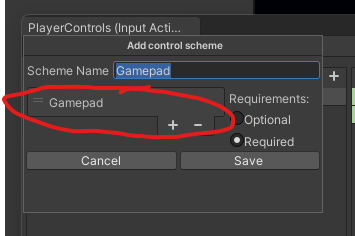
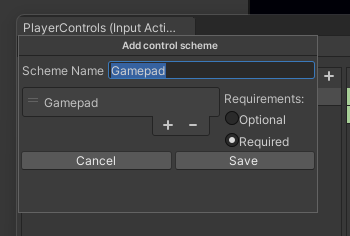
The problem was inside the input action window where you define each controller scheme. There’s a list of input / controller types. None of the documents i read mentioned or explained what this was. Basically this is mapping the controller scheme to the “type” of controller being used, meaning for a gamepad, you could add gamepad to this list, and for mouse / keyboard the same.

9286366--1301524--upload_2023-9-11_14-18-55.png

this list was originally empty, as soon as i added the controller type to this list for each scheme the OnDeviceChanged even began firing as expected - makes sense now since without this unity doesn’t know what input type is to be assigned to your controller scheme

9286366--1301521--upload_2023-9-11_14-18-38.png

thanks! this got me unstuck when I was pulling my hair out over why my gamepad didn’t work!

Oh my god! You saved my life!

tx mate I already had the Gamepad added as you show, but that was not enough for me. I had setup PS5 dualsense setup and Xbox gamepad setups in the actions. I had to specifically add theese two gamepads in the Control Scheme list…
like this:

if I don´t make them required in the gamepad, it read xbox controller in keyboard shceme enabled, it is very frustrating.