Hi everyone,
I’m generating square sprites right inside the editor with a script:
Basically its just an image of my meshes on a white background. I create a screenshot at 2048x2048, then use a MaxSize selector to set it to a 256px max size. Selector also allows 32xN values - 32, 64, 128, 512 etc
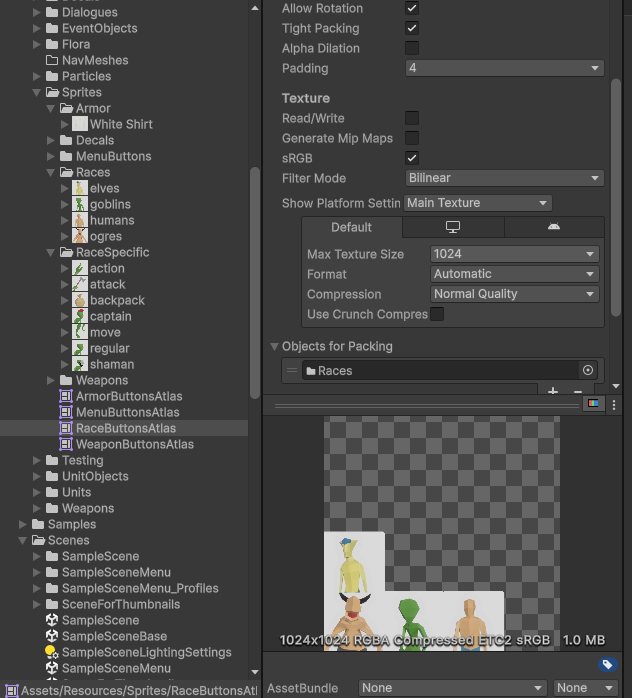
Later I pack those images into an atlas:
Atlas also allows sizes which are 32xN values - 32, 64, 128, 256, 512 etc. But because of the minimum padding of 2 - images never perfectly fit into the atlas, leaving lots of unused space (in my case 256 - (padding x items per row/column))
Can’t you make atlas sizes of a fully customizable width/height to add up padding and have a perfect filled square without empty sides? or else allow 0 padding. or both, so a developer can choose to use that or not.
Does it really not offer 0 for padding?
A 0-sized padding would just lead to visual glitches but still, it would work for point filtered (pixel art) textures. Perhaps padding = 0 is allowed if you set point filter.
Otherwise you’d have to create your own atlas texture either by script or external tools (TexturePacker if that is still around). I’d probably make it myself if all the sprites are uniformly sized since it’s almost trivial to both create such an atlas and create sprites from it. The Sprite Atlas tool is really most useful (it’s main use case) for arbitrary sized sprites.
Nope, seems it doesn’t offer 0 padding even with Point filter.
Yeah, well, eventually I might consider the external tools, but by the time I get close to release, it might as well be implemented in Unity’s default tool, so i decided to create a thread.
Actually, setting it directly to 0 in the .meta file seems to be working:
To ensure there are no rendering artifacts when sampling textures, pixels along the outline of the sprite are extended (padded pixels). Hence settings of 2, 4 or 8 are usually set for padding depending on the formats or usage.
However it’s entirely possible to set padding to 0 through scripting or editing the setting like above. It is also possible to fully control sprite packing if using SpriteAtlas V2.
A sample for scriptable packing is also available in 2D Common package (Packages/com.unity.2d.common/Editor/ScriptablePacker/SpriteAtlasScriptablePacker.cs)
So, why you make life complicated instead of just giving that freaking option to developers? If some one is so stupid to understand the concept of textures sampling it shouldn’t be a game developer. Don’t consider Unity devs are stupid monkeys..
That is the inconsistency Unity has as a product: on the one hand you release DOTS without any piece of docs to learn and which requires a deep computer science knowledge, and on the other hand you say “Oh no! My poor devs might get artifacts! So I should care of them and add “a fool protection” to the editor!”