I learnt on myself ( and from great shaders coders ) the few i know on those lil microprograms.
However, i know that i know very few things !
In shaderlab i wonder how data is passed from vert to frag or from vert to surface programs, and i still wonder what data is passed.
eg: if i only need a random float calculated in vert program, and pass it to surface program, do i have to initialize pos, normal, spec, etc… ?
at last but not least i still don’t know about shader data !
float, half, fixed… what are the precision/speed ratio cost ?
Also i guess the rules you can fix yourself when coding shaders for an NVidia GPU are not the same than for an ChingPongChong GPU coming from the deep country of china ?
So… you knowledgeable shaders coders, where did you get your knowledge from ( apart from practicing ) ?
Is there any must-have book ? any must-bookmark website ? any ppl to phone ?
The data output by the vertex shader is interpolated using barycentric interpolation for each visible pixel of the triangle being rendered, which is then passed in as the input for the fragment shader.
This is usually in the form of the v2f struct for vertex fragment shaders, though the name and even the struct itself is entirely arbitrary its naming and formatting. The only thing that actually matters is the semantics (the : TEXCOORD0 and similar after the variable names) used for each output and input. Values output to a specific semantic from the vertex shader are the same ones used for interpolation and input into the same semantic for the fragment shader. The use of the shared v2f struct is just to make sure both match, and for code organization.
For Surface shaders, you’re adding custom values to the Input struct, but that’s not getting passed from the vertex to the fragment. Rather Unity is packing any custom values you assign on the Input struct in the vertex function (which is really just a function being called by the “real” vertex shader function) into a hidden struct that is using semantics. In the fragment shader it’s unpacking those values back into a new Input struct created for each pixel that is passed to the surf function (which like the vertex function is just a function being called by the “real” fragment shader function). The Surface shader is going to do all the rest of the work for you, so you only need to worry about the custom values you add that aren’t handled by the Surface Shader generation system as listed by the documentation.
A half is defined as having a minimum precision of roughly a 16 bit half-precision floating point value. A full 32 bit float also meets that requirement, so on most GPUs that’s what it is. A fixed is a value with a range of at least -2.0 to +2.0 with a minimum precision of 1.0/255.0, which again a full 32 bit float can do, so that’s what it is on most GPUs.
Some mobile GPUs implement half as actually a 16 bit half precision float, and have significant performance benefits (roughly 2x over float) for the math operations that use those values. Some very old mobile GPUs also implemented fixed as even lower precision floating point values, with similar but not as significant performance benefits for using them, but I don’t know of any made in the last decade that do.
Yes and no. Any code written with HLSL or GLSL for a specific shader model should work on all GPUs that support that shader model, be it Nvidia or anyone else. Sometimes this isn’t the case due to bugs in the GPU’s drivers or hardware … however Microsoft’s HLSL shader compiler and Nvidia’s GPUs are surprisingly good at taking HLSL code that doesn’t actually conform to the spec and run it anyway, where as AMD, Android and especially MacOS (regardless of what GPU it’s using) are far more picky. So there are absolutely cases where shader code that runs on an Nvidia GPU won’t run on other GPUs, but that has more to do with Nvidia’s robust handling of undefined code behaviors, not the other GPUs being “bad”.
There are a ton of Youtube videos out there, talks from various devs, etc. Personally I mostly learned by doing and working with people who already knew things.
Your answer is precious on many ways @bgolus !!!
Thanks a lot
For the surface shader… i understand the surface function is ‘over’ the fragment shader. It is this way it does simple things for programmer, abstracting many things and therefore making shader programming easier & faster.
It appears that with some trick like shader variant, the surface shader strips-out the code that is not needed.
And it appears it does this very well ( in an optimization point of view ).
But it seems that when using surface shaders, i cannot get rid of specular & softness ( or metallic & softness ) parameters.
I set them respectively to 0 & 1. are those values still propagate to GPU internal registers when the fragment is calculated ? or are the spec & soft parameters simply stripped out of the shader ( wich would mean that a self-written ‘low-level’ fragment shader would be faster ) ?
I guess that gpus calculation cells have an non compressible time propagation that you cannot reduce whatever you use 4 calculations or 32 calculations ? am i right or wrong ?
I don’t know the low-level GPUs cell structure ( like the ones in an FPGA or CPLD ) but it would help a lot understanding many things^^ ( am a former FPGA engineer who developped my own CPUs & GPUs but they were done ‘my way’ for my needs )
I have much to learn on shaders ( and not enough time for it ) as this is an extremely interresting topic for intensive calculations…
I guess you’ll hear from me often @bgolus
Yes and no. The shader generator is looking at what values you assign / use from the input and outputs of the surf function and choosing to add or exclude some of the generated code based on it. But there’s also a lot of stuff that shader compilers are doing as well. Any code that doesn’t actually get used for any code path gets culled, similar to most compilers. I’m loath to refer to them as “variants” as it’s not adding lines to the shader for Unity’s shader processor to handle, which is what most people mean when they refer to shader variants, but it’s likely handled similarly in the actual Surface shader generation code.
A metallic of 0.0 is not the same thing as no specular. A metallic of 0.0 means it’s not a metallic surface, which means it has a specular color of roughly sRGB(56,56,56). Similarly a smoothness of 0.0 doesn’t mean no specular, it means a very rough surface, which still has specular. The metallic and smoothness, and really the entire surface shader “output” struct is defined by which lighting model you choose to use. The default is Standard, but you could also use StandardSpecular, or BlinnPhong, or Lambert, just to name the ones that are included with Unity. You can also write your own shading model to use if you’re so inclined. https://docs.unity3d.com/Manual/SL-SurfaceShaderLighting.html https://docs.unity3d.com/Manual/SL-SurfaceShaderLightingExamples.html
#pragma surface surf Lambert

struct Input {
  float2 uv_MainTex;
};

void surf(Input IN, inout SurfaceOutput o) // notice this is not using SurfaceOutputStandard!
{
  o.Albedo = tex2D(_MainTex, IN.uv_MainTex);
}
However, yes. If you hard code values or don’t assign them (in which case they use some default the shader generator is setting, usually 0.0) then the shader compiler can sometimes simplify or remove code. For example if a bunch of math is eventually multiplied by a hard coded 0.0, the shader compiler will usually junk all of the preceding math or even remove situations where the hardcoded value will have no affect (+ - 0.0 or * / 1.0, etc.).
So in this specific case, hard coding a metallic and/or smoothness value of 0.0 or 1.0 will end up simplifying some of the code, but not most of it. The shader generator might add or remove a few lines here or there, but for things like the lighting functions those are just being included from other files and called directly. It’s not touching those functions itself. Only the shader compiler will do that.
GPUs are SIMD, or more accurately now SIMT based. Lots and lots of very simple processors. Modern ones can do some amount of dynamic branching, but because they’re SIMT in groups of some number of lock step threads, if one thread has to do a branch, all threads in the group pay the cost of if they were doing it too.
I’m making nodes at my brain but i discover lots of things on shaders !
First i noted that ( with measuring the final frame rate, wich is finally what i’m interrested in ) in certain conditions, fewer shader instructions lead to slower run !
( where is the smiley bumping his head on a wall ??? )
I really feel like posting here my whole small project that i use for shader benching. Maybe it would be usefull for some ppl and would show the base from wich i talk about shader perf… not sure wether it’s a good idea thoough…
Anyway i come here with a simple question.
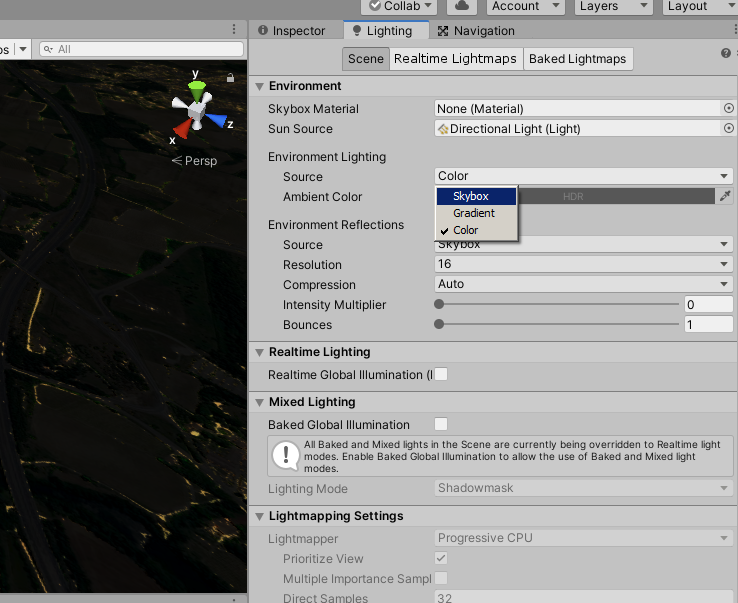
unity ambient colour needs no interpolation as it is constant all around the scene.
Why is it calculated on a per pixel basis in fragment shader, instead of beeing calculated in vertex shader ( or passed from app to vertex shader ) and set up as a constant in pixel shader ?
Not all instructions cost the same amount. Different GPUs can have different costs for different instructions. But even then the instruction count isn’t the only thing that matters for performance. GPU performance is a complex beast.
Because your base assumption of “ambient colour … is constant” is false. It can be constant, but rarely is. By default it’s based on the scene skybox, which means it’s grey from below and blue from above. And if you use a custom skybox you might have a different color coming from all major axis. The color might not change based on the position, but does change based on the surface normal. Ambient lighting is stored as a spherical harmonics probe, which is a way of representing multiple colors coming from multiple directions around a single point. The default way ambient lighting works on dynamic objects, the position isn’t even taken into account and it’s the “same” SH probe for an entire object even if there are multiple ambient light probes in a scene.
Is the internal UNITY_LIGHTMODEL_AMBIENT.rgb still intrepolated ( i understand slowly generated ) or does it becomes a constant value directly coming from unity ?
In my app i do not use GI nor any of the internal unity lighting except 1 directionnal light wich is the sun.
I handle my own ambient values that i set up in script from a base color and an intensity curve.
Therefore, in your opinion, should it be better ( i mean faster ) to leave UNITY_LIGHTMODEL_AMBIENT.rgb and pass my own ambient color to shader ?
I feel like posting here the lil U3D project i made for all my shaders perf tests.
This might be usefull to some people and also to you for better understanding the things i do
EDIT: in fact the main problem i got is that i still don’t know/understand ( and found nothing clear on this topic ) what in fragment shader is interpolated ( i understand slow execution ) and what is constant ( i understand quick execution ). If you got any clear info about this i’d really be happy to get it
Thanks a lot and…
UNITY_LIGHTMODEL_AMBIENT is always just whatever value is set as the Ambient Color (or the Top Color if you’re using a Gradient ambient source) in the lighting settings, even if you’re using the Skybox ambient mode and the Ambient Color is hidden from the inspector. It is not affected by light probes in the scene either. It does not change and is constant regardless of normal or position.
Which is why none of the built in Unity shaders use it anymore, except for ones that are essentially deprecated and haven’t been updated in 6+ years.
If you plan on manually controlling the ambient color at all times using a single color, then using UNITY_LIGHTMODEL_AMBIENT in your shaders is a totally fine alternative to assigning the color with a custom value. Though using a custom variable is fine too. Presumably you’re setting that using Shader.SetGlobalColor() and not on each material directly?
While constant values are indeed fast, I think it’s a misnomer to say interpolated values are “slow”. They’re also fast. Just not as fast as constant values. It also depends on in which context you’re using the term interpolated. The word just means to blend from one value to another. The values it’s blending between might themselves be constant, or dynamic. There’s also the question of if a value is being interpolated on the CPU and passed to the shader as a constant, or if the shader is doing the interpolation itself.
Going back to ambient lighting using spherical harmonics, if a scene has no light probes, this is a constant set of values being passed to all lit shaders. The shader uses a normal direction to sample the SH in the shader, either in the vertex shader or the fragment shader. If in the vertex shader then it’s sampling the ambient per vertex and then that color is being interpolated when used by the fragment shader. If it’s in the fragment shader then the vertex normal is being interpolated by the fragment shader. All of these options are “fast”. Generally per-vertex sampling of the SH is faster, but if you have especially high poly models it might be slower, and if you have normal maps you need to do it in the fragment shader anyway since you don’t know the correct normal until you’ve calculated it in the fragment shader.
I previously used the UNITY_LIGHTMODEL_AMBIENT after setting the ambient color in C#.
As i guess, UNITY_LIGHTMODEL_AMBIENT is a uniform var ( eg one coming from the application if i understood right things i red here: The Cg Tutorial - Chapter 3. Parameters, Textures, and Expressions ).
After some quick tryouts, i noticed that UNITY_LIGHTMODEL_AMBIENT or even my own uniform _MY_AMBIENT_COLOR is a bit slower than a color that can be set up in c# from shader properties.
In fact my own uniform ambient color is slower than when i use UNITY_LIGHTMODEL_AMBIENT.
But when using an exposed color in shader, it is visibly faster:
Of course the c# sets up values at start and Update() loop is empty for not disturbing the measures
The difference is not that much ( 0,7fps over 109 is only 0,64% ) but i learn a lot on this and also optimize my draw times ( small streams make big rivers )
Forget about the ‘dissolve’ things as it’s a variant i use at start for appearing effect
So here is now the best i can get for this shader ( flat, unlit, no shadow casting/receiving )
What do you think about it ?
Next step for me will be harder but based on the same knowledge and same try-and-measure method:
An identical shader with alpha clip.
OMG !!!
I just discovered one thing:
changing this:
Tags {“Queue”=“Geometry” “RenderType”=“Opaque” }
to this:
Tags {“Queue”=“Transparent” “RenderType”=“Opaque” }
gives this:
is depth-buffer squizzing the responsible for this ?
At last but not least I appears that in my shader, the fog is set up in a vertex manner instead of a per-pixel manner.
I have to check wether it is a problem or not in my application…
108.8 fps vs 109.5 fps is the difference of 0.05 ms. Not really that significant. That’s within the margin of error, especially when running the game within the editor. Fps is a terrible metric to use to compare performance with as it’s non-linear. For example the difference between 60 and 65 fps is about the same actual performance difference between 125 and 150 fps, ~1.5 ms. And that’s what you should really focus on, the total milliseconds per frame, not the framerate.
No depth buffer writes may indeed help if you can guarantee there are no overlapping meshes, or that they’re sorted properly in the cases they are. 2D renderers often disable the depth buffer entirely, but there are plenty of cases where the depth buffer can lead to significant performance improvements even for “2D” games in more real setups.
ooookay i agree it’s in the margin error
I noticed it’s quite hard to get a significant millisecond measuring in editor.
So many things run behind !
but…
I sometimes get a measure curve that is damn flat ! perfectly flat…
Of course, the conditions and the rendered things are very important. but when you got 95.6 fps on a scene with a shader and 96.2 with new shader on exactly the same scene ( identical for each pixel ) you can reasonably say ( apart the ‘mouse-over’ windows UI ) that the later one is faster ^^
Some friends of mine tell me i… fu*k flies…
I agree with them but on a samsung J5, 0,5 fps can subjectively make the difference between unusable shit and… amazing shit
and this is just part of the final thing… i kow that making things faster on my win7 G610 don’t mean that droid app will run faster, nor ( and am total noob in this world ) ios app will run faster…
what i know is that short code runs fast. whatever the plaform.
My aim is running 3D first person things on low end devices ( droid J5, win7 and G610 or 710 and apple… errrr… apple :-/ )
Even if my apps run ‘fine’ on droid and win devices i’d really like to increase the frame rate.
This is my main target.
@bgolus you cannot imagine the help you give me for this !
And i thank you VERY VERY MUCH !!!
for now i’m still struggling with shaders running faster and real flare handling…
far unlit ambient objects with night lights…
And those shaders deserve optimization.

 ) ?
) ? ?
?


 fu*k flies…