OnTriggerEnter with particle system

Can you guys tell me why it does not work? I found this tutorial

but it seems overcomplicated. I think there mus be easier way. I want to make this zoombie dissapear after colliding with particle system.

CODE - script placed on zoombie

using System.Collections;
using System.Collections.Generic;
using UnityEngine;

public class DestroyngZoombie : MonoBehaviour
{
    private void OnTriggerEnter(Collider other)
    {
        if (other.gameObject.tag == ("Milk"))
        {
            Debug.Log("Collision Milk - Zoombie");
            Destroy(gameObject);          
        }
    }


}

Particle systems are not the same as objects and don’t work this way. Even with detect collision the collision is one way detectable. It is only for the purpose of your particle to rebound etc: you need to fire invisible bullets if you are using collision. Or else you should fire a raycast, and apply damage in interval intervals that are timed to your particle system:

Did you complete Step #2 of the process to verify this intuition? If not, then it’s just a spidey sense, and those are not useful when programming.

Tutorials and example code are great, but keep this in mind to maximize your success and minimize your frustration:

How to do tutorials properly, two (2) simple steps to success:

Step 1. Follow the tutorial and do every single step of the tutorial 100% precisely the way it is shown. Even the slightest deviation (even a single character!) generally ends in disaster. That’s how software engineering works. Every step must be taken, every single letter must be spelled, capitalized, punctuated and spaced (or not spaced) properly, literally NOTHING can be omitted or skipped.
Fortunately this is the easiest part to get right: Be a robot. Don’t make any mistakes.
BE PERFECT IN EVERYTHING YOU DO HERE!!

If you get any errors, learn how to read the error code and fix your error. Google is your friend here. Do NOT continue until you fix your error. Your error will probably be somewhere near the parenthesis numbers (line and character position) in the file. It is almost CERTAINLY your typo causing the error, so look again and fix it.

Step 2. Go back and work through every part of the tutorial again, and this time explain it to your doggie. See how I am doing that in my avatar picture? If you have no dog, explain it to your house plant. If you are unable to explain any part of it, STOP. DO NOT PROCEED. Now go learn how that part works. Read the documentation on the functions involved. Go back to the tutorial and try to figure out WHY they did that. This is the part that takes a LOT of time when you are new. It might take days or weeks to work through a single 5-minute tutorial. Stick with it. You will learn.
Step 2 is the part everybody seems to miss. Without Step 2 you are simply a code-typing monkey and outside of the specific tutorial you did, you will be completely lost. If you want to learn, you MUST do Step 2.

Of course, all this presupposes no errors in the tutorial. For certain tutorial makers (like Unity, Brackeys, Imphenzia, Sebastian Lague) this is usually the case. For some other less-well-known content creators, this is less true. Read the comments on the video: did anyone have issues like you did? If there’s an error, you will NEVER be the first guy to find it.

Beyond that, Step 3, 4, 5 and 6 become easy because you already understand!

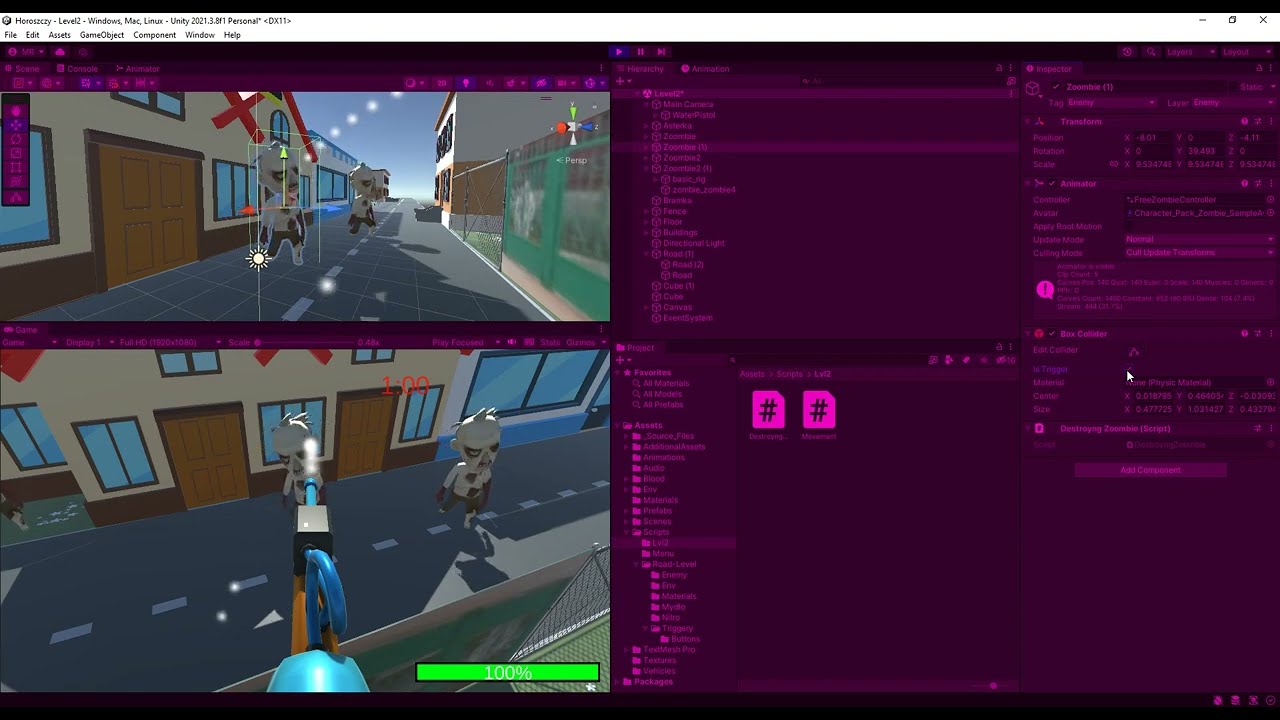
Ok, I fixed this by adding a cube which is extensing when you hold left mouse click and react with the boxCollider placed on zoombie. I ran into a problem where I burned my gray cells too much. I spent too much time on this and will come back to it tomorrow but decided to ask because maybe someone has a good idea how to fix this problem or maybe just different perspective on this problem.

I want the Zoombie to disappear after 2s interaction with the stream (the previously mentioned cube), the problem is that it disappears, but 2 seconds regardless of whether the Zoombie is in this stream. This means that you just need to touch the zombie with the stream and take it off from the zoombie. The Zoombie will disappear (just like in the video). I want you to have the stream directed at the zombie for the entire two seconds. And if you exit from the zoombie, you will have to back to attack the zoombie for 2seconds to kill it

Ofc during the game the cube has mesh renderer off, I showd it only for this movie

CODE ON WEAPON

using System.Collections;
using System.Collections.Generic;
using UnityEngine;

public class Shooting : MonoBehaviour
{//script placed on gun, makes the stream flow on left mouse clikc (holding the button)
    public GameObject milk;
    public GameObject cube;
    void Update()
    {
        if (Input.GetMouseButton(0))         {
            milk.SetActive(true);
            cube.transform.localScale += new Vector3(0, 0, 0.001f);      
        }
        else //if u release the left mous button cube reset it position and the stream is stopped
        {
            milk.SetActive(false);
            cube.transform.localScale = new Vector3(0.0143741956f, 0.0143741984f, 0.00468107313f);
        }
    }

  
}

CODE MAKES ZOOMBIE DYING

using System.Collections;
using System.Collections.Generic;
using UnityEngine;

public class DestroyngZoombie : MonoBehaviour
{//script destroyng zoombie after 2secods after ontiggerener with Stream
    public GameObject cube;
    public bool isKilled;

    private void OnTriggerEnter(Collider other)
    {
        if (other.gameObject.tag == ("Milk"))
        {
            Debug.Log("Collision Milk - Zoombie");
            Destroy(gameObject, 2f);
            //After killing zoombie the cube should resent it position to default
            cube.transform.localScale = new Vector3(0.0143741956f, 0.0143741984f, 0.00468107313f);
        }
    }


}

This is generally accomplished by adding a small amount of time to a counter on each frame that the stream IS touching the zombie.

void Update()
{
  if (InStream)
  {
    TimeInStream += Time.deltaTime;
  }
}

InStream is just a bool

Your trigger or collision stuff sets or clears InStream

TimeInStream is a float, and elsewhere check if it goes over 2.0 and Destroy() the agent

I will never thought I will be having so much trouble with this.
Here is my code, I used this time but propably somehow in the wrong way because it is sill does not work as intended

using System.Collections;
using System.Collections.Generic;
using UnityEngine;

public class DestroyngZoombie : MonoBehaviour
{//script destroyng zoombie after 2secods after ontiggerener with Stream
    public GameObject cube;
    public bool isKilled;
    public bool InStream = false;
    public float TimeInStream;

    private void OnTriggerEnter(Collider other)
    {
        if (other.gameObject.tag == ("Milk"))
        {
            InStream = true;
            Debug.Log("Collision Milk - Zoombie");
            cube.transform.localScale = new Vector3(0.0143741956f, 0.0143741984f, 0.00468107313f);
        }
        else
        {
            TimeInStream = 0;
            InStream = false;
        }
    }

    void Update()
    {
        if (InStream)
        {
            TimeInStream += Time.deltaTime;
            Debug.Log(TimeInStream);
            if (TimeInStream >= 2)
            {
                Destroy(gameObject);
                TimeInStream = 0;
            }
        }
    }

}

Welcome to debugging! Here is how to get started:

You must find a way to get the information you need in order to reason about what the problem is.

Once you understand what the problem is, you may begin to reason about a solution to the problem.

What is often happening in these cases is one of the following:

  • the code you think is executing is not actually executing at all
  • the code is executing far EARLIER or LATER than you think
  • the code is executing far LESS OFTEN than you think
  • the code is executing far MORE OFTEN than you think
  • the code is executing on another GameObject than you think it is
  • you’re getting an error or warning and you haven’t noticed it in the console window

To help gain more insight into your problem, I recommend liberally sprinkling Debug.Log() statements through your code to display information in realtime.

Doing this should help you answer these types of questions:

  • is this code even running? which parts are running? how often does it run? what order does it run in?
  • what are the values of the variables involved? Are they initialized? Are the values reasonable?
  • are you meeting ALL the requirements to receive callbacks such as triggers / colliders (review the documentation)

Knowing this information will help you reason about the behavior you are seeing.

You can also supply a second argument to Debug.Log() and when you click the message, it will highlight the object in scene, such as Debug.Log("Problem!",this);

If your problem would benefit from in-scene or in-game visualization, Debug.DrawRay() or Debug.DrawLine() can help you visualize things like rays (used in raycasting) or distances.

You can also call Debug.Break() to pause the Editor when certain interesting pieces of code run, and then study the scene manually, looking for all the parts, where they are, what scripts are on them, etc.

You can also call GameObject.CreatePrimitive() to emplace debug-marker-ish objects in the scene at runtime.

You could also just display various important quantities in UI Text elements to watch them change as you play the game.

If you are running a mobile device you can also view the console output. Google for how on your particular mobile target, such as this answer or iOS: https://discussions.unity.com/t/700551 or this answer for Android: https://discussions.unity.com/t/699654

Another useful approach is to temporarily strip out everything besides what is necessary to prove your issue. This can simplify and isolate compounding effects of other items in your scene or prefab.

Here’s an example of putting in a laser-focused Debug.Log() and how that can save you a TON of time wallowing around speculating what might be going wrong:

https://discussions.unity.com/t/839300/3

When in doubt, print it out!™

Note: the print() function is an alias for Debug.Log() provided by the MonoBehaviour class.
So I did Debugging XD

using System.Collections;
using System.Collections.Generic;
using UnityEngine;

public class DestroyngZoombie : MonoBehaviour
{//script destroyng zoombie after 2secods after ontiggerener with Stream
    public GameObject cube;
    public bool InStream = false;
    public static float TimeInStream = 0;

     public void OnTriggerStay(Collider other)
    {
        if (other.gameObject.tag == ("Milk"))
        {
            InStream = true;
            TimeInStream += Time.deltaTime;
            Debug.Log("Collision Milk - Zoombie");         
                   
        }
        else
        {
            InStream = false;
            Debug.Log(InStream);
            Debug.Log("ZERO STAY");
            TimeInStream = 0f;
        }

        if (TimeInStream >= 2)
        {
            Destroy(gameObject);
            TimeInStream = 0f;
            cube.transform.localScale = new Vector3(0.0143741956f, 0.0143741984f, 0.00468107313f);

        }
        Debug.Log(TimeInStream);
    }

    public void OnTriggerExit(Collider other)
    {
        TimeInStream = 0f;
        Debug.Log("ZERO EXIT");
        Debug.Log(TimeInStream);
    }
  
}

I changed the code. And It works… kind a. If I enter zoombie time start, if I exit the trigger it stops, but when I back to Zoombie this time starts from the time when it stoped… So You can shoot at one zoombie, get to 1.5 and then stop and kill second zoombie in just 0,5 wchich is not what I want. I cannot manage to make the TimeInStream=0; No idea why, like, I can see it in the console that OnTiggerExit worked and it literally shows that the value of TimeInStream is 0 (screenshot). I feel like a I’m missing smth how variables hold on / change values…

Line 9 is a static… that means there is precisely ONE variable shared between all the zombies.

Wouldn’t each zombie need its own TimeInStream?

Oh, I forget to mentioned it but I make it static to use it in another script responsible for shooting, so when you release the left mouse button the TimeInStream = 0. That’s why I set it up as static to access it from another script.
SCRIPT RESPONSIBLE FOR SHOOTING

using System.Collections;
using System.Collections.Generic;
using UnityEngine;

public class Shooting : MonoBehaviour
{//script placed on gun, makes the stream flow on left mouse clikc (holding the button)
    public GameObject milk;
    public GameObject cube;
    void Update()
    {
        if (Input.GetMouseButton(0)) //sprawdza czy naciśniety jest przycisk strzału i czy liczba naboi ze skryptu Global ammo jest większa niz 1
        {
            milk.SetActive(true);
            cube.transform.localScale += new Vector3(0, 0, 0.001f);       
        }
        else //if u release the left mous button cube reset it position and the stream is stopped
        {
            milk.SetActive(false);
            cube.transform.localScale = new Vector3(0.0143741956f, 0.0143741984f, 0.00468107313f);
            DestroyngZoombie.TimeInStream = 0f;
        }
    }

Answer to your question “Wouldn’t each zombie need its own TimeInStream?” - Yes, it would be great, but the OnTriggerStay is based on the Tag, and all zoombie have the same tag “enemy”, idk how to make each zombie its own TimeInStream :confused:

If I delate the static and it is still the same problem ]

STILL FAIGHTING

More than “great,” it’s kinda necessary.

Don’t use static unless you truly want one value to apply to your entire app.

If you think you need to use static because you don’t have a reference to the script the variable is contained in, that is NOT a valid reason to use a static.

Instead, you must pass in or obtain a reference to the desired script so that you can access the correct item.

Ideally structure it so that :

  • particles tell a zombie “YOU ARE IN A STREAM!” (just one boolean)

  • In FixedUpdate (so that it matches collider calls):
    —> if in stream, increase the zombies time in stream value (and clear the boolean variable)
    —> if not in stream, reduce the time slowly back to zero

  • in Update():

  • when a single zombie exceeds his “max time” he dies