Hi, Im developing a board game and I wrote a script that creates the board tile by tile given a certain width and height. This script sets the “SpriteRenderer” property “Order in Layer” so the next column does not overlap the previous one.
Ex: In a 10x10 board, the first column has “Order in Layer” 10, the next one 9 and so on.
However, some tiles overlap others when I use more than 1 different sprite.
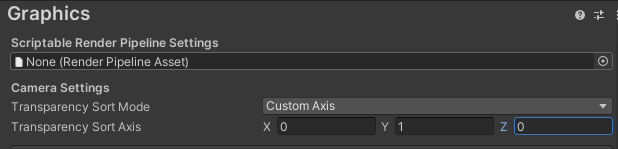
If we assume that your script is assigning the correct order in layer values (and I don’t know that because I haven’t seen it), then my guess would be that the sprites are sorted on the wrong axis. If you’re on the default render pipeline, I think it’s under Project Settings → Graphics. In URP you’ll find it in the Renderer 2D Data asset. Should be called “transparency sort mode” or something like that. If you set it to custom axis, you can specify which axis to sort by. I can’t make out which one that would be from the screenshots, but maybe just try different values here to see if it helps.
If this is set up correctly, you should actually be able to get rid of the order in layer stuff, because everything might be sorted automatically by the position values anyways.