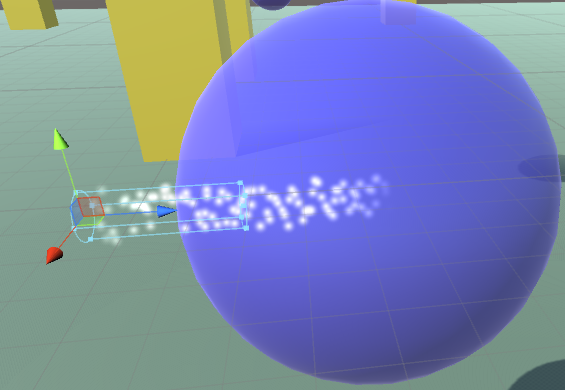
I have a little problem when I try to put a particle system in or near an transparent object. (That is, an object with a material that has rendermode = “Transparent” and an intermediate alpha value.) Any particles inside the object get inconsistently rendered. They are sometimes rendered as if they’re outside the object, and sometimes as if they’re inside.
The two screenshots are of the same scene. The particles here are emitted from the particle system and are moving along the Z axis. The locations of the particle system and the sphere haven’t changed between screenshots, I just moved the viewport slightly to the right. This behavior also occurs in game, and also if the system and all particles are inside the sphere.
I would honestly be fine with either behavior, but the sudden change looks ugly. Is there something I can do to change this?

Edited. btw I still don't know how. When I added chooseAnswer () similar to void ChooseQuestion().... I got some error
– Grisia