I am calling the play through API, such as rootParticleSystem.Play();
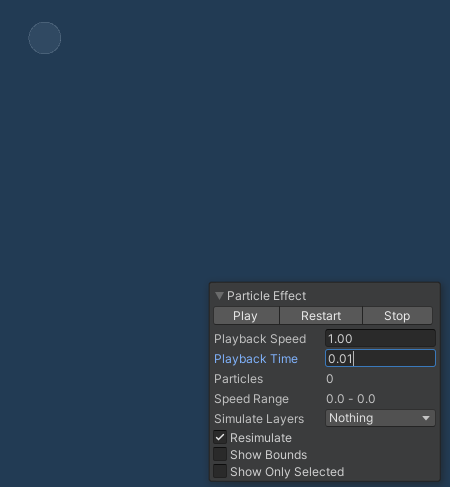
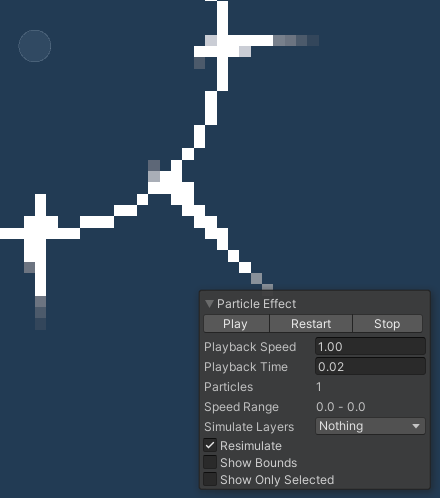
but as you can see from the screen shot above, I also tried to adjust playback time at 0.01 sec in scene view, but no particles spawned, until when I set it to 0.02sec.
The particle effect monitor also shows this. It is not the transparency or color over life time etc. Just nothing spawns until 0.02sec on Particle monitor on scene view…
I could totally misunderstood it, but I thought following should have happened…
Spawn particle prefab with play on awake turned off either by instantiate or turning the game object active from object pooling.
At the same time ( I mean by through code ofcourse so at the same frame) I let particle to play through rootParticleSystem.Play();
Expect the particle to actually spawn at the same frame so that it is visible on the frame it called Play.
If this is not the case, and I have misunderstood how it all internally(?) work, please do let me know.
Weird thing is that even if it needs a step of simulation… why would it not spawn at 0.01sec?
0.02sec of delay could mean nothing for some games, but it could mean a lot of difference in certain circumstances… I thought by not having any delay in the particle system and call it Play or Spawn with play on awake should spawn a particle at the frame of instantiating or calling Play?
If it needs a step of simulation no matter what, then is 0.02sec the fixed timing?
If I can’t emit a particle on the frame I want, then wow… I don’t know… how to work around it?
The Scene view uses a custom solution to let you see in between the discrete update steps of the simulation. We may not do the first update until the time is 0.02, when setting the preview time in the scene view (i dont recall the exact number)
We do deterministic updates at these fixed intervals so the playback in repeatable, and we can guarantee the effect looks the same every time it is played.
You can disable it explicitly in script by doing:
float tinyStep = 0.000001f;
ps.Simulate(tinyStep, true, true, false);
ps.Play(); // Because Simulate leaves the system in a paused state
Right, ok, will give that a go. Thanks for the tip. Simulate a tiny bit and the play.
I still feel a bit uncomfortable about it but if it is what it is, then I don’t mind using above work around.
Hi @richardkettlewell@castor76 ,
I have noticed that particles are indeed created only after a “Fixed Timestep” interval. So configuring a burst at time 0 will actually only emit particles at 0.02s (or whatever is configured). And they will lack behind by that amount over their lifetime.
To make this really visible, you can increase the Fixed Timestep (only takes effect in play mode, though). For visualization I have created a particle systems that emits one particle with speed 1 and a sphere that is animated to move at the same speed for reference. Particle and sphere should always be aligned, but are not and their offset depends on the fixed timestep.
I have also experimented with code like suggested above to confirm this:
Curiously, this code will make the particle lack behind by one “Maximum Particle Timestep” instead of “Fixed Timestep”. It will create particles earlier than after a fixed timestep, but their later simulation is then again delayed.
When I switch the Animator to Update Mode “Animate Physics”, particle and sphere are aligned sometimes and sometimes, probably due to a rounding error.
I would expect particles to be emitted at the configured time, i.e., 0. I will report a bug ticket.
I doubt that Unity will ever change/fix this issue due to how the system was made/built from the beginning like that.
The catch is that this behavior is not known well to the developers and there is very little you can do to work around it properly.
I did try the simulate work around as suggested here, but I have found different problem with Particle system where if you have “warm up” option and “loop” checked and then, if you do any kind of API calls to the particle system such as Stop, Simulate, and then call Play, warm up does not happen and loop does not happen.
Having seen the issue as described in this thread, I have lost hope for this to be fixed ( and the other issue I have described here ) and did not reported this as a bug.
If Unity feels like the issue I have described here seems like a bug, then let me know. But then again, I will probably be asked to submit “bug report” yet again, taking precious dev time away from me. I just wish for something like this critical issue Unity themselves try and reproduce the error first and then ask us to report it as a bug instead of just bluntly asks for the bug report everytime.
I think you’re correct. They either don’t know about the issues with small amounts of time and the particle system, or they don’t care.
These problems become more noticeable the faster and larger the particles and the faster the emitter moves.
My ‘best’ solution is to run FixedUpdate at 240fps.
Wish it could have a separate update (for particle system engine) not tied to the physics system so it could run much faster without increasing physics workload.
i believe this is what the Maximum Particle Timestep is for in the Time settings. Make it really small to make the particle system update at a really high frequency. But beware the performance consequences.
Is it? I implemented it myself. I don’t think it’s that
If the frame timestep is larger than the particle timestep limit, the particle update is broken down into multiple smaller timestep updates, to preserve the quality of the particle simulation.
“Maximum Particle Timestep” has “Fixed Timestep” as a lower bound, so you cannot reduce this without taking the performance hit of also lowering the fixed timestep. Also, the delay of particles is “Fixed Timestep” and not “Maximum Particle Timestep”. The latter seems to only take effect when using the API to manually control the simulation.
I feel like particle systems should emit at the right frame and simulate with respect to the configured spawn times instead of a delay of one fixed timestep. Just making the unwanted delay small by speeding everything up does not feel like a viable workaround.
I find it interesting that a “Start Delay” in a particle system that is a fraction of a fixed timestep does not affect the particle system at all. This also holds when using the API call that explicitly simulates in-between-physics-steps times. Apparently everything is rounded to multiples of fixed timestep internally? Maybe the delay is based on a rounding off-by-one? All speculation of course
I have sent in a bug report with a test scene and utilities to reproduce and analyze the issue. Hope this helps.
Add Update Rate Adjustment per Particle System, PLEASE!
If you’re going to consider doing anything about this for the beloved Shuriken, please consider a “rate of update” addition to EVERY particle system.
Let it default to whatever is set within the existing frameworks of time and timings, as it is now. Nothing to change if the user doesn’t change anything.
But by adding this to each particle system, those few situations that a particle system needs a far faster/tighter/accurate timing, it doesn’t cripple the performance of the rest of the game by affecting all other particle systems.
Conversely, for effects like flames, fires, lamps, smoke, clouds and other larger particle systems, the user might elect to slow the rate of update, thereby increasing performance available for the rest of the game and other particle systems.
Can confirm, I’ve found odd correlations between fixedUpdate’s rate and the rate of particle systems being updated. It’s almost as though they’re somewhat tied together in all situations, not just for determining where to emit particles from a particle system attached to a physics body. Suspect this has something to do with the collision features of particle systems leaning on a physics update cycle and this being somewhat integrated to everything about how/when a particle system is updated.
Furthermore… having particle systems having their own unique update rate available would allow all sorts of easy customisations on particle systems using collision, with one simple rate adjustment.
Even more ideal if the load of a slower rate updating particle system could spread portions of its total particle count across updates.


 but… we aren’t aware of any issues like this.
 I will do an report as soon as I can spare sometime this weekend.