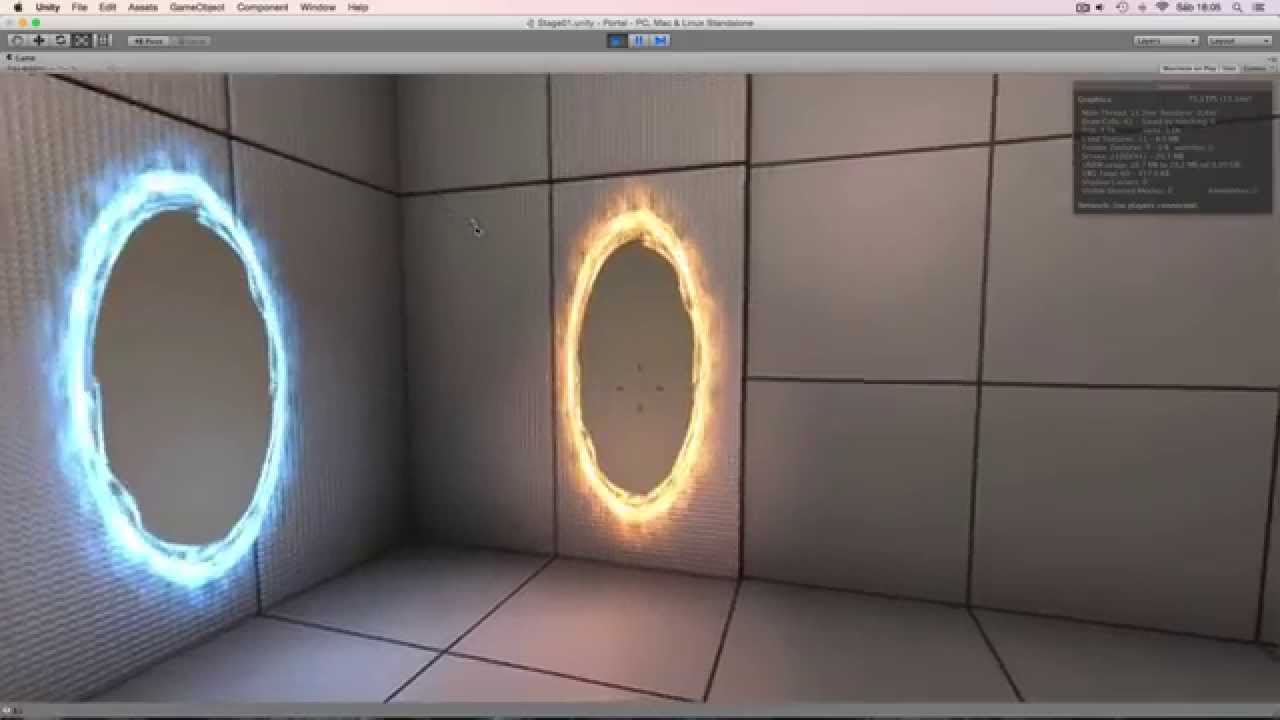
I am trying to achieve a similar effect to the portals in …(you guessed it)… Portal.
This is something I am willing to spend a lot of time on, and I DO have Unity Pro, pre-order for 5, so I also have 4 for now as well.
I need the ability to not only create visual portals and be able to seamlessly move between them (NOT teleporting), but also the ability to put objects through them and preferably the ability to snap them to specific places and make sure they don’t work on some materials.
Yes, this is a lot of work, but I am willing to do what I can to get this up, and will be more than willing to share what I do with anyone who can help me do this, my hope out of this is to create something as close to the effect and functionality of Portal and probably release it, I may end up selling a supped-up version of what I manage to come up with on the Asset Store, and all code used that was not provided by myself, the supplier will be mentioned in a commented out line above their code.
I am hoping this will be a large collaborative effort by many people and rest assured, I will NOT be selling your code at all, if this ever ends up on the Asset Store it will most likely be free, or rewritten completely, to which anyone who helped me with the original would only have to ask to be given.
If you are interested in helping with this, I am always reachable on the Unity Forums, probably easiest to post a reply to this thread.
UPDATE: Our website seems to be experiencing some issues at the moment, we are currently talking to the hosts and waiting for them to get back to us, we hope this will be fixed soon.
Until our website is back up and running, here is a more in-depth overview of what Project Physix is:
Project Physix was started as a community collaboration project on 4th January 2015 to supply users of the Unity 3D Game Engine a high-quality and free solution to portals.
The aim of this project was to replicate the effects and functionality of the portals within Valve’sPortal and Portal 2 video game titles.
Disclaimer: This project was in no way designed to infringe on Valve’s IP (Intellectual Property) rights. The majority of code was supplied by the community.
This page will be updated regularly with our latest progress and assets. This is an open source project and we have no intention of withholding anything from the amazing community that helped us with this project.
This sounds like a great project. I know you can do portal-ish type things with layers, but things often get sticky at the actual portal itself, especially if you want to be on one side and affect the other, or if you want to be one foot on one side and one foot on the other.
One effect I’d like to see is sort of a cartoon-like effect where you lay down a hole and then a character emerges from it.
We will make this project as adaptive as possible throughout its development, which I’m sure will take some time, but I am hopeful that this will be usable for more than just portals.
With this project I hope the community will do what it always does when something new and exciting is released, modify it and make it better, that’s why I am hoping to have others contribute to this.
I have sent a message to the developer of this demo, I am hoping he may be generous enough to provide us with the effect he is using for his portals.
I am hoping to take this kind of thing one step further, as you have described, instead of teleporting the player on collision, I am hoping we will be able to collectively come up with a solution that allows for seamless transitions, like those seen in Portal, where you can stand in-between them and see through both, as though there was a physical hole there.
In portal it is not seamless, the portals just each have there own camra that renders to the opposite of the portal pair. Than when moving through a portal you maintain your velocity.
You are never actually on both sides of the portal at once as far as the game logic goes, it just appears that way since you can walk into the wall a little, and you teleport when the charcter center collides with it. Add that with the render texture stuff and it fakes it very well.
Edit: don’t forgot to change the players camera angle when going through the portal, and the cameras to render the texture for the portal are a little more complex since there rotation would have to change as well based on the player position
I know zero about shaders, but I’ve wondered if it is possible to have a character appear to be astride a portal by using a variant of a dissolve shader to render part of the character on layer A and part on layer B, or failing that, to have a means of coordinating a dissolve such that two identical models in the same space but on different layers are dissolved one into the other based on an incrementing/decrementing value on a X, Y, or Z axis.
Not sure what the fuss is about. With pro the portals created in the game Portal are not that difficult to make. Portal became popular because of its unique mechanic, and the well executed gameplay. Its not because implementing portals is particularly difficult.
Thoughts on the implementation of portals
Use a render texture to see through the portal
Use custom controller and rigidbodies on anything that needs to move through the portals
Duplicate the mesh of anything that moves through the portal to have it appear on both sides. For performance it probably pays off to create the duplicate mesh from the start of the game for every object that can go through a portal
Use collision detection to detect when an object is going through a portal. Put the fake mesh on the other side. Rotate anything that goes through the portal to match to orientation of the new portal. Move the actual object through when some defined pivot point (probably its actual transform) passes the plain of the portal. At this point the object and its duplicate mesh should change places. It should also become subject to the physics from the other side of the portal.
What I’m looking for is Portal-like, but preferably able to operate with Unity Indie and with portals in mid-air, where a body doesn’t teleport but visibly transitions through a portal surface.
Creating the body visibly passing through the portal isn’t too difficult in free. Making the portal show an image of what’s on the other side is difficult. So you could easily make a StarGate for example. But making a Portal would be difficult.
@Kiwasi
I have made a “Stargate” effect many times for different purposes, this I have found quite easy, its being able to place them at will, see through them and disable them if necessary that I have never touched before.
After hunting around, I came to the conclusion that there is nothing to the kind of quality I am used to working with so I decided to start this, I am hoping that more people will get involved and we can start working on this as soon as possible.
@Kiwasi
If you are talking about missing Unity Pro for Render to texture, check this out.
Not sure how useful it will be, but may be worth giving a go.
Update: Thanks to the efforts of our web development team working round the clock for the last day and a half, our website is back up and running. Thank You for bearing with us. http://labyrith.co.uk/projects/project-physix/
I’ve not played Portal, but from what I see of it, if you play it in 3rd person it blinks you through the portals. You don’t ever appear to be half in / half out of a portal. You don’t, say, stick your hand in one portal and see it coming out of another portal.
Portal was never really designed for 3rd person, Valve developers use this to test the character model in their games.
In first person perspective, with portals close to each other, you can see the body emerge from one without it being fully through the other.
It is not something most people notice, and for this project we will be focusing more on functionality than aesthetics until more of the community gathers interest and works out how to modify it.
We are hoping to have our first little demo working in the next week or so, until then we will be concentrating on getting it roughly working, and then concentrate on fine tuning later after our first demo and release the code and see what people can do with it.
In Portal, the portals all appear to be cast onto walls, thus a body passing through a portal is actually entering or exiting a wall, and this is what creates the appearance of crossing a portal boundary.
If the portal was in mid-air, I think it might be more difficult to show just a portion of the body as it enters or exits a portal.