Hey all, I’m working on a modified decal shader and one of the things I’d like to be able to do is adjust vertex positions to ensure the decal is visible even if it’s slightly below the surface (for example, if it’s flat on the ground, bumping up its y-value). I’ve got the vertex offset working, the problem is I believe the decal effect is still using the old vertex position, meaning it still renders even if I bump it way up.
I believe the issue is that the decal effect uses Screen Position and Scene Depth to fade the decal as it gets further from the surface, but it’s using the unmodified vertex position for the calculations. I’m wondering is there a way to use the updated vertex position? Here’s that section of the shader graph:
I tried calculating the screen space manually, but it looks pretty different than the current value, plus it’s only a Vector3 instead of a Vector4:
What type of object are you applying the shader to and what render pipeline are you using? Typically, decal shaders are not applied to meshes. They’re used with Decal Projectors. They don’t have a mesh. They just get applied to anything that intersects of the volume of the projector. So there shouldn’t be any issues with decals being below the surface. Let me know if you’re doing something else.
Hey we’re working in URP. I know this is a bit of an unusual use case, but we get meshes exported out of other software (things like road markings) and they don’t always sit 100% flush with the surface, which is why we’re using a decal shader to ensure they render on the surface. The goal is basically to use the mesh itself as the projector, but the problem is the meshes are thin and if they’re below the surface they don’t render at all, which is why I’d like to be able to bump their vertices up. But maybe there’s another way of doing what we want?
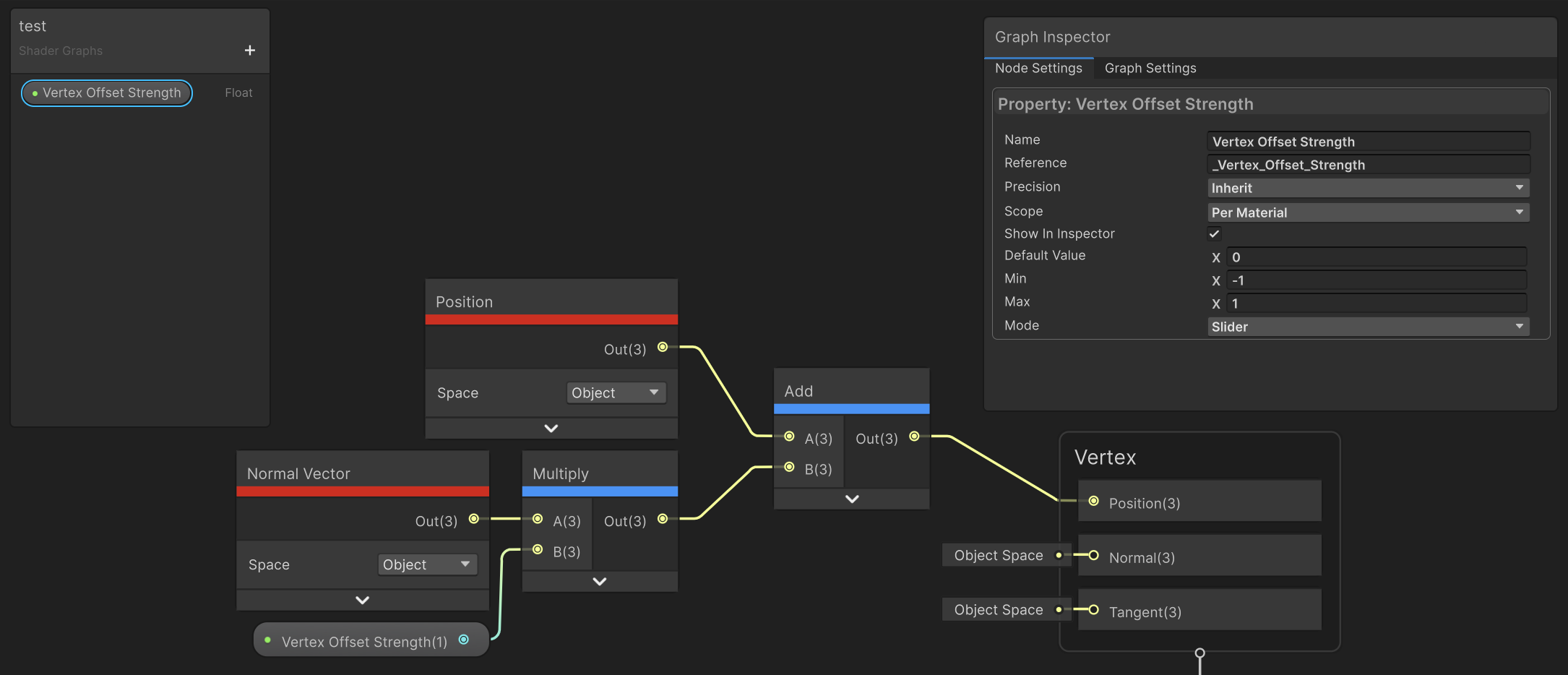
Ok, sounds like what you’re doing is reasonable. In that case, I recommend pushing the vertices of the decal meshes along their normals. That way they’ll move away from the surface. You can control the amount with a parameter. The setup looks like this: