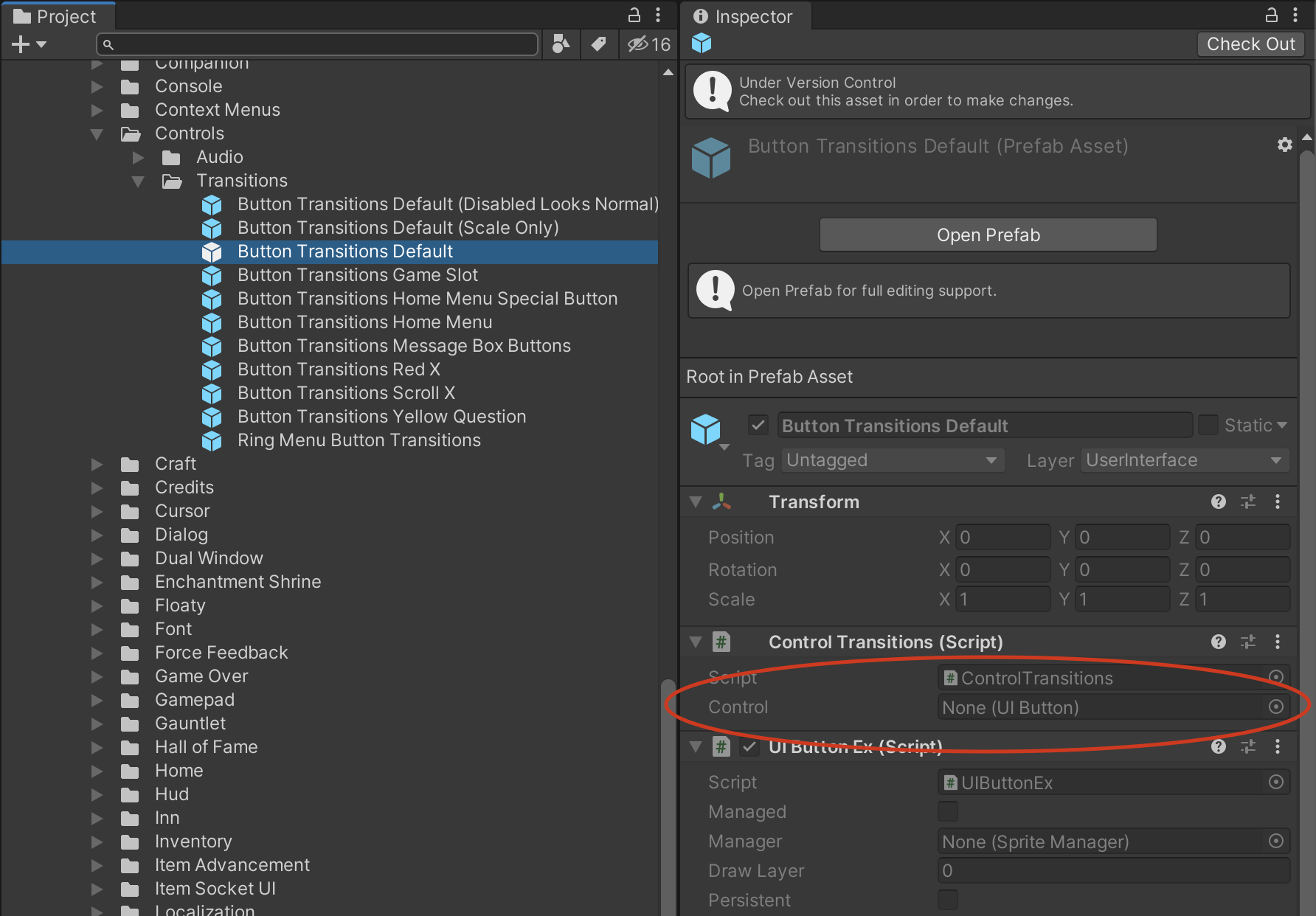
When I click on a prefab in the project window, the inspector shows all default / unset values for all members of the prefab. Double clicking that same prefab in the project window opens up the prefab editor for it, and when selecting objects in the hierarchy within the prefab editor, the inspector shows the correct values that were not displayed when clicking on the same prefab in the project view.
When I drag one of those prefabs from the project view into a scene, an instance of the prefab appear in the scene … but just like issues in the project view, the instanced object has all default / unset values.
The inspector seems to think I have overrides on all the fields, but reverting them does nothing
Yeah, I have done that and the values seem to be correct when looking at the prefab in prefab mode which is shown in the second screenshot above.
The prefab in this case is called “Button Transitions Default”, when viewing in prefab mode there is a field called “Control” that can be seen which is a reference to the prefab root. The reference in the “Control” field is properly set in the prefab mode to the root prefab object, but when the prefab is viewed from the project inspector or if the prefab is instanced into a scene, the “Control” field is not set (see all the red circles in the above images and see the image headers for where each of these screenshots was taken)
All of my references to other objects within a prefab (not just the root object) appear broken in this same way in that the references are there in prefab mode, but not in any other mode. I did not check to see if other simpler data like floats or enums were also not set but I think there broken as well … I have unfortunately downgraded my project to move forward with development at this point.
Ok, that is good because data was not lost then.
To fix this you have to reimport your prefabs but make sure there are no compiler errors when doing so.
This is super annoying and we are working hard to make sure prefabs are properly reimported after script changes or script updating during Unity upgrade.
I see, yes … during the upgrade process there was in fact a compile issue that needed to be fixed. Now that I know what that issue was during the upgrade I expect I would be able to upgrade without having that now and will try again soon.
I imagine that a compile issue is a fairly common situation when doing project upgrades, I myself have seen it at least a few times over the years when doing upgrades so probably others are as well.
I am also having issues after a upgrade to 2019.3.1.
It keeps saying random prefabs are missing when i spawn them at runtime. Not all of them, cant tell why specific ones have problems. The problem happens in stand alone builds too.
So my project is kinda FUBAR right now. Some of the prefabs that i’ve been working on for months and have many parents and prefab variants are frozen and cannot be updated. Only the topmost parent prefab can be changed reliably. It seems as though “Chains” of prefab variant assets are frozen. Some prefab variant chains work fine, others are totally unworkable.
If i change a value on some prefabs, click away, and click back on the prefab they’re all reverting. I’m no longer getting a progress bar showing values are propagating it simply throws them away with no errors or anything. At least I haven’t had any crashes lately, but crashes can be worked around, i’m totally frozen right now.
UPDATE found a fix to these issues. By clicking the “overrides” button in the upper right and reverting all on the offending prefabs at the highest level prefab that was broken seemed to fix the issue (must be done with this button, fixing the fields one by one does nothing). Once you find the field that can’t be updated and do this for the highest level prefab with the issue seems to be the magic bullet that fixes all the lower prefabs.
can confirm lots of issues with nested prefabs; broken on import, broken on platform switch, some are just broken permanently (file contents look okay in text editor)
A lot of prefabs in my project seem to be broken. Specifically, a lot of overrides don’t seem to take effect when running the game or sometimes they randomly get reset to the overridden value.
This is a very serious bug.
I am on 2019.3.3f1 but I began noticing the problem in 2019.3.1f1
I was on 2019.3 since 2019.3.0b2 and been using nested prefabs since 2018.3 beta and never had a serious problem like this. I thought 2019.3 was out of beta and stable? Not sure why there had to be a change in nested prefabs to create this serious bug.
Please fix as top priority cause at this point when there are bugs in our game it is hard to know if it is just because of this Unity bug.
Some notes: It seems to happen when there are multiple instances of a prefab in another prefab and each of those instances have overrides. The issue is all those overrides will behave as if they don’t have any overrides. I found that to fix it, I can manually revert an override on one of the instances and set the override again. Then all the other overrides on the other prefab instances will magically work.
Also, the same prefab files on different machines can give different results. For example, my coworker commits his changes that works on his machine. I pull his changes and instead of the overrides working like on his machine, they exhibit the bug described above. So the same code with the same Unity version run on different machines can give widely different results due to this bug.
I can confirm that the bugged prefab overrides were created in 2019.3.1f1. But 2019.3.3f1 still exhibits the behavior where the bugged prefab overrides don’t work at runtime.
Every who are experiencing these issues please file bug reports so we can investigate.
But please also try to reimport all your prefabs, compilation issues during upgrade or generally if there are compile errors while editing a prefab causes issue due to the missing Monobehaviours.
We are still working on fixing these issues with dependencies on compilation.
We don’t have a solid repro and our project is massive and a pain to upload. However it seems that switching platform is the main factor in us hitting issues (it’s a 15hr~ process to reimport all on two platforms to confirm). We just are using different machines for platform builds now to avoid issues.
Reimporting individual prefabs does seem to fix them, but trying to find the broken things when it’s randomly occurring is really troublesome. I should also note that most of our issues were with prefabs being in a completely broken state (grey box icon, nothing in inspector when selected). I don’t think we saw missing references, but only these failed-to-load prefabs.
Would definitely like to know which versions of Unity this occurs (or doesnt) in so we can sit on a stable build once the issue is located.
For what it’s worth, the prefab fields that seemed to be broken were holding external scripts that hadn’t been touched in some time so i doubt it’s compile errors related to the held scripts, also this prefab was used during play mode and I was using the experimental new fast loading feature of unity that no longer reset the scene at play start.
Perhaps it was this combination of circumstances that caused the issue? None of the other prefabs that weren’t loaded at runtime had the bug.
I’m relatively still new to Unity, is there an easy one step way to do this?
EDIT: I found it. Can right click and Reimport in the Project view.
Now it looks like I just lost about a day of work due to this issue because all overrides in a prefab just disappeared. I’m not sure if I can continue working on the game like this.
@IllTemperedTunas
It is not about the actually script on your prefabs.
Any compile error will prevent Unity from loading the .Net assembly and none of your scripts will be available until you have fixed all the compile errors. So import of prefabs with any compile error will cause these issue. This is one of the things that makes fixing this complicated.
@chanon81
In the search field in the project browser you can type t:prefab and the browser will show all your prefabs, select all and use the context menu to reimport them.
Sorry about the lost work, might have been because you created overrides on prefabs that were not properly imported.
2019.3.3f1 is a disaster … now I have a prefab that won’t keep the order of its children.
I open the prefab, drag a child up to where I want it. Close the prefab. Then open it and the child is back to where it was before I dragged it. I try it again and again and the child won’t stay where I move it to.
Re-importing doesn’t help. I already re-imported the whole project, and re-importing this prefab again doesn’t help. I’m not sure if I can make a reproduction of this but will try.
@chanon81
Please file a bug report with a small project and steps to reproduce. It is a little hard for me to figure what state the prefab is in when you are making changes, without some steps to reproduce the issue.
You can post the bug number here and I can have a look at it immediately
In trying to create a minimal reproduction project, I am copying a subset of my prefabs over to another project. However, I get Missing Prefab on nested prefabs even though the nested prefab file has been copied too.
Is there a way to tell Unity where the missing prefab is?
Looks like I’ll just have to do it by deleting other stuff from my actual project.
We upgraded from 2018.3.8f1 to 2019.3.4f1 and we have this problem also. Not all of our prefabs are broken though just a select few and it appears to affect the prefabs that were created using PSB files. All of the prefab variants are basically empty and with these its says Missing Prefab (Dummy). When you go to the original prefab that these variants were made from it looks like the Sprites are missing. If we take the project and downgrade to the old version again the prefabs are present once more but now these seem to have lost their IK movements.
As I say this only affects prefabs that were created from PSBs with IK. Other prefabs that are made up of individual sprites (without IK) seem to have retained all their data and work fine. Unfortunately and stupidly I didn’t backup the latest project prior to upgrading so it had caused quite a bit of lost work as we seem to be unable to import the animations from their packages again even despite removing them. I also cant downgrade because this creates all sorts of new problems where even more assets get corrupt so i’m kind of stuck with a huge hole to fill. Any help would be appreciated.
** EDIT **
Its worthwhile noting that when we upgraded I did have a compile error that wasn’t there in the original version. The compile error appeared because the 2D Inverse Kinematics (IK) needed to be upgraded to be compatible with this version. This was compile error introduced as part of upgrading Unity versions.