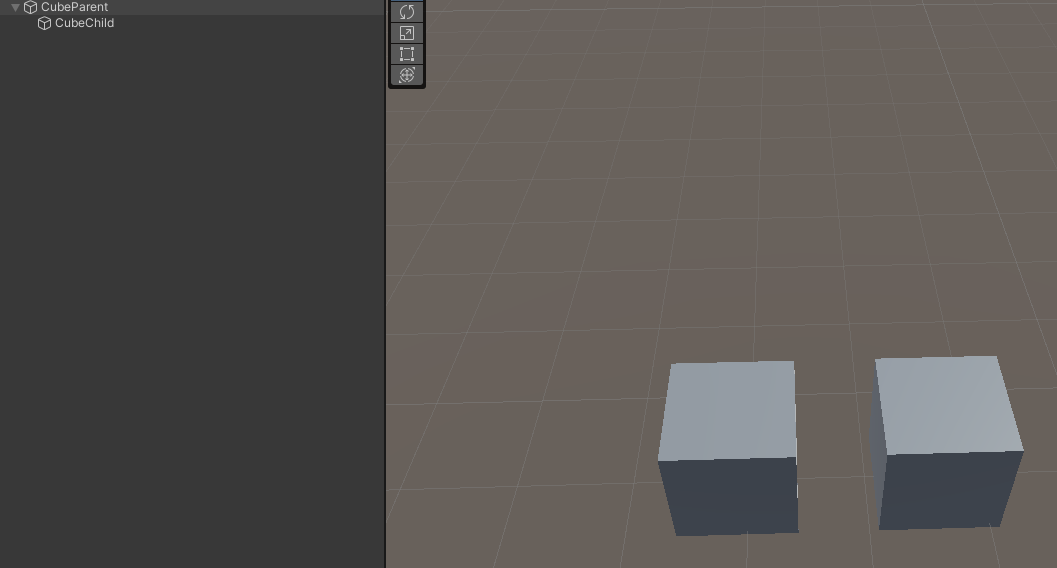
I have two cubes with simple hierarchy, left one is parent, right one is child. Then I set parent’s local scale with (2, 1, 1), the child cube will be affacted by parent’s scaling by default. I want child cube to be the same size so I set it’s localscale by (1/2, 1, 1). It’s ok when these two cubes axis-aligned totally. But if i give a rotation to child cube, it will be distorting like this:
so, what i can do to fix this?
i can’t change this hierarchy. cuz in my project, this scenario will become an avatar’s skeleton, modify bone’s scale to get different ‘size’ avatar. so i can’t change model’s hierarchy.
Or scale the parent uniformly when needed. But yes, if you need non-uniform scaling, keep things separated.
Bones should never change scale anyways. Bones rotates and in some rare cases might displace. However a skinned character (SkinnedMeshRenderer) would not grow or shrink at all when you scale the bone structure. If your character is made up of individual parts with separate renderers, What zulo said is the only viable solution then. Can you be a bit more specific of your actual usecase? In general you should never add child renderers to objects which also have a renderer on it. Exactly because of scaling issues.
A Transform represents its own coordinate space. When you scale it non-uniformly, the whole space gets distorted with everything that lives in it. So when you have a longer chain of nested coordinate spaces and you introduce non-uniform scaling at several levels, you can end up with a heavily distorted space that’s probably even hard to conceptualize in your mind. So what’s your actual goal? You want to scale the parent but not scale the children? What do the different objects actually represent? When you have a skeletal animated character and you scale the whole thing on one axis, even the skinned animations would be distorted. So if an arm looks thin and long when it’s hanging down, it would look short and thick when it is stretched out since that’s what the coordinate space itself looks like. You know, like those distorting mirrors. When you move the distortion will affect different parts of your image.
ok, I do it more specifically.
I want to dev an UGC game that players can modify them character’s size of different part. Let’s say i wanna change width of character’s upperarm, but i don’t want to change lowerarm’s width either. Like i set upperarm’s scale to (2, 1, 1), but it effect lowerarm and all children of it, that’s not i want.
I’ve try a lot of calculations on lowerarm’s scale to make it stay (1, 1, 1) in WorldSpace, but failed.
That still isn’t done with scaling. It’s done with bones that certain parts of the mesh are weighted to, and manipulated via scripts or animations. Or its done with blend shapes that you set in your meshes before exporting, and modify via scripting.
Start with two bones and skinned animation and get it working 100%.
Do not even consider moving onto a more-complex model than 2 bones until you understand every single part of every piece of data that goes in to the modification transformation you want to have.
Any further work beyond two bones and proving your idea out is just clutter blocking your way.
Wow!Your idea on blend shapes inspried me!Maybe i can focus on bindPoses of SkinnedMesh?Scaling on target bone’s bindPose can also affect Vertexs that weighted to this bone!I will try it rightnow.
In two bones situation, I can’t get it working 100% when using non-uniform scale like (2, 1, 1) on parent. This is my calculation below, let’s say targetBone has only one child:
targetBone.localScale = targetScale;

        for (int i = 0; i < targetBone.childCount; i++)
        {
            var childBone = targetBone.GetChild(i);
            var childDesiredWorldMatrix = Matrix4x4.identity;
            childDesiredWorldMatrix.SetTRS(childBone.position, childBone.rotation, Vector3.one);
            var diffMatrix = targetBone.transform.worldToLocalMatrix * childDesiredWorldMatrix;
            childBone.localScale = diffMatrix.lossyScale;
            Debug.Log($"ChildBone's scale: {childBone.localToWorldMatrix.lossyScale}");
        }
Which i desired the result of childBone’s scale is equal to (1, 1, 1). But it’s not when the childBone rotating around Y-axis.
Consider the transform on the final object itself to be a special bone that is centered at local (0,0,0) and whatever you do propagates through its matrix. That’s why we leave it zero local position, identity scaling and identity rotation.
Fire up Probuilder or Blender, make yourself a 2x1x1 cube and get on with your gamedev.
I’m being serious. You’re not going to change math.
EDIT: Obviously you must APPLY all local transforms before saving the mesh in Blender. Obviously… otherwise you’re right back where you are here.