Hello. I got a problem when using specularity shaders. The specularity is some sort of pixelerated, there are those tiny squares all over the object. I’ve uploaded a picture of what I’m talking about. Am I doing something wrong or this is just the way Unity handles specularity ?
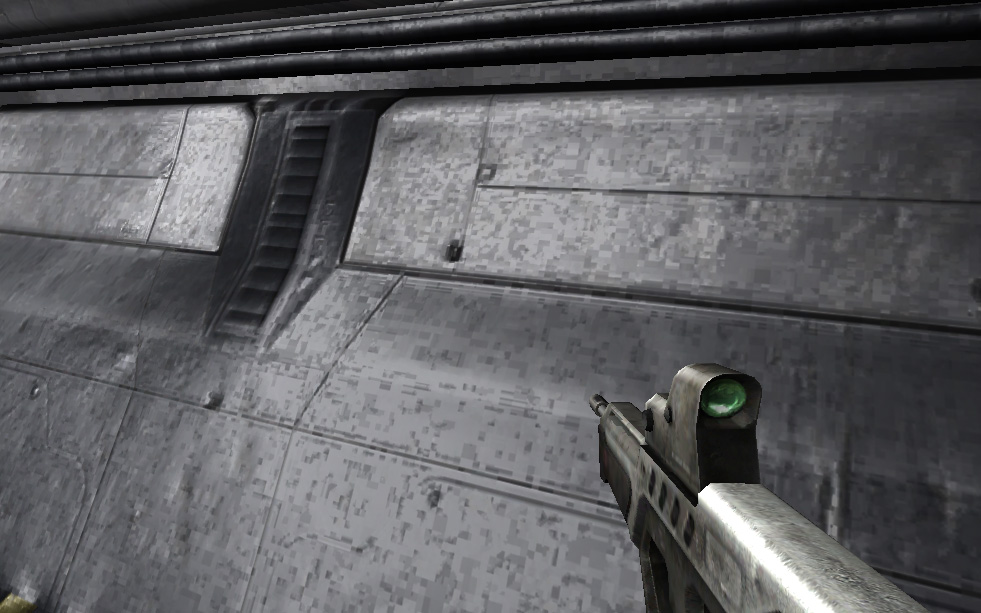
I think you have your texture filtering mode set to “Point”. Yes?
No, it’s set to Bilinear, I tried both three of the filtering modes and there’s no change 
What about the quality of the texture?.. maybe it is too small.
I dobut that 1024 X 1024 is too small, the normal map is the same size too. I always have strange problems, that no one can explain 
Of course… isn’t small. :?
Did you try changing the texture for other, to see what happens?
I tried with another texture, I tried changing the normal map, generated a normal map for another texture, but all of the textures with specularity and even with bump have this problem
Yes, does copying a different specular map into the alpha channel still give pixelation?
Edit: same time posting
Yeah, I even tried generating one with Unity and still there are those squares, they were harder to see, because Unity-s normal map was a lot more detailed, but they were there…
Change the normal map so it’s not using texture compression.
–Eric
They just got more…don’t know what’s happening.
