Quit and memory cleanup

We are working on making it possible to properly quit the unity runtime and cleanup memory afterwards.

The solution we are working on will allow you to quit the unity instance / runtime via either C# or JS:
C#: call Application.Quit()
JS: call unityInstance.Quit(callback)

Note that the JS Quit() is an asynchronous function. The callback parameter is a user-defined onQuit function which will be called when the runtime has quit. In practice, this means you can execute your own custom code:

unityInstance.Quit(function() {
    console.log("done!");
});
unityInstance = null;

Alternatively, if you want to Quit from C# and still provide a onQuit callback, you can do that at instantiate-time:

UnityLoader.instantiate("unityContainer", "%UNITY_WEBGL_BUILD_URL%", {onProgress: UnityProgress,
    Module:{
      onQuit : function(){
        console.log("unity has quit");
      }
    }
});

The current fix/implementation will land to 2019.1 and possibly backported to 2018.3. Feedback is welcome.

9 Likes

Neat. “Quitting” the game right now for us means we’re loading an empty scene with a GameObject that is looking a Restart message then reloads the main scene. Having a proper way to quit is much welcome.

Is it related to not freed memory bugs after user click close tab in browser? (about crashes when memory not freed in webgl) Or it’s specific functionality for close tab?

No. That sounds like a browser garbage collection problem, which Unity has no control on.

This sounds great.
Are you able to provide detail of how this works under the hood? I’m wondering if this might help with my use case and the issues i’ve been getting when users are exiting and returning to the application and getting the ‘Your browser does not support WebGL’ error.

Here is what we do:

  • engine shutdown sequence

  • remove all JS event listeners from canvas, window and document

  • cancel main loop

  • clear all JS intervals

  • delete temporary objects created by UnityLoader

  • remove the canvas

I think that this feature is not working correctly, i have tested it on unity 2019.1.0 beta and here is the code snippet which i am using to quit the application.

function Quit(){
      unityInstance.Quit(function() {
            console.log("done!");
        });

The error description is, i copied my webgl build in wamp server, load the page, then i try to refresh several time the webgl page. After each loading i wait for complete load then refresh the page and randomly chrome get crash with aw snap error while for firefox it produce below error

failed to asynchronously prepare wasm: out of memory UnityLoader.js:4:11155
__*printErr http://localhost/HS2_Testing_Empty_CachingEnable_Unity2019/Build/UnityLoader.js:4 instantiateArrayBuffer blob:http://localhost/519db456-077c-4338-8198-1923f8b0b961:8*__
out of memory
out of memory UnityLoader.js:4:11155
__*printErr http://localhost/HS2_Testing_Empty_CachingEnable_Unity2019/Build/UnityLoader.js:4 onAbort http://localhost/HS2_Testing_Empty_CachingEnable_Unity2019/Build/UnityLoader.js:4 abort blob:http://localhost/519db456-077c-4338-8198-1923f8b0b961:8 instantiateArrayBuffer blob:http://localhost/519db456-077c-4338-8198-1923f8b0b961:8*__

The same was happening in older unity version but in new unity even after using the quit method each time, it still show this error.

1 Like

Additionally thing i want to ask, I tried unity 2018.3.8, you didn’t back ported this feature yet? as unity 2019 available in beta format so we can use it in production.

@Marco-Trivellato I have downloaded Unity 2019.1.2 and it is not releasing memory for me,

What I did:

Create new Project
give it a canvas with red bg
Build, Add a button: Quit

Press the button, memory stays the same, any suggestions?

  • the render area becomes black
  • the console shows its calling quit and quitting
  • memory stays the same

Thanks

Which browser you are using? and do you have open the console/dev tools of the browser?

perhaps you are still holding a reference to the unityInstance. Could you try to assign unityInstance to null after calling Quit() ?

When we use unityInstance.Quit() just like in the exemple or call Application.Quit() from C# we get an exception:

Quitting...
UnityLoader.js:4 Performance warning: deleting framebuffer on context thread release!!!!
UnityLoader.js:4 exception thrown: RuntimeError: memory access out of bounds,RuntimeError: memory access out of bounds
    at wasm-function[10012]:246
    at wasm-function[9732]:28
    at wasm-function[6043]:131
    at wasm-function[10036]:140
    at wasm-function[9673]:271
    at wasm-function[9526]:65
    at wasm-function[9502]:203
    at wasm-function[9443]:387
    at wasm-function[9442]:678
    at wasm-function[67439]:12
    at Object.dynCall_v (blob:https://s3.amazonaws.com/8a416455-e54b-48c8-a074-1639db7347cd:8:493465)
    at browserIterationFunc (blob:https://s3.amazonaws.com/8a416455-e54b-48c8-a074-1639db7347cd:8:175877)
    at Object.runIter (blob:https://s3.amazonaws.com/8a416455-e54b-48c8-a074-1639db7347cd:8:178938)
    at Browser_mainLoop_runner (blob:https://s3.amazonaws.com/8a416455-e54b-48c8-a074-1639db7347cd:8:177400)

Tested with Unity 2019.1.4f1.

UP!

Same exceptions on Unity 2019.2.1f1:

Quitting...
UnityLoader.js:4 Performance warning: deleting framebuffer on context thread release!!!!
UnityLoader.js:4 exception thrown: RuntimeError: memory access out of bounds,RuntimeError: memory access out of bounds
    at wasm-function[6732]:403
    at wasm-function[6331]:28
    at wasm-function[6309]:131
    at wasm-function[6981]:139
    at wasm-function[6208]:388
    at wasm-function[10441]:66
    at wasm-function[10417]:206
    at wasm-function[10361]:388
    at wasm-function[10360]:712
    at wasm-function[49506]:12
    at Object.dynCall_v (blob:http://localhost:8081/5e9d3e8b-d562-49a6-ba2a-3642efadc5c6:8:489845)
    at browserIterationFunc (blob:http://localhost:8081/5e9d3e8b-d562-49a6-ba2a-3642efadc5c6:8:183989)
    at Object.runIter (blob:http://localhost:8081/5e9d3e8b-d562-49a6-ba2a-3642efadc5c6:8:187050)
    at Browser_mainLoop_runner (blob:http://localhost:8081/5e9d3e8b-d562-49a6-ba2a-3642efadc5c6:8:185512)
printErr @ UnityLoader.js:4
runIter @ 5e9d3e8b-d562-49a6-ba2a-3642efadc5c6:8
Browser_mainLoop_runner @ 5e9d3e8b-d562-49a6-ba2a-3642efadc5c6:8
requestAnimationFrame (async)
requestAnimationFrame @ 5e9d3e8b-d562-49a6-ba2a-3642efadc5c6:8
Browser_mainLoop_scheduler_rAF @ 5e9d3e8b-d562-49a6-ba2a-3642efadc5c6:8
Browser_mainLoop_runner @ 5e9d3e8b-d562-49a6-ba2a-3642efadc5c6:8
requestAnimationFrame (async)
requestAnimationFrame @ 5e9d3e8b-d562-49a6-ba2a-3642efadc5c6:8
Browser_mainLoop_scheduler_rAF @ 5e9d3e8b-d562-49a6-ba2a-3642efadc5c6:8
Browser_mainLoop_runner @ 5e9d3e8b-d562-49a6-ba2a-3642efadc5c6:8
requestAnimationFrame (async)
requestAnimationFrame @ 5e9d3e8b-d562-49a6-ba2a-3642efadc5c6:8
Browser_mainLoop_scheduler_rAF @ 5e9d3e8b-d562-49a6-ba2a-3642efadc5c6:8
Browser_mainLoop_runner @ 5e9d3e8b-d562-49a6-ba2a-3642efadc5c6:8
requestAnimationFrame (async)
requestAnimationFrame @ 5e9d3e8b-d562-49a6-ba2a-3642efadc5c6:8
Browser_mainLoop_scheduler_rAF @ 5e9d3e8b-d562-49a6-ba2a-3642efadc5c6:8
Browser_mainLoop_runner @ 5e9d3e8b-d562-49a6-ba2a-3642efadc5c6:8
requestAnimationFrame (async)
requestAnimationFrame @ 5e9d3e8b-d562-49a6-ba2a-3642efadc5c6:8
Browser_mainLoop_scheduler_rAF @ 5e9d3e8b-d562-49a6-ba2a-3642efadc5c6:8
Browser_mainLoop_runner @ 5e9d3e8b-d562-49a6-ba2a-3642efadc5c6:8
requestAnimationFrame (async)
requestAnimationFrame @ 5e9d3e8b-d562-49a6-ba2a-3642efadc5c6:8
Browser_mainLoop_scheduler_rAF @ 5e9d3e8b-d562-49a6-ba2a-3642efadc5c6:8
Browser_mainLoop_runner @ 5e9d3e8b-d562-49a6-ba2a-3642efadc5c6:8
requestAnimationFrame (async)
requestAnimationFrame @ 5e9d3e8b-d562-49a6-ba2a-3642efadc5c6:8
Browser_mainLoop_scheduler_rAF @ 5e9d3e8b-d562-49a6-ba2a-3642efadc5c6:8
Browser_mainLoop_runner @ 5e9d3e8b-d562-49a6-ba2a-3642efadc5c6:8
requestAnimationFrame (async)
requestAnimationFrame @ 5e9d3e8b-d562-49a6-ba2a-3642efadc5c6:8
Browser_mainLoop_scheduler_rAF @ 5e9d3e8b-d562-49a6-ba2a-3642efadc5c6:8
Browser_mainLoop_runner @ 5e9d3e8b-d562-49a6-ba2a-3642efadc5c6:8
requestAnimationFrame (async)
requestAnimationFrame @ 5e9d3e8b-d562-49a6-ba2a-3642efadc5c6:8
Browser_mainLoop_scheduler_rAF @ 5e9d3e8b-d562-49a6-ba2a-3642efadc5c6:8
Browser_mainLoop_runner @ 5e9d3e8b-d562-49a6-ba2a-3642efadc5c6:8
requestAnimationFrame (async)
requestAnimationFrame @ 5e9d3e8b-d562-49a6-ba2a-3642efadc5c6:8
Browser_mainLoop_scheduler_rAF @ 5e9d3e8b-d562-49a6-ba2a-3642efadc5c6:8
Browser_mainLoop_runner @ 5e9d3e8b-d562-49a6-ba2a-3642efadc5c6:8
requestAnimationFrame (async)
requestAnimationFrame @ 5e9d3e8b-d562-49a6-ba2a-3642efadc5c6:8
Browser_mainLoop_scheduler_rAF @ 5e9d3e8b-d562-49a6-ba2a-3642efadc5c6:8
Browser_mainLoop_runner @ 5e9d3e8b-d562-49a6-ba2a-3642efadc5c6:8
requestAnimationFrame (async)
requestAnimationFrame @ 5e9d3e8b-d562-49a6-ba2a-3642efadc5c6:8
Browser_mainLoop_scheduler_rAF @ 5e9d3e8b-d562-49a6-ba2a-3642efadc5c6:8
Browser_mainLoop_runner @ 5e9d3e8b-d562-49a6-ba2a-3642efadc5c6:8
requestAnimationFrame (async)
requestAnimationFrame @ 5e9d3e8b-d562-49a6-ba2a-3642efadc5c6:8
Browser_mainLoop_scheduler_rAF @ 5e9d3e8b-d562-49a6-ba2a-3642efadc5c6:8
Browser_mainLoop_runner @ 5e9d3e8b-d562-49a6-ba2a-3642efadc5c6:8
requestAnimationFrame (async)
requestAnimationFrame @ 5e9d3e8b-d562-49a6-ba2a-3642efadc5c6:8
Browser_mainLoop_scheduler_rAF @ 5e9d3e8b-d562-49a6-ba2a-3642efadc5c6:8
Browser_mainLoop_runner @ 5e9d3e8b-d562-49a6-ba2a-3642efadc5c6:8
requestAnimationFrame (async)
requestAnimationFrame @ 5e9d3e8b-d562-49a6-ba2a-3642efadc5c6:8
Browser_mainLoop_scheduler_rAF @ 5e9d3e8b-d562-49a6-ba2a-3642efadc5c6:8
Browser_mainLoop_runner @ 5e9d3e8b-d562-49a6-ba2a-3642efadc5c6:8
requestAnimationFrame (async)
requestAnimationFrame @ 5e9d3e8b-d562-49a6-ba2a-3642efadc5c6:8
Browser_mainLoop_scheduler_rAF @ 5e9d3e8b-d562-49a6-ba2a-3642efadc5c6:8
Browser_mainLoop_runner @ 5e9d3e8b-d562-49a6-ba2a-3642efadc5c6:8
requestAnimationFrame (async)
requestAnimationFrame @ 5e9d3e8b-d562-49a6-ba2a-3642efadc5c6:8
Browser_mainLoop_scheduler_rAF @ 5e9d3e8b-d562-49a6-ba2a-3642efadc5c6:8
Browser_mainLoop_runner @ 5e9d3e8b-d562-49a6-ba2a-3642efadc5c6:8
requestAnimationFrame (async)
requestAnimationFrame @ 5e9d3e8b-d562-49a6-ba2a-3642efadc5c6:8
Browser_mainLoop_scheduler_rAF @ 5e9d3e8b-d562-49a6-ba2a-3642efadc5c6:8
Browser_mainLoop_runner @ 5e9d3e8b-d562-49a6-ba2a-3642efadc5c6:8
requestAnimationFrame (async)
requestAnimationFrame @ 5e9d3e8b-d562-49a6-ba2a-3642efadc5c6:8
Browser_mainLoop_scheduler_rAF @ 5e9d3e8b-d562-49a6-ba2a-3642efadc5c6:8
Browser_mainLoop_runner @ 5e9d3e8b-d562-49a6-ba2a-3642efadc5c6:8
requestAnimationFrame (async)
requestAnimationFrame @ 5e9d3e8b-d562-49a6-ba2a-3642efadc5c6:8
Browser_mainLoop_scheduler_rAF @ 5e9d3e8b-d562-49a6-ba2a-3642efadc5c6:8
Browser_mainLoop_runner @ 5e9d3e8b-d562-49a6-ba2a-3642efadc5c6:8
requestAnimationFrame (async)
requestAnimationFrame @ 5e9d3e8b-d562-49a6-ba2a-3642efadc5c6:8
Browser_mainLoop_scheduler_rAF @ 5e9d3e8b-d562-49a6-ba2a-3642efadc5c6:8
Browser_mainLoop_runner @ 5e9d3e8b-d562-49a6-ba2a-3642efadc5c6:8
requestAnimationFrame (async)
requestAnimationFrame @ 5e9d3e8b-d562-49a6-ba2a-3642efadc5c6:8
Browser_mainLoop_scheduler_rAF @ 5e9d3e8b-d562-49a6-ba2a-3642efadc5c6:8
Browser_mainLoop_runner @ 5e9d3e8b-d562-49a6-ba2a-3642efadc5c6:8
requestAnimationFrame (async)
requestAnimationFrame @ 5e9d3e8b-d562-49a6-ba2a-3642efadc5c6:8
Browser_mainLoop_scheduler_rAF @ 5e9d3e8b-d562-49a6-ba2a-3642efadc5c6:8
Browser_mainLoop_runner @ 5e9d3e8b-d562-49a6-ba2a-3642efadc5c6:8
requestAnimationFrame (async)
requestAnimationFrame @ 5e9d3e8b-d562-49a6-ba2a-3642efadc5c6:8
Browser_mainLoop_scheduler_rAF @ 5e9d3e8b-d562-49a6-ba2a-3642efadc5c6:8
Browser_mainLoop_runner @ 5e9d3e8b-d562-49a6-ba2a-3642efadc5c6:8
requestAnimationFrame (async)
requestAnimationFrame @ 5e9d3e8b-d562-49a6-ba2a-3642efadc5c6:8
Browser_mainLoop_scheduler_rAF @ 5e9d3e8b-d562-49a6-ba2a-3642efadc5c6:8
Browser_mainLoop_runner @ 5e9d3e8b-d562-49a6-ba2a-3642efadc5c6:8
requestAnimationFrame (async)
requestAnimationFrame @ 5e9d3e8b-d562-49a6-ba2a-3642efadc5c6:8
Browser_mainLoop_scheduler_rAF @ 5e9d3e8b-d562-49a6-ba2a-3642efadc5c6:8
Browser_mainLoop_runner @ 5e9d3e8b-d562-49a6-ba2a-3642efadc5c6:8
requestAnimationFrame (async)
requestAnimationFrame @ 5e9d3e8b-d562-49a6-ba2a-3642efadc5c6:8
Browser_mainLoop_scheduler_rAF @ 5e9d3e8b-d562-49a6-ba2a-3642efadc5c6:8
Browser_mainLoop_runner @ 5e9d3e8b-d562-49a6-ba2a-3642efadc5c6:8
requestAnimationFrame (async)
requestAnimationFrame @ 5e9d3e8b-d562-49a6-ba2a-3642efadc5c6:8
Browser_mainLoop_scheduler_rAF @ 5e9d3e8b-d562-49a6-ba2a-3642efadc5c6:8
Browser_mainLoop_runner @ 5e9d3e8b-d562-49a6-ba2a-3642efadc5c6:8
requestAnimationFrame (async)
requestAnimationFrame @ 5e9d3e8b-d562-49a6-ba2a-3642efadc5c6:8
Browser_mainLoop_scheduler_rAF @ 5e9d3e8b-d562-49a6-ba2a-3642efadc5c6:8
Browser_mainLoop_runner @ 5e9d3e8b-d562-49a6-ba2a-3642efadc5c6:8
requestAnimationFrame (async)
requestAnimationFrame @ 5e9d3e8b-d562-49a6-ba2a-3642efadc5c6:8
Browser_mainLoop_scheduler_rAF @ 5e9d3e8b-d562-49a6-ba2a-3642efadc5c6:8
Browser_mainLoop_runner @ 5e9d3e8b-d562-49a6-ba2a-3642efadc5c6:8
requestAnimationFrame (async)
requestAnimationFrame @ 5e9d3e8b-d562-49a6-ba2a-3642efadc5c6:8
Browser_mainLoop_scheduler_rAF @ 5e9d3e8b-d562-49a6-ba2a-3642efadc5c6:8
Browser_mainLoop_runner @ 5e9d3e8b-d562-49a6-ba2a-3642efadc5c6:8
requestAnimationFrame (async)
requestAnimationFrame @ 5e9d3e8b-d562-49a6-ba2a-3642efadc5c6:8
Browser_mainLoop_scheduler_rAF @ 5e9d3e8b-d562-49a6-ba2a-3642efadc5c6:8
Browser_mainLoop_runner @ 5e9d3e8b-d562-49a6-ba2a-3642efadc5c6:8
UnityLoader.js:3 Invoking error handler due to
Uncaught RuntimeError: memory access out of bounds

Anyway memory is not cleaned up after call Quit().
Everytime i open url or just refresh a page with WebAssembly build, and it allocated memory heap (= Memory size in player settings), tested in Safari (Mobile,Desktop), Chrome, Opera. Only in Firefox it works properly.
Tested on empty project in Unity 2018.3.12(doesn’t supported Quit()) and Unity 2019.2.1, same issue for both.

@Marco-Trivellato any suggestions?
Thanks.

Hello everyone, same issue here with Unity 2019.1.8
Anyone solved or get around this ?
thanks

Hello @Marco-Trivellato , hello Unity developpers

I tried to check what Unity version support the call to the Quit() function.
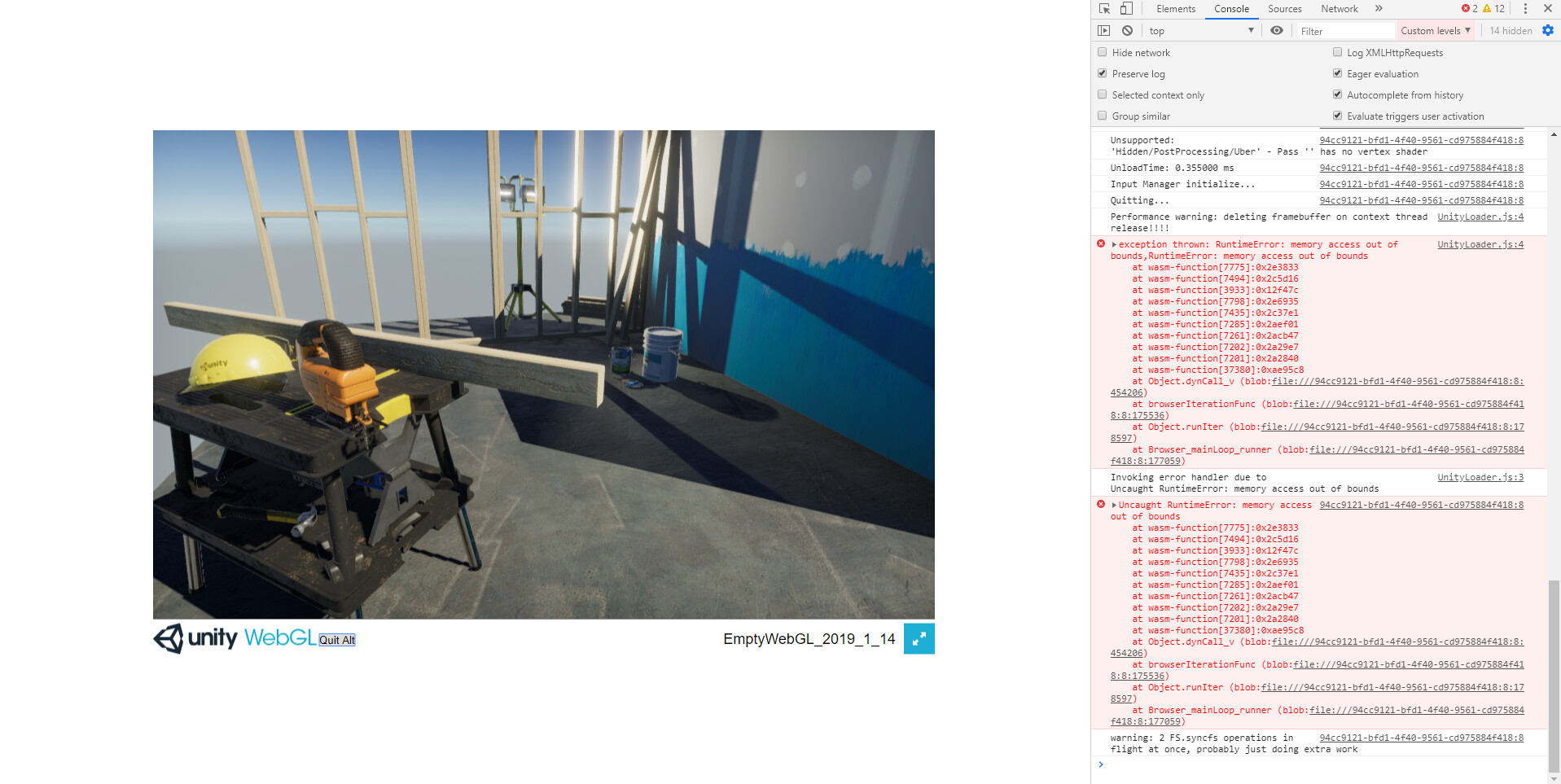
I created a LWRP project (my project uses LWRP), builded to webgl and altered the index.html file by adding in it :

<button
          type="button"
          onclick="unityInstance.Quit(function() {console.log('quit done!');});gameInstance = null;">Quit Alt</button>

I tested with Chrome 78.0.3904.108
2019.1.8 : crash
2019.1.14 : crash
2019.2.15 : crash
2019.3.0 : crash (with a different call stack though)

Is there something I’am not doing right in this test ? Do you know if the results depend on the browser version ?
Is there another way to deal with quit and memory cleanup ?

have a nice day,
thanks


In case it could help, here is the call stack whith a development build (Unity 2019.3.0) :

6b452f9a-dc87-4fab-bb4e-42bdf8928c1f:9326 Uncaught RuntimeError: memory access out of bounds
at __ZN18GfxFramebufferGLES18ReleaseFramebufferEP17RenderSurfaceBaseP14GfxContextGLES (wasm-function[9165]:0x30c964)
at __ZN13GfxDeviceGLES28DestroyRenderSurfacePlatformEP17RenderSurfaceBase (wasm-function[8838]:0x2ee6f0)
at __ZN9GfxDevice20DestroyRenderSurfaceER12ObjectHandleI17RenderSurface_TagP17RenderSurfaceBaseE (wasm-function[4852]:0x15098d)
at __ZN11ContextGLES22DeleteIntermediateFBOsEv (wasm-function[9189]:0x30f886)
at __ZN11ContextGLES7DestroyEv (wasm-function[9273]:0x318ec5)
at __ZN13GfxDeviceGLESD2Ev (wasm-function[8779]:0x2ec342)
at __Z16DestroyGfxDevicev (wasm-function[8589]:0x2d72b2)
at __Z13CleanupEnginev (wasm-function[8490]:0x2ca4e5)
at __Z13PlayerCleanupb (wasm-function[8402]:0x2c16b0)
at __ZL8MainLoopv (wasm-function[8400]:0x2c14b2)
at dynCall_v (wasm-function[51372]:0xd03c66)
at Object.dynCall_v (blob:file:///6b452f9a-dc87-4fab-bb4e-42bdf8928c1f:25151:36)
at browserIterationFunc (blob:file:///6b452f9a-dc87-4fab-bb4e-42bdf8928c1f:9218:23)
at Object.runIter (blob:file:///6b452f9a-dc87-4fab-bb4e-42bdf8928c1f:9320:5)
at Browser_mainLoop_runner (blob:file:///6b452f9a-dc87-4fab-bb4e-42bdf8928c1f:9256:20)

And the call stack for Unity 2019.2.15 (this error appears twice in the console log)

Uncaught RuntimeError: memory access out of bounds
at __ZN18GfxFramebufferGLES18ReleaseFramebufferEP17RenderSurfaceBaseP14GfxContextGLES (wasm-function[5166]:0x16b897)
at __ZN13GfxDeviceGLES28DestroyRenderSurfacePlatformEP17RenderSurfaceBase (wasm-function[4687]:0x13d53b)
at __ZN9GfxDevice20DestroyRenderSurfaceER12ObjectHandleI17RenderSurface_TagP17RenderSurfaceBaseE (wasm-function[4665]:0x13cdf9)
at __ZN11ContextGLES22DeleteIntermediateFBOsEv (wasm-function[5426]:0x1894e0)
at __ZN11ContextGLES7DestroyEv (wasm-function[5649]:0x1a47a6)
at __ZN13GfxDeviceGLESD2Ev (wasm-function[4562]:0x139055)
at __Z16DestroyGfxDevicev (wasm-function[9106]:0x2f9a9e)
at __Z13CleanupEnginev (wasm-function[8983]:0x2ed965)
at __Z13PlayerCleanupb (wasm-function[8893]:0x2e45c2)
at __ZL8MainLoopv (wasm-function[8891]:0x2e43c4)
at dynCall_v (wasm-function[46263]:0xc0efef)
at Object.dynCall_v (blob:file:///8aa94320-b377-40ca-b05b-ebfecbb36124:24953:36)
at browserIterationFunc (blob:file:///8aa94320-b377-40ca-b05b-ebfecbb36124:9014:23)
at Object.runIter (blob:file:///8aa94320-b377-40ca-b05b-ebfecbb36124:9116:5)
at Browser_mainLoop_runner (blob:file:///8aa94320-b377-40ca-b05b-ebfecbb36124:9052:20)

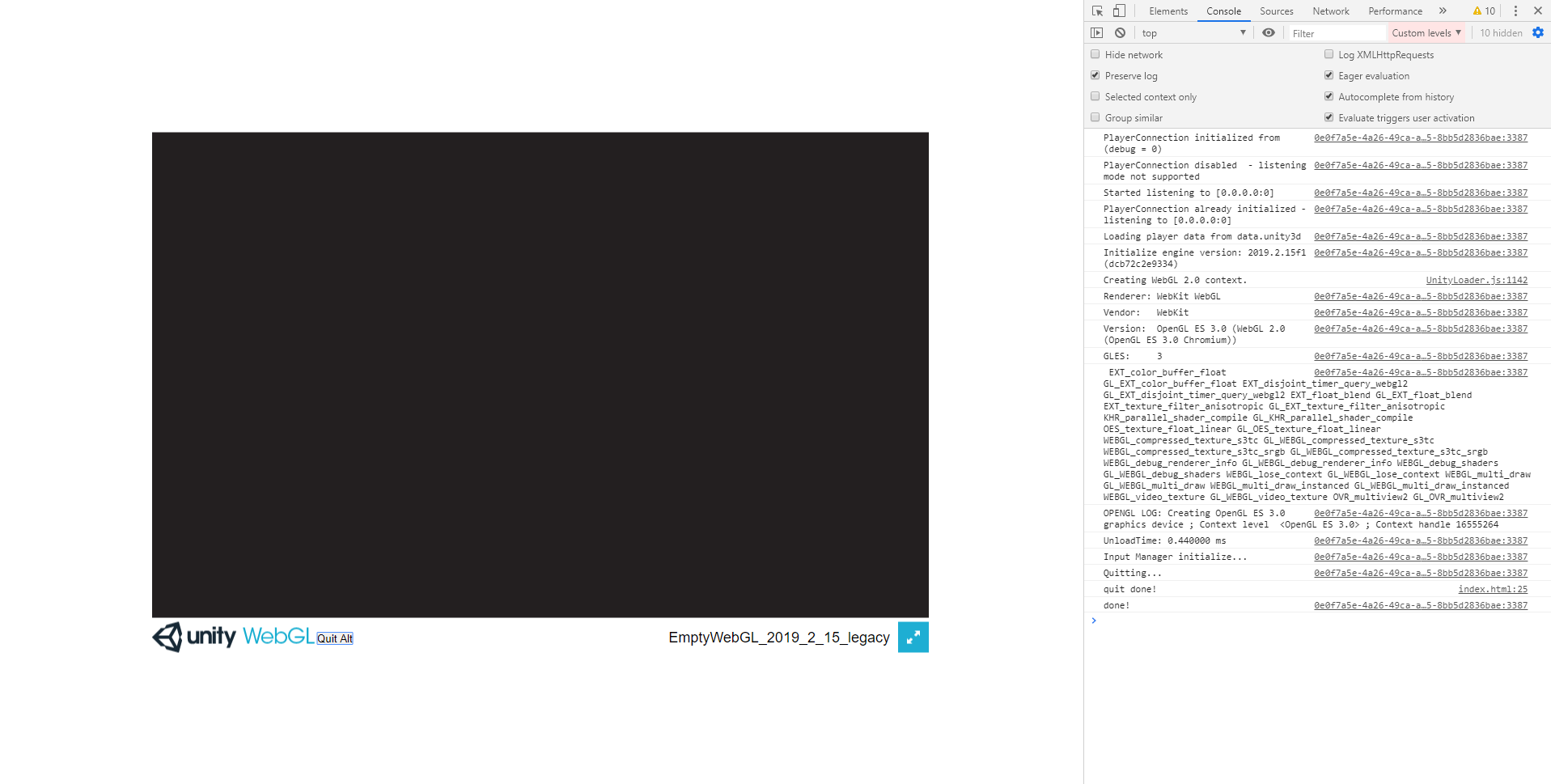
Oh, it seems there is a huge difference between a LWRP project and Legacy project.
Legacy projets are ok (tests made with Unity 2019.2.15 and 2019.3.0)