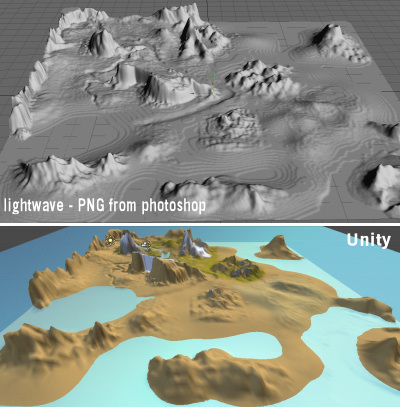
I’ve been playing with exporting height maps and I’m a little confused.
I export a 8 bit height map from Unity and reimport it straight away… data has been lost, what is this 8 bit export for exactly?
I export a 16 bit height map from Unity and import it into Photoshop as 16 bit, save from Photoshop, Import into Unity and its all messed up, infact importing as a 16 bit RAW height map into Photoshop looks pretty messed up anyway.
I export a 16 bit height map from Unity and import it into Photoshop as 8 bit, 2 channel. save, then import into Unity as 16 bit and everything is fine and dandy.
Is this normal? and can anyone explain what is special about the RAW map used for a height map in Unity?
p.s. I’m really after getting this heightmap into Lightwave so I can trace some roads and rivers over the rough model, If anyone has some suggestions they’ll be most welcome.
Thanks, that makes sence why saving 16 bit out of photoshop didnt work, I didn’t think to import the opposite of what i’d exported, how silly of me
so now I have a single channel 16 bit RAW file in photoshop, it will now allow me to save as a PNG either interlaced or not (which lightwave can use) however on usign it as a displacement map it still shows these contour artefacts where in Unity the heightmap is smooth.
What other information does that RAW file contain that is not saving with the PNG?
I’ve never used the Raw file format before, any help so I can understand it more would be great.
Thanks for that… I’ve had a read of various posts and know a little more about these elusive heightmaps
I’ve come to the conclusion that getting a rough (tho not as rough as i’ve got) into Lightwave is a no go, I also asked a friend to try use the raw file in C4D and apparently nothing happened.
I’d be interested to know what the Unity developers who made the Island demo used to make the ripples around the coast, these must have been made in an external program using the heightmap from Unity as a template?
I am not familiar with Lightwave, but it looks like you are importing an 8bit image into Lightwave (which creates the steps for a lack of information). I would check what 16bit image file format Lightwave supports and try to re-import. For example, there is a 16bit TIFF format that can be exported from Photoshop.
I know the feeling, been struggling with this for a while before I perfected my workflow (using modo), thanks to a lot of help from the friendly forum people.
I am actually having some troubles too. I cant find a free photo editor that lets me save in raw. I have Gimp but its telling me I cant. I also tried googleing for a jpg/png to raw converter but I only found the exact opposite thing. Does anyone have any suggestions as to what I can do?
Update on this thread. Gimp does support exporting as raw now. This video is helpful though when I click import raw on the Terrain inspector nothing seems to change for me… Thinking my numbers may be off or perhaps I am using too large of a file as its 4093x4093…