Raycast(Vector3 origin, Vector3 direction) Bug

I wrote some script to check if a vertex is inside cube, but Raycast without RaycastHit is not working.

Here is the code.

void OnDrawGizmos()
    {
        Gizmos.color = Color.red;

        foreach (Vector3 point in hitPoints)
        {
            Gizmos.DrawSphere(point, 0.01f);
        }
    }

Raycast(Vector3 origin, Vector3 direction)

  void Update()
    {
        hitPoints.Clear();

        Vector3 origin = transform.position;

        foreach (Vector3 vert in vertices)
        {
            int count = 0;

            Vector3 worldPoint = transform.TransformPoint(vert);

            if (Physics.Raycast(worldPoint, Vector3.up))
            {
                count++;
            }
            if (Physics.Raycast(worldPoint, Vector3.down))
            {
                count++;
            }
            if (Physics.Raycast(worldPoint, Vector3.left))
            {
                count++;

            }
            if (Physics.Raycast(worldPoint, Vector3.right))
            {
                count++;

            }
            if (Physics.Raycast(worldPoint, Vector3.forward))
            {
                count++;
            }
            if (Physics.Raycast(worldPoint, Vector3.back))
            {
                count++;
            }

            if (count == 6)
            {
                hitPoints.Add(worldPoint);
            }
        }
}
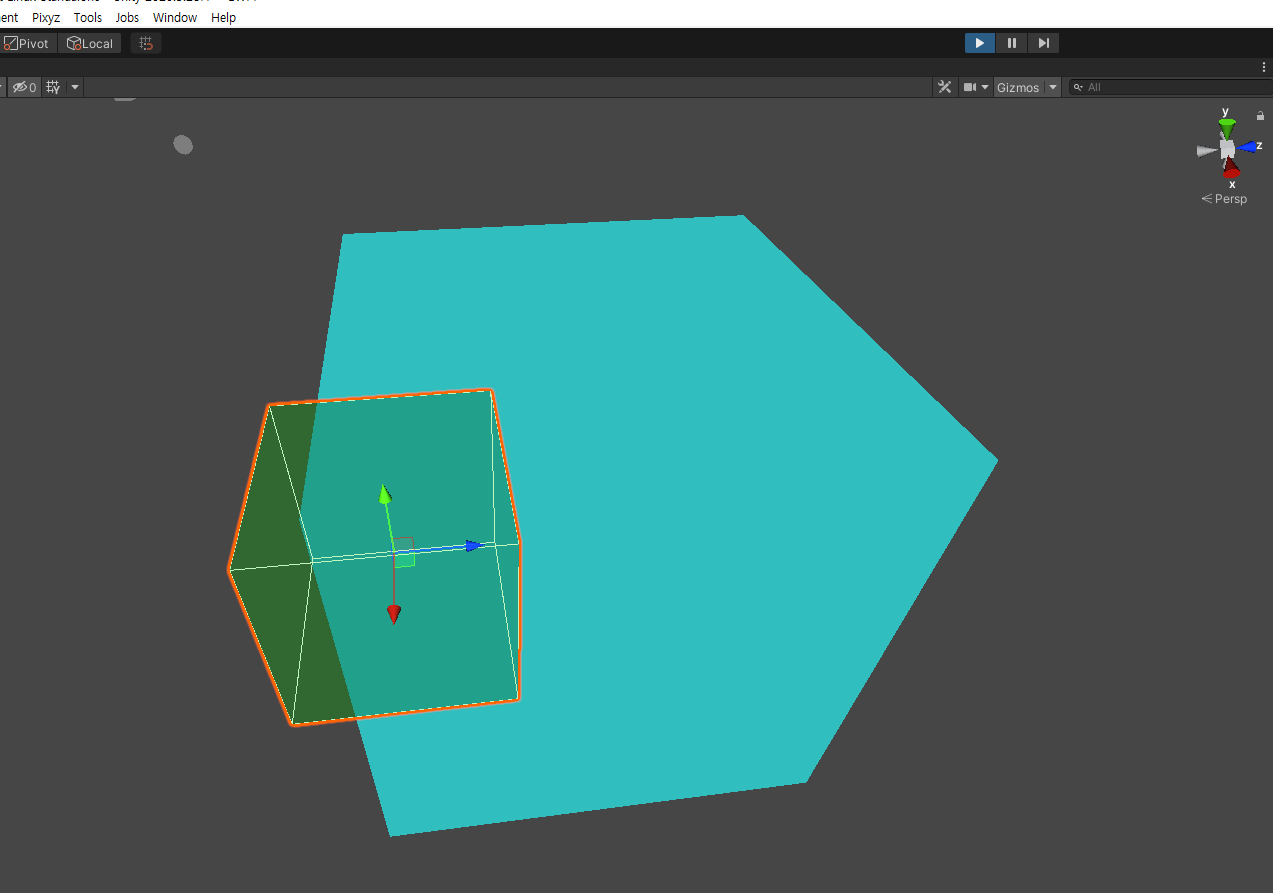
No Spheres are showing means hit count wasn’t 6.

Raycast(Vector3 origin, Vector3 direction, out RaycastHit hitInfo)

  void Update()
    {
        hitPoints.Clear();

        Vector3 origin = transform.position;

        foreach (Vector3 vert in vertices)
        {
            int count = 0;

            Vector3 worldPoint = transform.TransformPoint(vert);

            RaycastHit hit;

            if (Physics.Raycast(worldPoint, Vector3.up, out hit))
            {
                count++;
            }
            if (Physics.Raycast(worldPoint, Vector3.down, out hit))
            {
                count++;
            }
            if (Physics.Raycast(worldPoint, Vector3.left, out hit))
            {
                count++;

            }
            if (Physics.Raycast(worldPoint, Vector3.right, out hit))
            {
                count++;

            }
            if (Physics.Raycast(worldPoint, Vector3.forward, out hit))
            {
                count++;
            }
            if (Physics.Raycast(worldPoint, Vector3.back, out hit))
            {
                count++;
            }

            if (count == 6)
            {
                hitPoints.Add(worldPoint);
            }
        }
}

But with this code spheres are showing as I wanted to do.

What is wrong with Raycast without RaycastHit parameter?
It happened 2 years ago as I remember and it’s still not fixed.

Maybe narrow it down a little. What is the hitcount?

So it’s not fixed implies it’s been reported as a bug by you? What’s the case number? I’ll ask the 3D physics team for you. Or is this you just assuming it’s a known issue?

Sorry for being late.
Hit count is the variable ā€œcountā€ in the foreach statement. I increased when Raycast was hit.

I didn’t report this bug because I didn’t know how to report exactly then.
So I am not sure if it’s a known issue.

Yeah, you’ve said. The issue or the root cause hasn’t been established so without some reproduction case submitted as a bug or a lot more detailed information, it isn’t going to be resolved either unfortunately.

So have you done anything to narrow it down? A test which expects a whole bunch of rays to detect a hit but if one doesn’t you just get nothing isn’t going to narrow it down. What if it’s just one ray and it always ā€œfailsā€ at 5? What if it’s always that ray? Maybe you’re too close to one edge? All I’m doing is guessing at the first things that come to my head; I’m asking if you’ve tried to narrow this down at all. If you have, which I’d expect you to have, maybe you can pass that info along too, either here or in a bug report.

I just had a test with Raycast again and I found that the experiment I did before had errors.

  • It wasn’t hitting from inside the cyan cube, the hits were from surface of the cyan cube.(it wasn’t hitting backface)
  • The raycast was using default layer paremeter(All layers) so it was also hitting itself.

As you said I narrowed it down. Ran the script below.

void Update()
    {
        Vector3 origin = transform.position;
        Vector3 direction = target.position - origin;
        RaycastHit hit;

        if (Physics.Raycast(origin, direction))
        {
            Debug.Log("Physics.Raycast(origin, direction)");
        }

        if (Physics.Raycast(origin, direction, out hit))
        {
            Debug.Log("Physics.Raycast(origin, direction, out hit)");
        }

        Ray ray = new Ray(transform.position, direction);

        if (Physics.Raycast(ray))
        {
            Debug.Log("Physics.Raycast(ray)");
        }

        if (Physics.Raycast(ray, out hit))
        {
            Debug.Log("Physics.Raycast(ray, out hit)");
        }
    }

All had same results so there was no bug.

I still don’t know why there was difference between Physics.Raycast(origin, direction) and Physics.Raycast(origin, direction, out hit) because the only difference in code was just getting RayCastHit from it.
And the real problem is it couldn’t even make the count 6, it had to be less than 4.(Because it can only hit surfaces, 1 hit from green cube and 3 from itself is maximum expected.)
Maybe there was a mistake in object settings like layer, collider and etc…

Anyway, I found that it’s working well now so there’s no actual bug to report.

I am sorry for posting a flawed experiment, I had to check my settings and scripts first.

1 Like

It’s all good. The main thing is you’re unblocked and can move forward so good luck!

If you can reproduce this consistently then I would absolutely consider reporting this as a bug because you are correct in that they should produce the same results.