ArchVizPRO Interior Vol.5 brings to you a modern chalet, build in every single detail.
The house is fully furnished and includes a complete environment system.
The scene is high optimized, and use Baked GI and Mixed Lighting, perfect for a smooth and immersive VR experience.
All furniture and props are highly detailed and can be reused in any other project.
Yes Furniture/Props can be turned off without problem.
But you have to rebuild the Lighting.
Everything is already setup, so you have only to press the “Generate Lighting” button.
Normally it could take some hours, but without furniture it will be much faster.
So far, my experience with your package wasn’t great. Nothing seems to work, and the attached pdf is not helping in troubleshooting. I spent the last hour trying to work it out on my own, but surrender.
I have some experience with unity: I created my own scenes, just much simpler. I successfully used steam VR in combination with my HTC VIVE to have a VR experience of my scenes. I used the PostProcessingStack for better looks, and even implemented teleportation in my scenes. So I felt setting up your package would be a walk in the park.
But … none of the things I know how to do seem to work. Assuming that the problem is with me and the lack of my knowledge, could you please provide a step-by-step guide to set up your scene for VR with HTC Vive?
Here is how far I got:
I start a new project
I import your asset from the asset manager.
I load the scene you’ve created for VR.
I copy your quality settings into the project settings.
So far so ok.
I guess here is where it starts to fall apart, because while the below works in scenes that I built, it doesn’t work with yours:
5. Do I import SteamVR?
6. Do I place the CameraRig prefab in your scene?
7. Do I add a player script to the camera?
8. Do I have to create hands and add those to the camera rig as I learned to do?
9. Do Add post processing to the camera scrip to the camera?
So, going back to step 4 above, what should I do next to get to experience your environment in VR?
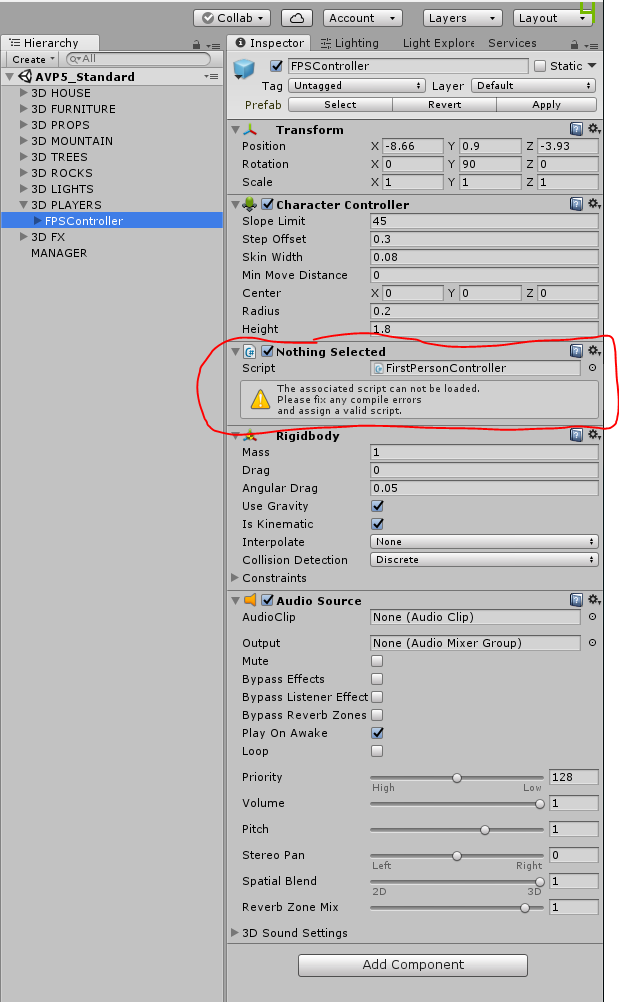
Assets/Standard Assets/Characters/FirstPersonCharacter/Scripts/FirstPersonController.cs(3,27): error CS0234: The type or namespace name CrossPlatformInput' does not exist in the namespace UnityStandardAssets’. Are you missing an assembly reference?
Assets/Standard Assets/Characters/FirstPersonCharacter/Scripts/FirstPersonController.cs(4,27): error CS0234: The type or namespace name Utility' does not exist in the namespace UnityStandardAssets’. Are you missing an assembly reference?
Assets/Standard Assets/Characters/FirstPersonCharacter/Scripts/FirstPersonController.cs(20,34): error CS0246: The type or namespace name `MouseLook’ could not be found. Are you missing an assembly reference?
Assets/Standard Assets/Characters/FirstPersonCharacter/Scripts/FirstPersonController.cs(22,34): error CS0246: The type or namespace name `FOVKick’ could not be found. Are you missing an assembly reference?
Assets/Standard Assets/Characters/FirstPersonCharacter/Scripts/FirstPersonController.cs(24,34): error CS0246: The type or namespace name `CurveControlledBob’ could not be found. Are you missing an assembly reference?
Assets/Standard Assets/Characters/FirstPersonCharacter/Scripts/FirstPersonController.cs(25,34): error CS0246: The type or namespace name `LerpControlledBob’ could not be found. Are you missing an assembly reference?
I have no idea what that means, but I have noticed something else:
Hello
Please read the included PDF.
You have to import character controller to solve compile error.
(Character Controller is used for Desktop walkthrough).
Hope this will fix your problem.
Regards
I bought this project, I would like to ask a few questions, firt how many hours did the bake process last, and what are the provisioning of the computer? what should I do with the light settings for a perfect bake, last Do you give some information about settings
The project takes around 1.5 hour to bake.
CPU: Intel i7-6700K (4.00 GHz)
VIDEO CARD: GTX 1070
RAM: 32 Gb
The scenes are already setup for optimal baking quality/speed.
For additional project setting please check the included PDF.
Regards
Hello
Sorry for the delay.
I see you made some change from the original asset, and It’s difficult to understand the problem without seeing the project settings. Could you send me the project so I can check ?
Thank you