Quick update; I’ve made some progress on URP support. Very exciting stuff.
cavlam
Quick update; I’ve made some progress on URP support. Very exciting stuff.
cavlam
Looks awesome!
I know many will disagree with me, but I much prefer SRPs Render Feature workflow over adding a bunch of components to camera objects. Just seems cleaner to me.
Can’t wait!
Also, I’m very curious about the specs of your PC running Corgi. Could you share them?
I don’t have anything against how the SRP RenderFeature/RenderPass system works yet really, I just really hate how Unity seems to change how everything works so frequently. Keeps us on our toes!
To answer your question, I’ve been developing on both a PC and a Laptop.
PC Specs:
CPU: Ryzen 3900X (12 core / 24 threads)
GPU: GTX 2080s
RAM: 32 GB of DDR4, 4400mhz
Laptop Specs:
CPU: some mobile intel chip (~4 core / 8 threads)
GPU: Mobile GTX 1060
RAM: 16 GB of DDR3, 1600mhz
Surprisingly, I’ve been able to run the demo scene’s at ~100-200 fps on my laptop. On my PC, they seem to be over ~200-400fps. The scenes are very simple though, I think performance will vary greatly depending on your scene complexity. In general, you don’t want to raytrace against everything, only stuff that gives the most visual impact.
I know fps isn’t a very good metric though. If you’d like I could grab some actual profiler timings.
That’s awesome to hear, I’m very surprised as well that the 1060 can run it at all!
No need to show profiler timings (for me, anyway), I was just curious about what you were developing/testing.
Thanks!
I was surprised it ran, as well! Nvidia must be using a compute solution under the hood, probably after some driver update in the past. If you can try the demo on any ‘weird’ setups, let me know how it runs! Be sure to play with the sliders, as they affect performance greatly. You’ll probably be able to get away with some really nice visuals just by tweaking the resolution slider; but I also have implemented stuff like temporal rendering + reprojection which really goes a long way with performance.
Is there any chance this will work on MacOS?
Afaik there’s no API that supports hardware ray tracing on MacOS. On Linux there would be Vulkan ray tracing but Unity currently supports DXR only on DX12.
If OSX ever adds a raytracing api to their graphics apis, Unity will likely update to add in support for OSX. If Unity adds in support for RaytracingShaders in OSX, then Corgi Raytracing should automatically work with OSX as well. Until this series of events happens, however, no raytracing is possible on OSX.
Thanks for getting back to me
Apple already has raytracing for metal or am I reading this wrong?
Then it sounds like the first domino has fallen! When will Unity support it? It’s a question to ask them.
I’ve spent this last weekend trying to get URP + VR + Single Pass Instanced all working together. After a lot of frustration and thoroughly reading through the URP source code, I’ve finally made some progress.
0g0zab
Now that I’ve got this working, the next step is making sure it works in basically every permutation URP/builtin/vr/non vr/single pass/multi pass. Once this hard part is done though, I can get to work on getting all the features from builtin ported over to urp and hopefully soon push an update to the asset store so it works in all these places.
Getting SPI was quite a nightmare, I had to dig into HDRP’s source code and see wtf they were doing in a few places, and had to write some macros for corgi raytracing to use which are not available in URP but were in HDRP. hopefully all this pain will be worth it haha
OK! The first build for URP support is ready to test. If you’re interested in getting an early build, please DM me here (with your invoice) and I’ll reply with a google drive link. I just submitted the build to the Unity Asset Store, so if no major issues are found I’ll be updating the asset store build very soon.
v1.4.5 changes:
* Added experimental URP support
* URP has some limitations, please refer to the documentation's platform limitation section for more info.
Updated documentation, including URP support information: Corgi Raytracing - ReadMe - Google Docs
Has this been tested at all with the dots hybrid renderer(v2)? Absolutely incredible work though! Also any plans for raytraced gi?
@funkyCoty said:
So if the plan has not changed (and things go well), realtime GI may be somewhere on the horizon. 
Oh my gosh, I can’t believe I missed these new posts! SO excited for URP, purchasing the asset now 
@funkyCoty I actually had a possibly dumb question:
The asset is advertised as having “Volumetric Shadows,” but the documentation says “Volumetric Lighting”. What (if any) is the difference? What are you referring to when you use these terms?
Thanks!
Haha sorry, I’ve seen the term used multiple ways and now I’m guilty of it, too. The effect tries to make shadows feel volumetric, by tracing through the volume of the screen to find what is and is not occluded. It’s very expensive and really not worth it over traditional screen space methods of solving this, so it’s mostly there as another example of how you can write your own effects.
It’s somewhere on the roadmap in my head
Got it… I think, lol. I’ve been using this asset for my volumetric lighting and it works great. To clarify, is this the effect you’re referring to? I definitely think faking it using assets like this is more efficient, but I’m very interested in seeing an RTX version just for the hell of it.
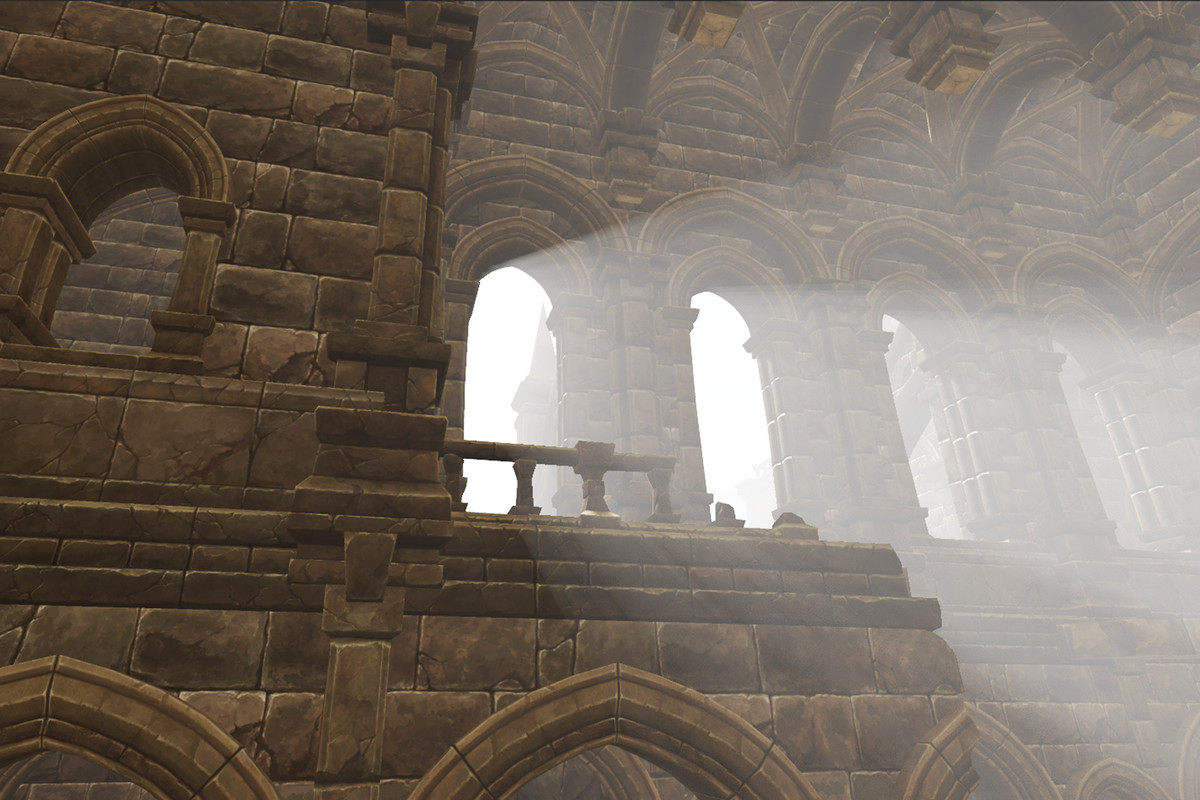
Follow up question: With the URP workflow with RenderFeatures/not needing scripts on cameras, will everything work with multiple cameras in the scene? I have one being displayed normally, and one being output to a render texture at all times.
EDIT: Follow up 2 (Sorry!)
Aside from specific things that I wouldn’t want RTX applied to, I’m basically using the standard lit shader throughout my project. If I modify it/replace it with a compatible shader, will the scene “break” if the RTX options are turned off? Or will it look identical to before, just without the RTX effects?
It’s kind of the inverse of this. Volumetric lighting tends to make non occluded space and make it very bright. Mine is the reverse, it makes occluded space darker. And yeah, traditional methods are much faster than the RTX implementation. I think the best and most useful for real world usage effect in the package is the RTX reflections.
Hmm, I believe so, yes.
Yeah, they’ll look normal with the effects off. Definitely needs to work this way, so you can use the same materials on PCs which don’t have raytracing capable cards haha.
Ah, I understand, thanks for the clarification. I might politely suggest making the distinction clear somewhere, because RTX volumetric lighting is also a huge draw to people, and I wouldn’t want people to be disappointed because they misunderstood, lol. Just looking out for ya!
This asset looks amazing!
