Introducing PIXELCRAFT: Dynamic Resolution for URP
In the realm of game development, maintaining optimal performance while preserving visual quality is a perpetual challenge. PIXELCRAFT addresses this by seamlessly integrating a powerful DYNAMIC RESOLUTION system.
Performance Monitoring: PIXELCRAFT continually monitors your game’s performance in the background. Should the frame rate drop below the developer-specified target, it dynamically adjusts the rendering resolution to restore intended performance levels.
FSR Integration for Visual Restoration: Beyond standard dynamic resolution, PIXELCRAFT incorporates AMD’s FidelityFX Super Resolution (FSR). This feature reconstructs missing pixels when the rendering resolution is below the native resolution, ensuring a native frame quality without compromising performance during demanding scenarios.
Balanced Performance and Visual Quality: PIXELCRAFT strikes a harmonious balance between performance and visual quality. It eliminates the need for trade-offs, providing developers with a comprehensive solution.
Developer Control: PIXELCRAFT empowers developers with granular control. Fine-tune dynamic resolution parameters to align with the specific requirements of your game.
Volume System for Targeted Optimization: PIXELCRAFT introduces a sophisticated Volume system, allowing developers to strategically define specific areas within their game world. Each encapsulated Volume serves as a zone of targeted optimization, offering precise control over performance parameters and ensuring a nuanced gaming experience.
ASSET LINK:
Note
The scenes used to showcase this tool are not included!
SUPPORT – QUESTIONS - NEWS
Hop on our Discord server.
Follow on Twitter/X.
You can read the documentation here.
Published Update 1.1.0 with the following changes:
Added a new API to Pause Dynamic Resolution, this is helpful when you want to open UI menus.
Fixed a bug where the Frametime Tracker reports incorrect FPS readings after using “Time.timeScale = 0f;”.
Renamed Camera property to Volume Camera to properly highlight its function, this Camera needs to be assigned in Volume mode only, in Preset mode it can be left empty.
Renamed SetSmartDynamicResolutionCamera to SetVolumeCamera for better clarity.
Added a safety check on the Volume Camera to prevent it from throwing an error when you’re in Preset mode.
I’m working on new changes, most notably adding 2 new options (90FPS and 120FPS), these would play nicely with next gen consoles, and some bug fixes and performance improvements…
A version of this tool for the Built-in rendering pipeline is also in the works, but with less features like the inclusion of FSR. This URP version remains the best and most feature packed!
Update 1.2.0 is going to bring 90 FPS and 120 FPS support, alongside minor bug fixes and new API focused on performance. More updates are planned in the near future!
Update 1.2.0 in now live on Unity Assets Store, here are the changes:
Added 2 new Performance targets (90 FPS and 120 FPS).
Added a new overload to “NotifyOfCameraChange” which takes “Camera” as a type. This new overload is much more performant than the previous one (Without parameter).
Update 1.3.0 is live on the store with these changes:
Added a “Maximum Fixed Resolution Height” variable that determines the maximum resolution this tool is allowed to reach, it is exposed alongside the previous Percentage based variable in each Quality mode.
The changes for Update 1.4.0 are finalized, amongst other things the main focus would be integrating a working framerate lock to prevent battery drain on mobile devices.
An overhaul of the documentation is planned (for next week or the week after) since we added so many new features based on requests from other developers. If you have any feature request be sure to let me know, I’m open to consider any ideas…
Update 1.4.0 is now live on Unity Assets Store, here are the changes:
Added “FPS Limit”, a new parameter that puts a frame limiter to the game, it’s useful to prevent battery drain in devices with batteries like Handhelds and mobile phones.
Added “Fixed Minimum Resolution Height” to the Quality Modes.
Reorganized the parameters of the Quality Modes for a better presentation.
Added tooltips to some parameters for better clarity.
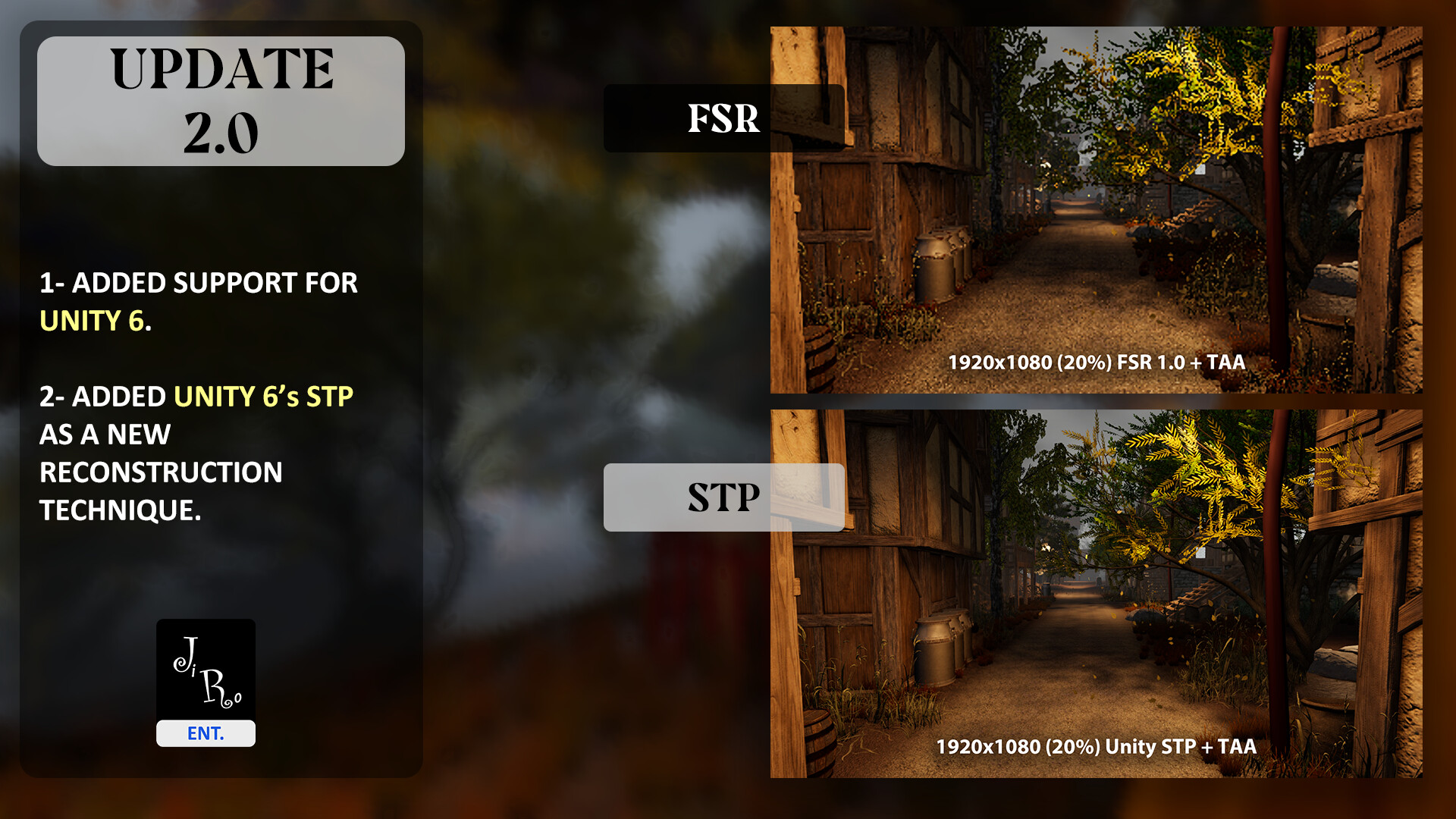
UPDATE 2.0.0 just landed for Dynamic Resolution, here are the change logs:
Added support for Unity 6.
Added support for “Unity 6 STP upscaler”.
Minor editor performance gains.
Temporarily disabled any temperament with MSAA as there’s a bug in Unity 6 that prevents it from working as intended. The bug has been raised to Unity and is awaiting a fix. This however does not affect the working of this tool.
STP in Unity 6 is by far the best upscaler I’ve ever tested, its ability to reconstruct perfect frames from extremely low resolutions is nothing short of extraordinary. With this update your game will look better than ever even when Dynamic Resolution is engaged and dropping internal resolution to uplift the framerate. If you haven’t already there’s never been a better time to grab your copy here:
Last week we have released the biggest update to Dynamic Resolution yet, bringing the much-requested HDRP support, alongside simpler setup to get you up and running faster than before, and support for newer upscalers like TAAU, Contrast-Adaptive Sharpen (CAS), and Catmull-Roll. Dynamic Resolution 2 is yet another step at boosting the performance of your games with minimal effort: