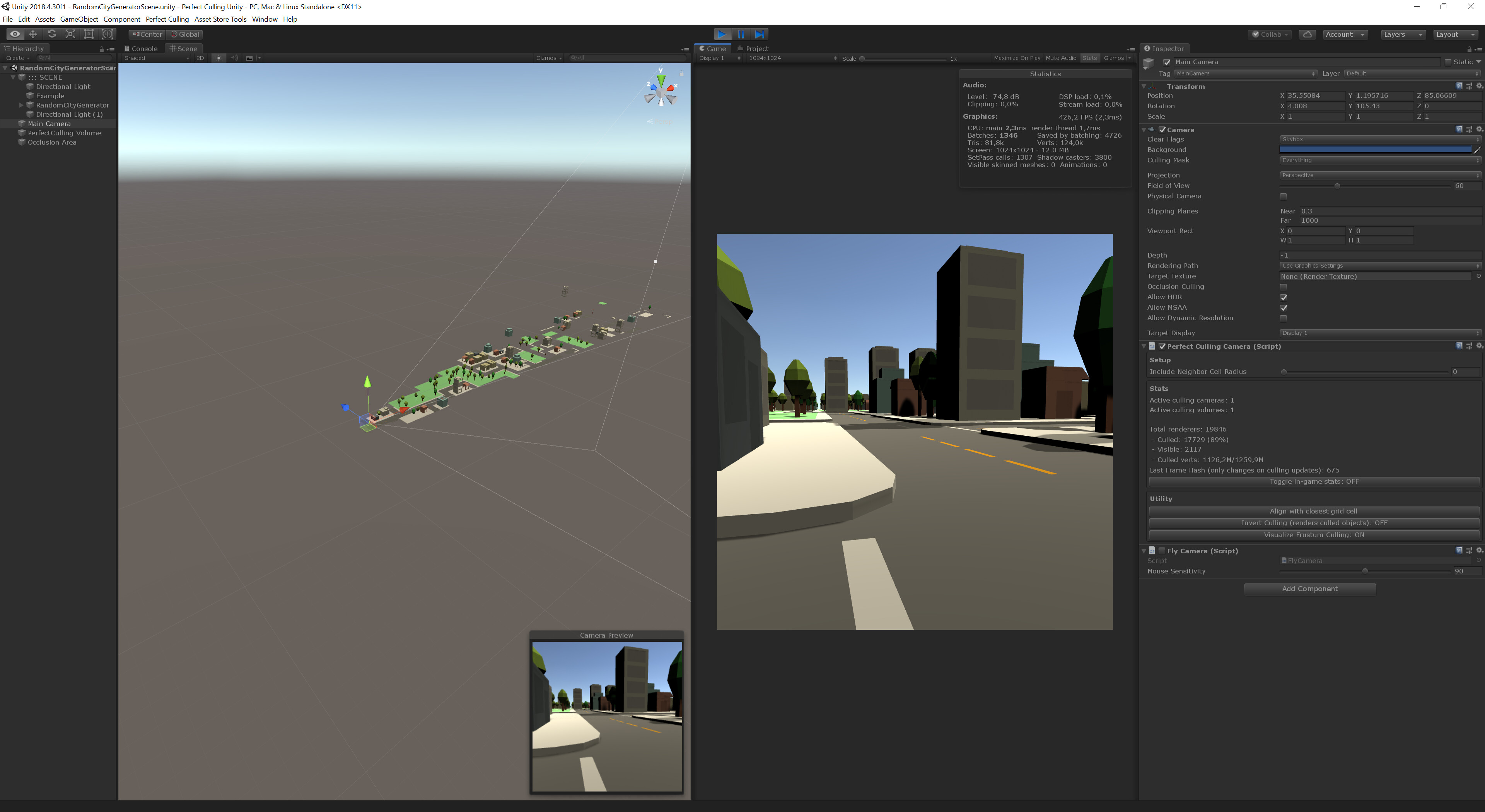
Perfect Culling enables you to bake pixel perfect occlusion data for prefabs and your scene. It works by assigning unique colors to all renderers and taking pictures from multiple perspectives. At the end the colors found in the images allow the asset to tell whether a renderer was visible or not.
Features:
Supports transparency
Supports multiple cameras
Supports pre-baking occlusion for prefabs and instantiating them at run-time
Pixel perfect thus very predictable results
Support for all build platforms
Support for built-in and HDRP/URP render pipelines
No performance overhead on GPU and almost no performance impact on CPU at run-time
Easy to setup
Perfect Culling cannot be used to cull objects that have not been baked but only works with baked prefabs and/or scenes.
Video that shows how to get started using this asset:
Short demonstration of what the occlusion culling looks like:
I hope all of this information gives you a good idea what Perfect Culling is and whether you want to give it a try after it released on the Unity Asset Store.
I’m definitely interested in what you all think and I’m also very happy to answer questions and respond to your feedback!
Whats the performance like and is the color lookup real time?
if so how are you checking what colors are in view?
also is there a limit to how many unique renderers can be culled?
The color stuff only happens during occlusion bakes in the Unity Editor. The basic steps are:
Save scene
Generate a list containing unique colors and apply them to the renderers
Setup a camera with 90° field of view
Place the camera at the desired sampling position
From all 6 angles take a screenshot and write it into a RenderTexture that lives on the GPU
Dispatch compute shader that tests all pixels in the RenderTexture and returns the unique colors
Now we got a list of colors that we can match back to the color list created earlier
The list of visible renderers is written to a ScriptableObject for fast lookup at run-time
Doing this at run-time without a prior bake step would be unfeasible and some mobile devices couldn’t do it at all. The bake step makes sure to resolves this limitation and thats why the asset works on any hardware including less powerful devices - where you’d really need it the most.
Because all of the hard work already happened in the Unity Editor there is little left to do at run-time. Looking up the list of visible renderers for a camera is O(1) and thus blazingly fast. Now the renderers need to be enabled or disabled. This step only needs to happen if your camera moved into a cell that contains new visibility information. Concluding that if you were to stand in the same position for the entire game you’d only toggle the renderers once.
There is a group limit of 65535 (2 bytes, unsigned short) for each bake volume. However a single group can contain multiple renderers. For instance the asset automatically organizes LODGroups into groups. You can also create your own groups, of course. Concluding that if you have a bunch of super small meshes or meshes that are always visible together you can easily just make that a single group and they will be culled together. Furthermore you are not restricted to a single bake volume.
Does this answer your questions? Or did you end up with even more questions now?
I made an attempt to decouple the baking process from editor-only functions but this use-case is definitely not officially supported.
I’m also seeing a bunch of potential issues here (just some quick thoughts; might be incomplete):
The baking process is destructive because it changes the scene materials. In the editor the scene is reloaded and the original scene restored. So you’d also need to reload/restore the level after the bake finished.
The occlusion data does not reference renderers directly but it stores indices. You’d need to make sure that your level loading is deterministic to ensure that the list of renderers ends up in the same order.
You want to bake as fast as possible but you probably also don’t want to show a black screen to the user while the baking is in progress. Doing both might bring the baking process down to a crawl.
If you are targeting mobile devices the bake process could make the device run out of charge quickly.
You’d probably need to expose baking options, create visualization options (they use Gizmos and wouldn’t work in a build for sure), etc.
Users that got very low end hardware (especially on mobile) might be unable to bake due to lack of for instance Compute Shader support.
Running the game while also baking might blow your memory budget and crash your app (especially on mobile).
You need to save and load the baked data and you definitely don’t want to use JSON because that would bloat the file size way too much. Not sure if you could still use ScriptableObject but you definitely need to get it back into the data type the asset uses (ScriptableObject + PreferBinarySerialization attribute).
Concluding that it might be possible but just looking at some of the potential issues it might not be worth it. Of course, I don’t know what your game looks like though.
I hope this helps. More questions are welcome, of course.
I’m working on a game that features huge terrain with sparse points of interest, like towns / farms / bunkers.
Is it possible to have multiple occlusion boxes on these areas?
I’m also curious about your “table lookup” is it rounding the position to get the closest cell or is it using a for loop to find the nearest one?
and my final question, does this system stop the unity default culling? or are both active at the same time?
As for baking at runtime, i do understand this is not what this asset is meant to do, but i think it would be a useful feature for games where you can build or change the map.
The destructive material changing thing could be solved via calling Graphics.DrawMesh passing your material as argument, so that you don’t have to change the materials on the MeshRenderers.
This function can also take a camera as argument to render to that camera only, which seems perfect for your system.
The Camera rendering could be done the same way as ReflectionProbes do, 1 face at a time or brute force render all.
Anyways, not expecting you to change your asset, just sharing thoughts ^^
The cell lookup itself is making use of Spatial Hashing and thus does not need to loop over all cells. Of course, if the camera is outside of the volume the position needs to be clamped to the closest cell to not run out of bounds. Usually this should be fine but if you can be sure that a point of interest is not visible at all you should just disable it manually because the asset only got information about the occlusion within the volume. However if theres enough occlusion opportunities you might be okay without needing to do that (especially if you make the volume slightly larger than it needs to be so it got some more information about its surroundings). Just wanted to bring it up for completeness and transparency.
You can use the Unity default culling system on top. The question is whether you really want to do that because the Unity default culling does have performance implications (especially on mobile) and can be tricky to tune. That is what ultimatively led to me creating this asset. But no restrictions going with a hybrid approach.
I will definitely think about the run-time feature a bit more. Thank you!
I will try to get an actual performance benchmark going to get some hard numbers but let me try to still write about some of the functional differences for now. Anyway keep in mind that I’m the creator of Perfect Culling and potentially biased!
Even though Umbra (the Occlusion Culling system Unity uses internally) also requires a bake step, this bake step does not generate final data you can lookup. At run-time you pay for traversing a tree structure and performing rendering steps using a software rasterizer to render depth information and evaluating this information. All of this happens every frame on the CPU(!). Furthermore Umbra doesn’t work well with procedural levels. On top of that there is not really a lot you can tune about it and you might hit a wall.
Perfect Culling requires a much more involed bake step but it generates a final set of data. The lookup is instant and doesn’t use a tree structure and that makes the lookup O(1). Really the only thing that needs to happen at run-time is turning the renderers on/off. Plus the asset only needs to do that if any camera moved into a different cell and thus requires a state update (for instance a stationary camera would be virtually free performance wise). Last but not least you can pre-bake occlusion for say a complex house prefab that you can spawn dynamically into your scene at run-time. Since the asset is generating pixel perfect occlusion data it is also easier to debug culling issues especially once you understood how the asset works.
I tried to get some actual numbers. Please see the attached PDF for a more detailed description.
The bars on the left represent Perfect Culling.
The red/orange bars on the right represent Umbra.
Obviously a huge part of the difference comes down to Perfect Culling culling more objects. Though if you start changing the settings for Umbra to make it cull more you will make its CPU overhead even larger.
TLDR: Perfect Culling performs better because it culls more objects and doesn’t hit the CPU in the way Umbra does.
Sounds nice!
Is there anything particular a potential user should worry about if its used in the interior scenario? Does it have occlusion portals?
What’s your planned release date and price point?
Thanks:)
I’d need to know more about how you plan to use the asset to give better feedback but generally interiors make Occlusion Culling systems very happy because there is a ton of culling opportunities.
Are you in need of occlusion portals to implement doors? Right now the asset does not support portals but this is also a situation where you’d know for sure that the objects are visible or not visible. So what I’d do is just bake the occlusion without the doors. If the occlusion culling system already culls sufficiently you are already done. Otherwise you could combine it with a simple script that enables/disables the entire room based on the door state. Theres also the option to bake multiple sets of occlusion data and swap them out at run-time but I’d really try the easiest approach first.
The asset already became available because I accidentally enabled auto-publish and I was also thinking the review would take much longer (so kudos to the Unity Asset Store review team). Anyway I already submitted an update to make sure all the improvements I made recently make it in as well. Concluding that you could buy it already but in that case definitely drop me a line info@koenigz.com with your invoice number so I can provide you with the updated package ahead of time.
Great looking way to do runtime culling! I definitely think it could be designed with runtime baking in mind - right now there is nothing like that available for Unity (while there are definitely other in-editor baking options).
No idea how you would handle the renderer references though - maybe a unique ID placed on them as a component.
Given the huge interest I will definitely explore runtime culling some more. Though before I do that I want to make sure that the core functionality is absolutely stable and feedback related to that is addressed. I hope that makes sense
Hi @PatrickKa !!! It would be good a video with a very large scene with several tiles of Unity terrain, vegetation, trees, etc. and comparing it with the native occlusion of unity seeing the performance of both and how they behave.
You should really highlight this in the asset store page, since it’s not clear why use Perfect Culling over Umbra.
Also, I think $98 is too expensive. Not that Perfect Culling doesn’t deserve it, but we’re indies here and we’re not rich, so you would sell much more lowering the price by half than keeping the high price tag. But that’s just my opinion and you have the right to put any price you want, of course.
Thats great feedback and you are both right that I need to highlight this more! I really appreciate it! Thanks!
The Unity Terrain is pretty special because it comes with its very own set of optimization features. To make terrains work with Perfect Culling you’d need to give up on that and convert them into meshes. If theres many culling opportunities this might be well worth the trade-off. However if your scene is mostly terrain this asset might not be a good choice unless you are willing to convert it into meshes.
Definitely wanted to bring this up for transparency. I also put the Unity Terrain on my list of things that I want to investigate further. So maybe theres a better way in the future.
Okay that’s sound good! now I have a question, I had a similar idea i never got to implement, during researching that idea, i realizedthat per cell the paralax was important within than cell, so here are my question:
How do you determine the cell size?
how does the cubemap texel size relate to the pixel of the screen?
How does parallax within a cell is handled (consider a simple non convex scene with a tower and thing behind it, on horizontal extremum of the cells, the thing are visible, but in the dead center, where you would put the cubemap pov, they would be invisible, which mean the cubemap will have false negative for some position within the cell). This can be mitigated, but not eliminated with smaller cell size, hence the first question. Maybe we query neighbor visibility too?
I guess you can support 4billions object right, seems like enough! Is there an extreme optimization possible where we basically cull the polygon soup instead? especially for static non animated objects that we could just merge based on material, then render the list of polygon per material as a single mesh, woudl reduce draw call too.
The cell size is configured by the user. I think this is important because it allows to find the right balance between bake time and the number of sampling points and thus occlusion data precision.
During profiling it turned out to be more efficient to just render six perspectives (also prevents biasing parts of the screen by making every perspective take up the same space) into a single RenderTexture. The entire RenderTexture is 3072x2048 px leaving a single perspective at 1024x1024 px. There is an option to change the rendering resolution though. If you were to create a camera and set the FOV to 90 and the resolution to 1024x1024 you should see what it would look like.
You are exactly right here and that is why the asset implements different ways to include neighbor visibility. The first option is on the PerfectCullingCamera and simply looks neighbor visibility up at run-time. This doesn’t require another bake and is great for testing (but needs to perform additional lookups at run-time). The other option is to merge neighbor cells after the bake finished (this is an option called Merge-Downsample on the PerfectCullingVolume). This literally bakes the neighbor visiblity into the occlusion data and because merging cells reduces the number of cells it also reduces the size of the occlusion data. It’s very powerful and a win-win situation. This can be performed more than once, too. Giving you another option to fine-tune.
The asset can address 65535 (unsigned short, 2 byte) groups. You can group smaller meshes or LODs, etc. into a single group and they will be culled together. You can also use multiple volumes which gives you another 65535 groups each. There should be ways to remove the 65535 group limitation but it would increase memory usage and I don’t think that many people would really need more than that (plus using multiple volumes is already an option to workaround it).
For the baking process I have experimented with combining all meshes into a giant one to render the entire level in a single draw call. This performed okay but it was even faster to slice the mesh up into chunks to allow for Frustum Culling.