I am working on a project a little bit similar to the game “The Sims” : the user can create a room, then place object inside the room, move and rotate the objects. And I want to use collisions in order that objects cannot move or rotate through the walls.
To begin with the collisions, I made a very simple project (the unitypackage is uploaded with this post).
I only have a plane for the ground, four walls, and a yellow object levitating.
I have a box collider and a rigidbody on the yellow object, and only box colliders on the walls. Gravity is disabled because I don’t want it.
Using this script I rotate the yellow object, but when it collides with a wall, most of the time it bounces and rotate in the opposite direction when I release left click. And often, the object goes through the wall and is shaking when the user is forcing the rotation against the wall. And when the mouse movement is too high, the object goes through the wall and is not blocked.
This is not the behaviour I want. What I want is to stop the object to rotate/move when it collides the wall, until the user wants to rotate the object in the other direction, as it is in real life. I don’t want the yellow object bounces against the wall.
I tried to add a Physic Material to the box collider attached to the yellow object, and change the friction and bounciness values, but with no result.
How can I accomplish what I want ?
Thanks in advance and sorry if I did english mistakes.
You’re experiencing a common misconception with the physics engine.
You want to move something to somewhere right now. The physics engine wants the object to collide with something, but you tell it the very next frame “No, go here right now” and the physics engine must obey. So you and the physics engine are fighting for direct control of the object.
That’s bad.
Stop that.
The physics engine will not behave that way. You’re being too rough with it.
What you want to do is convince the physics engine to do what you want to do, by giving it values that it likes. See, the physics engine likes velocities and accelerations. You like positions. There is a position (or rotation) that you want your object to be in. How do you tell the physics engine to move the object there using only velocities and/or accelerations?
That is your problem.
Your solution is simple:
When you move the mouse, change the angularVelocity/Velocity of your object’s rigidbody (accelerate it) instead of setting position/rotation of the transform. If your mouse moves left, increase spin around the Y axis at a speed relative to the mouse speed. If the mouse isn’t moving, velocity is 0.
To clarify, acceleration is when you increase or decrease (add to/subtract from) the velocity instead of setting it directly to a value
This is also very helpful because velocities mean you don’t have to keep track of position or angle, just set velocity to a positive or negative number and the position increases or decreases over time and increase/decrease velocity each frame to accelerate it.
Okay I tried this and it works better but I have another problem.
In my case, the pivot of the object is not at the center, but when I rotate using angular velocity, it doesn’t rotate around the pivot, it rotates around the center of the object.
Here is the configuration of my scene (Cube is the yellow cube with only MeshRenderer)
As I am using a primitive cube, I put it as a child of another object and move it in order to move its pivot where I want it to be. If I change transform.rotate, it rotates around the pivot as I want (but obviously doesn’t apply collision). But if I change angular velocity, it rotates around the center of the collider and not around the pivot.
I tried different configurations (attaching box collider and rigidbody to the yellow Cube, or attaching these to the parent transform as on the screenshot) but I have always the same problem.
If it is not clear, here is a drawing that explains the problem :
(forget the “dragger path” thing, it doesn’t matter in my case)
Mmmmmm, maybe someone will come along with a better proposition, but this is the best thing I came up with off the top of my head –
Give the yellow prism a Hinge Joint and attach it to an invisible object containing only a rigidbody, set as Kinematic (won’t budge). If this joint is hinged properly, then the physics will have to rotate the object around that hinge. If you can live with setting up the hinge joint on the object in the editor, you’re golden. If you’re wanting to do something tricky, like, click to specify pivot point, you’ll be programmatically changing the Anchor Point of the hinge.
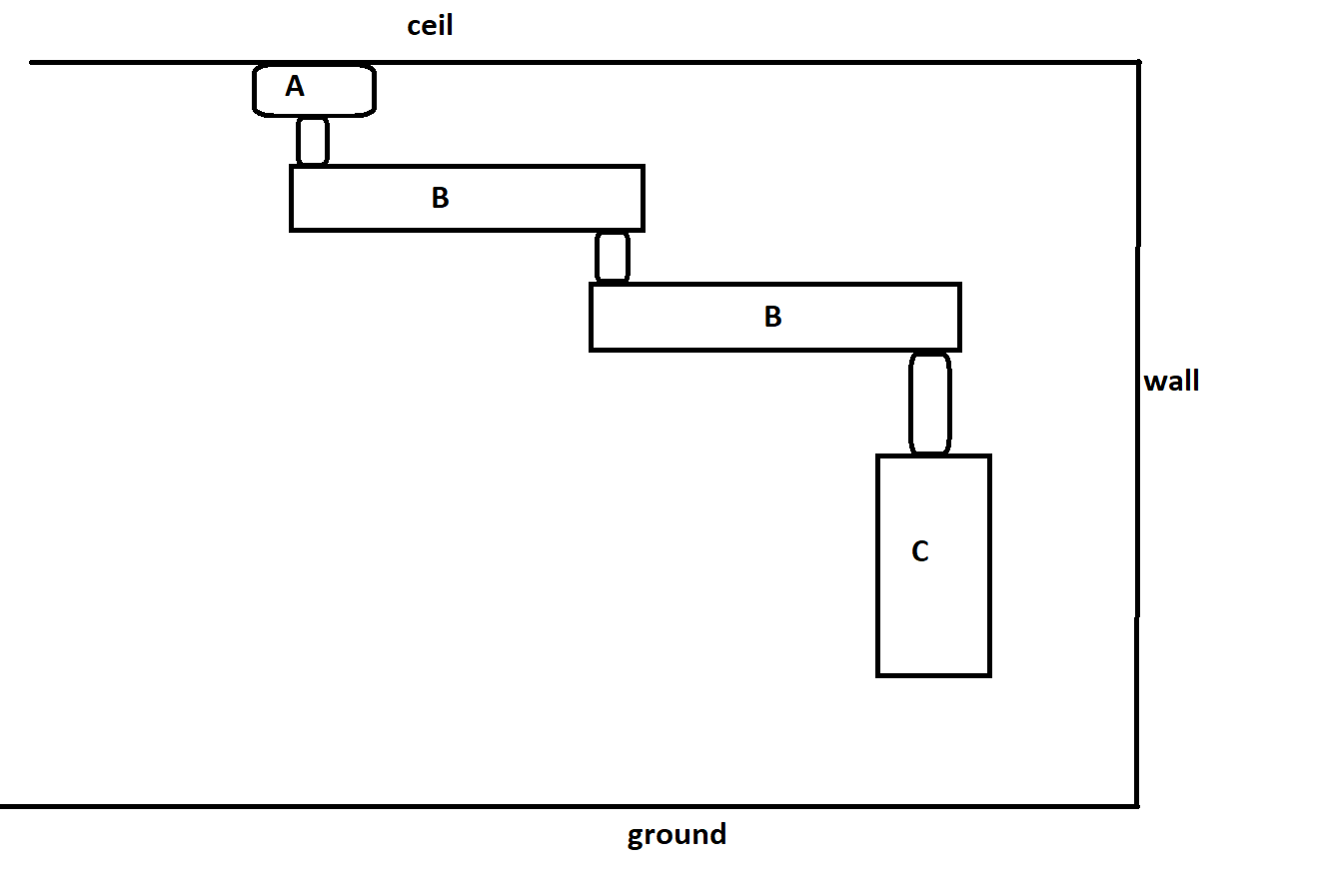
The final project is a bit more difficult because I have configurations like on the image attached to this post.
The objects are attached. The user can translate object A anywhere on the ceil (on z and x axis), and rotate objects B and C around Y axis, and the object must not go through walls.
Anyway, I think I can make it using Hinge Joints + rigidbody/colliders + modifying angular velocity and velocity by code.
So thank you again, now I have a good idea about how to accomplish the whole thing.