Save & Load System on SceneUnloaded, SceneLoaded, and OnApplicationQuit Broke on Android Build

I have followed Trever’s Save and Load System tutorial part 1 and 2 since my game won’t need more save slots (https://youtu.be/aUi9aijvpgs?si=g65R4UurYAgUK9fq). Currently my game needs to save player’s coin amount, each time the player has finished a minigame, they got some coins. I have tested in my Unity that when I changed scene the coin amount was saved (it works totally fine). The problem is that when I build my game for android and tested it in my phone (Samsung S21 FE), the coin gained from minigame won’t saved when the player change scenes. For example, after playing minigame A, I got 100 coins and it shown in the UI of the end game that my coin amoun has been increased. After the minigame ends, I have 2 choices, go back to main screen scene or reload the current minigame scene to play it again. Either choice is loading a new scene right? Now the problem is that either choice I have choosen, my coin amount is then reset back into 0. I don’t have any clue to fix this since the coin saved properly in development. I need this to be fixed ASAP since this is for my uni project and the deadline should be in one week. I will provide my CoinManager script where it handles the player coin amount in game.

using System.Collections;
using System.Collections.Generic;
using Unity.VisualScripting;
using UnityEngine;
using UnityEngine.UI;

public class CoinManager : MonoBehaviour, IDataPersistence
{
    public static CoinManager Instance;
    public int coinAmount;

    private void Awake()
    {
        // If there is an instance, and it's not me, delete myself.

        if (Instance != null && Instance != this)
        {
            Destroy(gameObject);
        }
        else
        {
            Instance = this;
            DontDestroyOnLoad(gameObject);
        }
    }

    private void Start()
    {
        updateUI();
    }

    public void LoadData(GameData data)
    {
        this.coinAmount = data.coinAmount;
        CoinManager.Instance.updateUI();
    }

    public void SaveData(ref GameData data)
    {
        data.coinAmount = this.coinAmount;
    }

    public void addCoin(int coinValue)
    {
        coinAmount += coinValue;
        updateUI();
    }

    public bool canSubstractCoin(int coinValue)
    {
        return coinAmount >= coinValue;
    }

    public void substractCoin(int coinValue)
    {
        if(coinAmount < coinValue)
        {
            Debug.Log("Coin amount not enough to be substracted by "  + coinValue + ".\nCoin Amount value remains = " + coinAmount);
            return;
        }
        coinAmount -= coinValue;
        updateUI();
    }

    public void updateUI()
    {
        CoinUI coin = FindAnyObjectByType<CoinUI>();
        if (coin)
        {
            coin.setText(coinAmount.ToString());
        }
    }
}

that is my CoinManager script, it SaveData method is inherited from IDataPersistence that should be called when SceneUnloaded from my DataPersistenceManager object. The script for DataPersistenManager is the same as Trevor’s shown in his tutorial and yet I don’t know how to fix this problem in Android build :frowning_with_open_mouth:

And for those who wonders the DataPersistenceManager script, here it is:

using System.Collections;
using System.Collections.Generic;
using UnityEngine;
using System.Linq;
using UnityEngine.SceneManagement;

public class DataPersistenceManager : MonoBehaviour
{
    [Header("Debugging")]
    [SerializeField] private bool intializeDataIfNull = false; //true only in development via inspector

    [Header("File Storage Config")]
    [SerializeField] private string fileName;
    [SerializeField] private bool useEncryption;

    private GameData gameData;

    private List<IDataPersistence> dataPersistenceObjects;

    private FileDataHandler dataHandler;

    public static DataPersistenceManager Instance { get; private set; }

    private void Awake()
    {
        if(Instance != null && Instance != this)
        {
            //Debug.LogError("Found more than one Data Persistence in the scene");
            Destroy(gameObject);
            return;
        }
        Instance = this;
        DontDestroyOnLoad(this.gameObject);

        this.dataHandler = new FileDataHandler(Application.persistentDataPath, fileName, useEncryption);
    }

    private void OnEnable()
    {
        SceneManager.sceneLoaded += onSceneLoaded;
        SceneManager.sceneUnloaded += onSceneUnloaded;
    }

    private void OnDisable()
    {
        SceneManager.sceneLoaded -= onSceneLoaded;
        SceneManager.sceneUnloaded -= onSceneUnloaded;
    }

    public void onSceneLoaded(Scene scene, LoadSceneMode mode)
    {
        this.dataPersistenceObjects = FindAllDataPersistenceObjects();
        loadGame();
    }

    public void onSceneUnloaded(Scene scene)
    {
        saveGame();
    }

    public void newGame()
    {
        this.gameData = new GameData();
    }

    public void loadGame()
    {
        this.gameData = dataHandler.Load();

        if(this.gameData == null && intializeDataIfNull)
        {
            newGame();
        }

        if(this.gameData == null)
        {
            Debug.Log("No data was found. A New game needs to be started before data can be loaded.");
            return;
        }

        // push the loaded data to all other scripts that need it
        foreach(IDataPersistence dataPersistenceObj in dataPersistenceObjects)
        {
            dataPersistenceObj.LoadData(gameData);
        }
    }

    public void saveGame()
    {
        if(this.gameData == null)
        {
            Debug.LogWarning("No data was found. A new game must be started before data can be saved.");
            return;
        }

        // pass the data to other script so they can handle it
        foreach (IDataPersistence dataPersistenceObj in dataPersistenceObjects)
        {
            dataPersistenceObj.SaveData(ref gameData);
        }

        // save that data to a file using the data handler
        dataHandler.Save(gameData);
    }

    private void OnApplicationQuit()
    {
        saveGame();
    }

    private List<IDataPersistence> FindAllDataPersistenceObjects()
    {
        IEnumerable<IDataPersistence> dataPersistenceObjects = FindObjectsOfType<MonoBehaviour>().OfType<IDataPersistence>();

        return new List<IDataPersistence>(dataPersistenceObjects);
    }

    public bool HasGameData()
    {
        return this.gameData != null;
    }
}

It works fine in my Unity Editor on development and testing. But the build’s coin system is broken when I tested in my Android phone. I don’t have any clue how to fix this since this only happens in build testing.

And the one who handles the saving into JSON file is my FileDataHandler with this script below:

using System.Collections;
using System.Collections.Generic;
using UnityEngine;
using System;
using System.IO;

public class FileDataHandler
{
    private string dataDirPath = "";
    private string dataFileName = "";
    private bool useEncryption = false;
    private readonly string encryptionCodeWord = "word";

    public FileDataHandler(string dataDirPath, string dataFileName, bool useEncryption)
    {
        this.dataDirPath = dataDirPath;
        this.dataFileName = dataFileName;
        this.useEncryption = useEncryption;
    }

    public GameData Load()
    {
        //use Path.Combine to account from different OS' having different path separators
        string fullPath = Path.Combine(dataDirPath, dataFileName);
        GameData loadedData = null;
        if (File.Exists(fullPath))
        {
            try
            {
                //load the serialized data from the file
                string dataToLoad = "";
                using(FileStream stream = new FileStream(fullPath, FileMode.Open))
                {
                    using (StreamReader reader = new StreamReader(stream))
                    {
                        dataToLoad = reader.ReadToEnd();
                    }
                }

                //optionally decrypt before write the data
                if (useEncryption)
                {
                    dataToLoad = EncryptDecrypt(dataToLoad);
                }

                //deserialize the data from Json back into C# object
                loadedData = JsonUtility.FromJson<GameData>(dataToLoad);
            }
            catch (Exception e)
            {
                Debug.LogError("Error occured when trying to load data from file: " + fullPath + "\n" + e);
            }
        }
        return loadedData;
    }

    public void Save(GameData data)
    {
        //use Path.Combine to account from different OS' having different path separators
        string fullPath = Path.Combine(dataDirPath, dataFileName);

        try
        {
            //Create the directory the file will be written to if it's doesn't already exist
            Directory.CreateDirectory(Path.GetDirectoryName(fullPath));

            // serialize the C# game data object into JSON
            string dataToStore = JsonUtility.ToJson(data, true);

            //optionally use encryption before write the data
            if (useEncryption)
            {
                dataToStore = EncryptDecrypt(dataToStore);
            }

            //write serialized data to a file
            using (FileStream stream = new FileStream(fullPath, FileMode.Create))
            {
                using (StreamWriter writer = new StreamWriter(stream))
                {
                    writer.Write(dataToStore);
                }
            }

        }
        catch (Exception e)
        {
            Debug.LogError("Error occured when trying to save data to file: " + fullPath + "\n" + e);
        }
    }

    private string EncryptDecrypt(string data)
    {
        string modifiedData = "";
        for(int i = 0; i < data.Length; i++)
        {
            modifiedData += (char)(data[i] ^ encryptionCodeWord[i % encryptionCodeWord.Length]);
        }
        return modifiedData;
    }
}

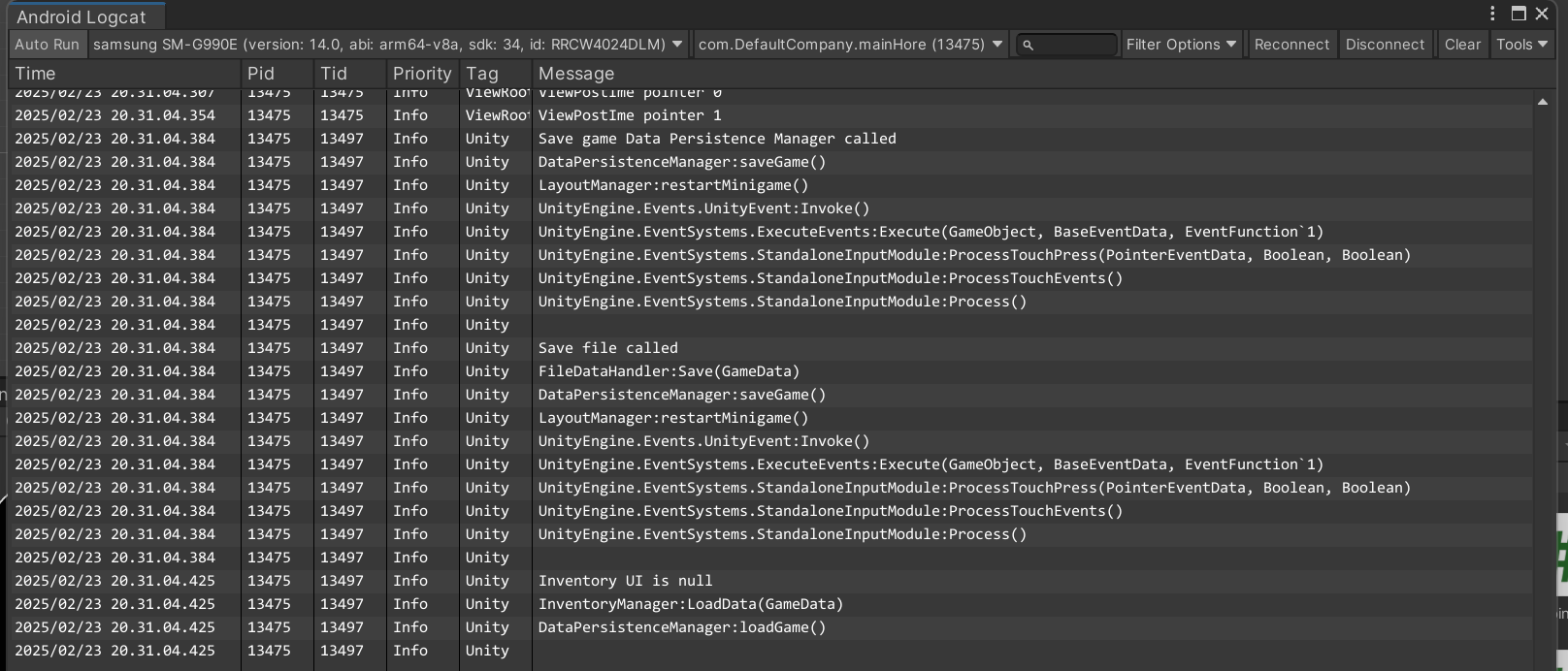
I tried debugging on Android Build using logcat, it seems that my save method are called correctly here, but the coin amount still reset back to 0. This also occurs to other save data like the player skin and inventory.

I tried to debug more and found out that my script called save data twice from my CoinManager. But the problem is that why would there another CoinManager with 0 coinAmount? My CoinManager should be a Singleton and didn’t have any duplicates. I will attach the image below with my CoinManager script. But the problem is this occured on every single script that have SaveData method implemented from IDataPersistence.

using System.Collections;
using System.Collections.Generic;
using Unity.VisualScripting;
using UnityEngine;
using UnityEngine.UI;

public class CoinManager : MonoBehaviour, IDataPersistence
{
    public static CoinManager Instance;
    public int coinAmount;

    private void Awake()
    {
        // If there is an instance, and it's not me, delete myself.

        if (Instance != null && Instance != this)
        {
            Destroy(gameObject);
        }
        else
        {
            Instance = this;
            DontDestroyOnLoad(gameObject);
        }
    }

    private void Start()
    {
        updateUI();
    }

    public void LoadData(GameData data)
    {
        this.coinAmount = data.coinAmount;
        CoinManager.Instance.updateUI();
    }

    public void SaveData(ref GameData data)
    {
        Debug.Log("Data.coinAmount before save: " + data.coinAmount);
        Debug.Log("Save Coin called, coin amount: " + this.coinAmount);
        data.coinAmount = this.coinAmount;
        Debug.Log("Data.coinAmount after save: " + data.coinAmount);
    }

    public void addCoin(int coinValue)
    {
        coinAmount += coinValue;
        updateUI();
    }

    public bool canSubstractCoin(int coinValue)
    {
        return coinAmount >= coinValue;
    }

    public void substractCoin(int coinValue)
    {
        if(coinAmount < coinValue)
        {
            Debug.Log("Coin amount not enough to be substracted by "  + coinValue + ".\nCoin Amount value remains = " + coinAmount);
            return;
        }
        coinAmount -= coinValue;
        updateUI();
    }

    public void updateUI()
    {
        CoinUI coin = FindAnyObjectByType<CoinUI>();
        if (coin)
        {
            coin.setText(coinAmount.ToString());
        }
    }
}

You can debug on device just like in the editor.

Visit Google for how to see console output from builds and even to debug actual builds on device.

Personally I would NEVER do anything like loading / saving in the “edge case” functions of Unity, such as the scene callbacks, OnEnable/OnDisable and / or ApplicationQuit. My reasoning is that it is just “too close to the metal” and too prone to future entanglements.

Be intentional about your loading and your saving: work it into a flow that YOU control explicitly. See below for more information about the key steps.

Sounds like you wrote a bug… and that means… time to start debugging!

By debugging you can find out exactly what your program is doing so you can fix it.

Use the above techniques to get the information you need in order to reason about what the problem is.

You can also use Debug.Log(...); statements to find out if any of your code is even running. Don’t assume it is.

Once you understand what the problem is, you may begin to reason about a solution to the problem.

Remember with Unity the code is only a tiny fraction of the problem space. Everything asset- and scene- wise must also be set up correctly to match the associated code and its assumptions.

Load/Save steps:

An excellent discussion of loading/saving in Unity3D by Xarbrough:

And another excellent set of notes and considerations by karliss_coldwild:

Loading/Saving ScriptableObjects by a proxy identifier such as name:

When loading, you can never re-create a MonoBehaviour or ScriptableObject instance directly from JSON. Save data needs to be all entirely plain C# data with no Unity objects in it.

The reason is they are hybrid C# and native engine objects, and when the JSON package calls new to make one, it cannot make the native engine portion of the object, so you end up with a defective “dead” Unity object.

Instead you must first create the MonoBehaviour using AddComponent() on a GameObject instance, or use ScriptableObject.CreateInstance() to make your SO, then use the appropriate JSON “populate object” call to fill in its public fields.

If you want to use PlayerPrefs to save your game, it’s always better to use a JSON-based wrapper such as this one I forked from a fellow named Brett M Johnson on github:

Do not use the binary formatter/serializer: it is insecure, it cannot be made secure, and it makes debugging very difficult, plus it actually will NOT prevent people from modifying your save data on their computers.

A good summary / survey of the problem space: