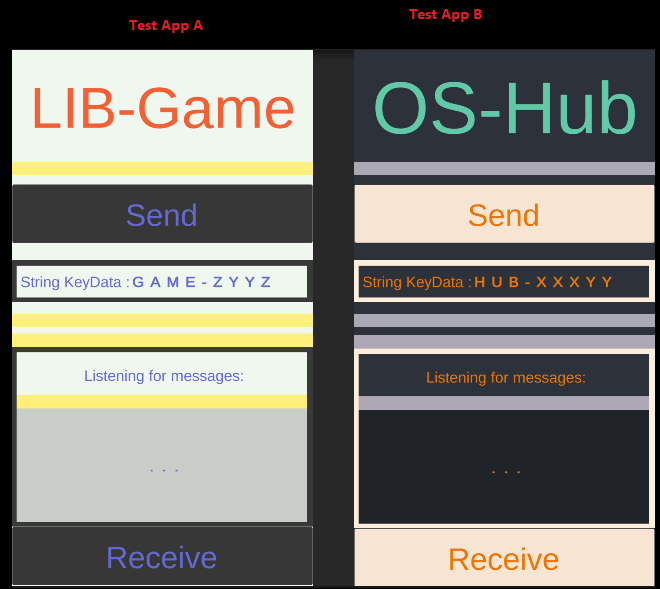
I am trying to send data (simple string in the moment) from app A to app B both built with unity. but its not working. the best solution i found was using “Intent”. but I am still not able to make it work.
this is what I have:
I have a java code with the intent:
import android.app.Activity;
import android.content.Intent;
import android.os.Bundle;

class ShareTextActivity extends Activity {

    @Override
    protected void onCreate(Bundle savedInstanceState) {
        super.onCreate(savedInstanceState);

        String textToShare = "HARDTestData";

        // Create an intent to share text
        Intent shareIntent = new Intent();
        shareIntent.setAction(Intent.ACTION_SEND);
        shareIntent.putExtra(Intent.EXTRA_TEXT, textToShare);
        shareIntent.setType("text/plain");

        // Start activity to share text
        startActivity(Intent.createChooser(shareIntent, "Share text with:"));
        finish(); // close this activity
    }
}
and am trying to send/get call like this:
 private static readonly string _gameAndroidClassName = "com.GameCompany.Game"; // path to java class
private static readonly string _hubAndroidClassName = "com.HubCompany.Hub"; // path to java class
private void ShareIntentData()
{
     //Listener(message);
     try
     {
         if (role == Role.Game)
         {
             AndroidJavaClass androidClass = new AndroidJavaClass(_gameAndroidClassName);
             androidClass.CallStatic("startActivity");
         }
         else
         {
             AndroidJavaClass androidClass = new AndroidJavaClass(_hubAndroidClassName);
             androidClass.CallStatic("startActivity");
         }
         // Start java class to send intent
         Debug.Log("Android test intent activity started");

     }
     catch (Exception e)
     {
         Debug.LogError("Error calling Android function: " + e);
     }
}

public void FetchIntentData()
{
     //AndroidJavaClass unityPlayer = new AndroidJavaClass("com.DefaultCompany.PlaymobilLifeHardwareSoftwareInterface.UnityMainActivityPlaymobil");
     AndroidJavaClass unityPlayer = new AndroidJavaClass("com.unity3d.player.ShareTextActivity");
     AndroidJavaObject currentActivity = unityPlayer.GetStatic<AndroidJavaObject>("currentActivity");

     // Retrieve the intent that started this activity
     AndroidJavaObject intent = currentActivity.Call<AndroidJavaObject>("getIntent");

     if (intent != null)
     {
         // Check if the intent has the data you want (in this case, "EXTRA_TEXT")
         bool hasExtra = intent.Call<bool>("hasExtra", "android.intent.extra.TEXT");

         if (hasExtra)
         {
             // Fetch the shared text data
             string sharedText = intent.Call<string>("getStringExtra", "android.intent.extra.TEXT");

             RecivedString(Role.Hub, sharedText);
             //IntentDisplay.text = sharedText;

             // Use the shared text data in your Unity code
             Debug.Log("Shared Text: " + sharedText);
         }
     }
}
I set the AndroidManifest.xml file like below and it builds and everything . but nothing happens when I call those methods
    <!-- The activity for sending and receiving shared text data -->
    <activity android:name="com.unity3d.player.ShareTextActivity" android:enabled="true"
                android:exported="true">
      <intent-filter>
        <action android:name="android.intent.action.SEND" />
        <category android:name="android.intent.category.DEFAULT" />
        <data android:mimeType="text/plain" />
      </intent-filter>
    </activity>
Logcat is your fried to diagnose the problems.
What I can quikly spot in your C# code:
- you access the classes of your Java activities and call static method startActivity on them, while startActivity is instance method, can only be called on activity object
- you access static field currentActivity from your ShareTextActivity class, which does not have such; currentActivity field is in UnityPlayer class, not elsewhere (unless you add it yourself)
Thanks. I will definitely give it a try. If I get Stuck I will come back XD
I realy dont know what I am doing anymore. I did add the logcat in Unity I created the Java file ShareTextActivity.java set the android manifest and am atempting to do the lines of code but is just not working.
I just wanted to send a string
 from one app to another and I cant achieve it.
this is my android manifest:

[code=CSharp]<?xml version="1.0" encoding="utf-8"?>
<manifest
    xmlns:android="http://schemas.android.com/apk/res/android"
    package="com.unity3d.player"
    xmlns:tools="http://schemas.android.com/tools">

  <application
      android:icon="@mipmap/app_icon"
      android:label="@string/app_name"
      android:theme="@style/UnityThemeSelector">

    <!-- The main Unity activity -->
    <activity android:name="com.unity3d.player.UnityPlayerActivity"
              android:theme="@style/UnityThemeSelector">
      <intent-filter>
        <action android:name="android.intent.action.MAIN" />
        <category android:name="android.intent.category.LAUNCHER" />
      </intent-filter>
      <meta-data android:name="unityplayer.UnityActivity" android:value="true" />
    </activity>

    <!-- The activity for sending and receiving shared text data -->
    <activity android:name="com.unity3d.player.ShareTextActivity" android:enabled="true"
                android:exported="true">
      <intent-filter>
        <action android:name="android.intent.action.SEND" />
        <category android:name="android.intent.category.DEFAULT" />
        <data android:mimeType="text/plain" />
      </intent-filter>
    </activity>
  </application>
</manifest>[/code]

this is a java class I created:

[code=CSharp]package com.unity3d.player;

import android.app.Activity;
import android.content.Intent;
import android.os.Bundle;

public class ShareTextActivity extends Activity {
    @Override
    protected void onCreate(Bundle savedInstanceState) {
        super.onCreate(savedInstanceState);
        // Add your custom code for handling shared text data here
        Intent intent = getIntent();
        if (intent != null && intent.getAction().equals(Intent.ACTION_SEND)) {
            String sharedText = intent.getStringExtra(Intent.EXTRA_TEXT);
            if (sharedText != null) {
                // Handle the shared text data
            }
        }
        finish();
    }
}[/code]
and this is the method that I am calling to send the string:

[code=CSharp]    public void StartShareTextActivity2(string textToShare)
    {
        AndroidJavaObject intentObject = new AndroidJavaObject("android.content.Intent");

        // Set the action and data for the intent
        intentObject.Call<AndroidJavaObject>("setAction", "android.intent.action.SEND");
        intentObject.Call<AndroidJavaObject>("putExtra", "android.intent.extra.TEXT", textToShare);
        intentObject.Call<AndroidJavaObject>("setType", "text/plain");

        // Create a new intent to start the ShareTextActivity
        AndroidJavaObject componentName = new AndroidJavaObject("android.content.ComponentName", _gameAndroidClassName, "com.unity3d.player.ShareTextActivity");
        intentObject.Call<AndroidJavaObject>("setComponent", componentName);

        // Get the currentActivity from UnityPlayer
        AndroidJavaClass unityPlayer = new AndroidJavaClass("com.unity3d.player.UnityPlayer");
        AndroidJavaObject currentActivity = unityPlayer.GetStatic<AndroidJavaObject>("currentActivity");

        // Start the activity
        currentActivity.Call("startActivity", intentObject);

        intentObject.Dispose();
    }[/code]
my lack of knowledge on all this android side is realy hiting hard  but I realy have no clue how to do this. All that I wanted was to send a text from one app to another [I don't really care how]...
forgot to mention the error I am getting from logcat:
2023/10/19 14:45:51.198 12835 12835 Error AndroidRuntime java.lang.RuntimeException: Unable to instantiate activity ComponentInfo{com.GameCompany.Game/com.unity3d.player.ShareTextActivity}: java.lang.ClassNotFoundException: Didn’t find class “com.unity3d.player.ShareTextActivity” on path: DexPathList[[zip file “/data/app/~~O6Js8FLqFSWLVFRTvcQIiw==/com.GameCompany.Game-ahddcyYKj7vGji7PZ7iAXA==/base.apk”],nativeLibraryDirectories=[/data/app/~~O6Js8FLqFSWLVFRTvcQIiw==/com.GameCompany.Game-ahddcyYKj7vGji7PZ7iAXA==/lib/arm, /data/app/~~O6Js8FLqFSWLVFRTvcQIiw==/com.GameCompany.Game-ahddcyYKj7vGji7PZ7iAXA==/base.apk!/lib/armeabi-v7a, /system/lib, /system_ext/lib, /product/lib]]
Is Java class in your application?
Also, have a look at minification settings, maybe class was obfuscated.
I found a way to send intent:
using System.Collections;
using System.Collections.Generic;
using UnityEngine;

public class Intent
{
    static AndroidJavaClass IntentClass;
    static AndroidJavaObject sendIntent;

    static AndroidJavaClass UnityPlayer;
    static AndroidJavaObject currentActivity;

    static bool IsInitialized = false;

    static void Initialize()
    {
        IsInitialized = true;

        string className = "android.content.Intent";
        IntentClass = new AndroidJavaClass(className);

        //Intent sendIntent = new Intent();
        sendIntent = new AndroidJavaObject(className);

        UnityPlayer = new AndroidJavaClass("com.unity3d.player.UnityPlayer");
        currentActivity = UnityPlayer.GetStatic<AndroidJavaObject>("currentActivity");

    }
    public static void IntentShareText(string text)
    {
        if (Application.platform != RuntimePlatform.Android)
        {
            return;
        }

#if UNITY_ANDROID
        if (!IsInitialized)
        {
            Initialize(); // Initialize Android-related objects
        }

        //sendIntent.setAction(Intent.ACTION_SEND);
        sendIntent.Call<AndroidJavaObject>("setAction", IntentClass.GetStatic<string>("ACTION_SEND"));

        //sendIntent.putExtra(Intent.EXTRA_TEXT, textMessage);
        sendIntent.Call<AndroidJavaObject>("putExtra", IntentClass.GetStatic<string>("EXTRA_TEXT"), text);

        //sendIntent.setType("text/plain");
        sendIntent.Call<AndroidJavaObject>("setType", "text/plain");

        //startActivity(sendIntent);
        currentActivity.Call("startActivity", sendIntent);
    }
#endif
}
and than a simple send button:
using System.Collections;
using System.Collections.Generic;
using UnityEngine;

public class IntentShareButton : MonoBehaviour
{
    float score = 10;
    //button press executes this method
    public void OnShareButtonPressed()
    {
        Intent.IntentShareText("This game is awsome! I scored"+ score.ToString()+ "Try it getting at play store: blabla.bla");
    }
}
the new challenge is having the other Unity apk listen to it. still have not figured out