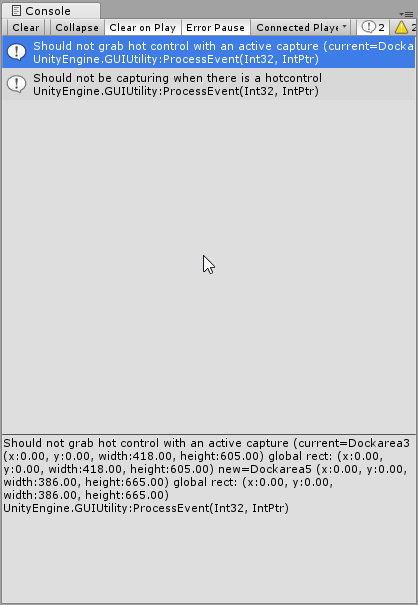
I was making a script, opened Visual Studio, and when done, came back to Unity. Suddenly this appeared in my Unity’s console view:
Should not grab hot control with an active capture (current=Dockarea3 (x:0.00, y:0.00, width:418.00, height:605.00) global rect: (x:0.00, y:0.00, width:418.00, height:605.00) new=Dockarea5 (x:0.00, y:0.00, width:386.00, height:665.00) global rect: (x:0.00, y:0.00, width:386.00, height:665.00)
UnityEngine.GUIUtility:processEvent(Int32, IntPtr)
Should not be capturing when there is a hotcontrol
UnityEngine.GUIUtility:processEvent(Int32, IntPtr)
What is this and what does it exactly mean? Can this be a virus, or spy plugin which keeps making photos of my project, or something internal in Unity and nothing to worry about?
ROFL no this does not mean anyone is spying on you! Might be worth considering less of that special smoke
This is something internal to Unity since the method that has failed is: “UnityEngine.GUIUtility”. Its not anything to worry about, basically your editor flaked out, so one of your windows might have screwed up for a frame and been re-opened but nothing more than that.
It seems to be related to the new UIElements system (persistent editor GUI controls).
Especially in the class UnityEngine.Experimental.UIElements.UIElementsUtility:
It does – It affects the transform gizmo in 2017.1 – I can change toggle the orange selection outline (under Gizmos) and back and suddenly the thing works again. Not really sure what is causing this. D:
-I had a button with a TextMeshPro text.
-Programatically, I told this text (in a row in a table made dinamically) to have a value according to the row at the moment is created (includes some data plus the button).
May be the fact is that it is a button and I should not change the text on the fly
What Unity version are you using? – They’ve changed some stuff in the 2017.x versions that breaks handles. Also, did you use Amplify Shader Editor in the project somewhere?
I am getting the error in the sprite editor. Unity 2018.3.10f1. I was trying to add some larger slices over some existing slices so I can prefab some sprites for interactive items. The error occurs when I try to drag the new slice into position. The sprite data sheet(That lets you manually input position, border, etc) also goes black and moves out of position, until I reselect the slice. Any ideas?
@LazloBonin Seems to be related to the Variables component with Bolt. If I have a lot of variables and the panel is of the variables component is closed, I still seem to be able to click on the dropdowns! I know you sold Bolt but found that bug right now and you might find it interesting. I’ll post the bug to Unity