Skinned Cloth - Tutorials, Tips and Tricks...

I thought it would be helpful to start a thread for those of you who are new to using Skinned Cloth within Unity. With the limited documentation and lack of tutorials online, I thought a thread in which we all can contribute with suggestions, tips and tricks would be beneficial.

I created a character mesh in which I wanted to simulate a semi skin-tight dress, and see how subtle motion would enhance the feel of the outfit. I feel it’s import to start out by understanding what it can and can’t do, based on my experience with it.

You can’t have an animated character, model some clothes for it, and expect the cloth to react to the character mesh. Maybe in 5 years we’ll have that in real-time, but not today! Lets say you have a walk cycle animation for your character. You’ll also need a “walk cycle animation” for your clothing as well. It’s not automatically going to conform to your character mesh. Mega-Fiers should have vertex morphing for skinned models soon, so I hope that will help alleviate having to create all the animations for our characters clothing. Will that work with Skinned Cloth? I have no idea…

You can’t use any custom colliders. So clipping into your character will happen; such as a flowing skirt into it’s legs and long hair into its shoulders and back, etc. You’ll need to use bones/weighting to keep that from happening, and use Skinned Cloth to “enhance” the feel of cloth motion. Any part of the clothing that you’d like to see a lot of movement in, such as flowing skirts for example, you’ll need to keep those polygons a significant distance from the character to avoid clipping.

In order to see your Skinned Cloth react, you’ll need to set up some script to have your character rotate, or play an animation. This seems pretty obvious, but I thought I would throw it out there. Cloth doesn’t move without an external force, aside from gravity on/off within the Skinned Cloth panel and the cube weighting info.

Think of cloth as something elastic. The more you want it to flow with your characters movements, the more stretching between vertices will happen. One thought is to design extra edge loops where you would like the extra movement, like for the bottom of a skirt for example. Also based on your Bending Stiffness and Stretching Stiffness, this will “shrink” or compress your vertices, so you might want to keep that in mind when designing your clothing.

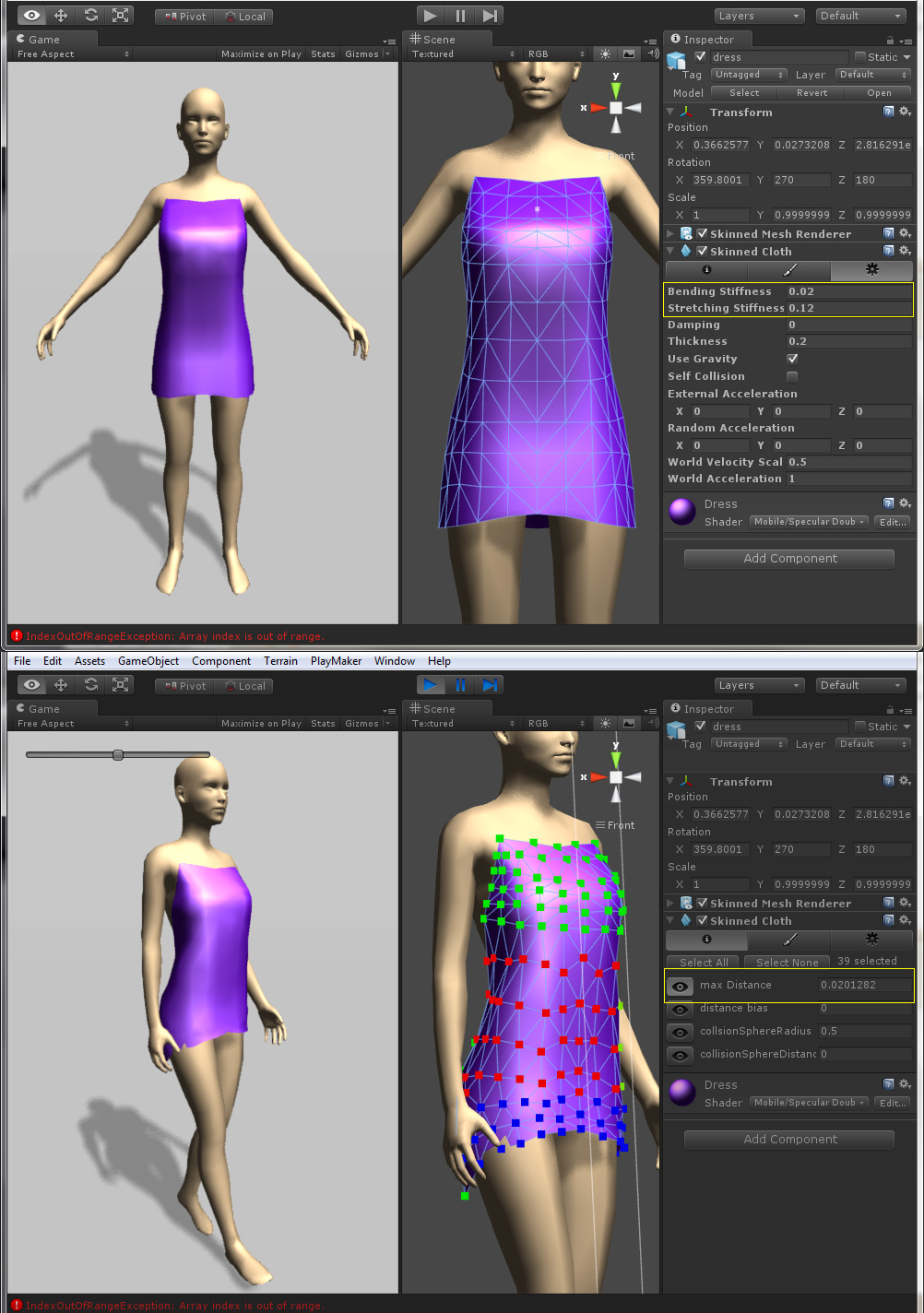
In my example below, it was easier for me to adjust the cloth settings starting from the greatest cloth movement to no movement, working backward. That way I can test how much movement I would want in the skirt, which in my example would have the most cloth movement, and then work up the cloth mesh in which there will be no movement at the top of the dress. Another tip is that any skin tight clothing; like around my character hips, butt and chest, I put a value of 0 since I don’t want any clipping to occur. Plus there really shouldn’t be any cloth movement there anyways, since it is skin tight. The cloth I was trying to simulate was something light and flowing like silk.

The yellow boxes were the only parameters I felt made any sort of difference. The green cubes had a value of 0 in the Max Distance, the red (the cubes selected) had a .02 since I wanted some slight motion in the stomach area, and the blue had a .08 for a more flowing skirt motion. They need some tweaking, both in my skinning and in the Skinned Cloth panels, but it was a good start and the Skinned Cloth gave nice dynamic motion for some visual interest.

And don’t ask me why there are black cubes that you can’t select, that’s a mystery to me. And I did have a couple of problem areas, such as that lower left green cube behaving with it’s own agenda… A bug perhaps?

Anyways I’m new to Skinned Cloth, so this is my 2-cents for playing around with it one evening. Please feel free to leave questions, comments, and/or suggestions/tips for everyone to benefit from!
1 Like

I too am working with the skinned cloth physics, and those black cubes/verts are a real pain, on the dress i’m working with there are many on one side of the chest area and a few at bottom of the dress, The black dots mess it up so badly, making the body protrude through. so buggy in my opinion. I can’t really do much work with my project because of this. I have tried Shroud studio too and right now it doesn’t work for me correctly. sad times for me right now.

please, write a bit about how you made it. something like tutorial, because i can’t understand where to add that skinned cloth component a how to make it working. thank you

Very nice initiative indeed.

But as our buddy above, I would like to see a step by step tutorial on the basics to get this thing working barely. If possible.

But thanks anyway.

It has been a while since I’ve done this, so I’ll do the best I can with remembering…

You’ll need a character with the animations setup. Say you have a character with a walk cycle animation. You’ll also need to “skin” or weight your clothing to your character’s skeleton, and create a walk cycle animation for just the clothing. Bring those both into Unity, drag them into your scene, have the animation loop so you get continuous playback, and you should see your character walking in place as well as your cloth moving with your character. So far so good.

Apply cloth to the actual mesh, not the root in your hierarchy (click the arrow icon to see everything listed). See my screenshot below. In the example below I have my animated character called ‘Woman’, and I dragged ‘Dress’ and made it a child of that. I applied the Skinned Cloth to the actual mesh object. Then follow my steps above to edit the cloth.

I hope that helps!

Soon I’ll update this with my setup using an animated character in Mecanim without actually weighting the cloth. I want to see how Megafiers works in regards to automatically deforming the mesh based on animation and morphing, plus having dynamic cloth on top of that…

(P.S. You can right-click on my image and choose ‘View Image’ or ‘Save Image As…’ depending on your browser to have it enlarged to actual size, in case some had trouble reading it.)

1 Like

Thanks for the info. I’m trying to figure out skinned cloth myself. I looked at the documentation and also this video:

http://vimeo.com/28853662

The problem I am facing is that when I try to paint properties, I don’t actually see those boxes come up on the vertices of my objects. Is there something I need to do in order to make them show up? My scale is set to 0.0254 0.0254 0.0254.

Any thoughts?

Thank you.

Adnan

Off the top of my head, try to apply the cloth to the actual mesh of your clothing and not to the “group”. See my second screenshot. You’ll notice the stack of the dress is expanded in the screenshot, and the ‘dress’ mesh is selected in the Pelvis stack. I hope that helps!

hello adamz, thank you very much for the tutorial. Lets say i have a single a walk animation, and 10 different skirts. Do i have to attach every skirt and recreate the animation? After every skirt is animated how do i use it in skinned cloth?

Well with the method above, every skirt would need the walk animation applied, and then you would attach the Skinned Cloth to the mesh object in the model drop-down (see my comment above). After that you should be able to follow my steps in the first post.

Another option in which I’m playing around with is using MegaFiers to create morph targets for changing my character shape, and then use MegaFiers “Wrap” to automatically deform the clothing around my character so I don’t have to animate every single piece of cloth with every animation my character has. So if would be automatic. After I would apply the Skinned Cloth and adjust the areas in which I’d like the cloth simulation applied. Here is their working example from the MegaFiers site to see what I mean: Unity Web Player | WebPlayer This of course doesn’t have the Skinned Cloth applied, just MegaFiers morph and warp in action.

I know in his example there are some intersecting issues with the model and cloth, but you should be able to resolve those issues by making sure the cloth vertexes are close to the models vertexes. One example I had working flawlessly is a skin tight bodysuit. I was able to clone my character mesh, delete the head, hands, and feet, scale the bodysuit larger, fix some vertex scaling issues, and apply the warp. With this method the vertexes of both the model and bodysuit mesh are close enough so when you apply the warp it will follow the character animation perfectly. I might have some time this weekend to test this with Skinned Cloth. If and when I do I’ll post my results here.

Ok, if i use the skinned cloth method, to i have to sync the cloth animation with the body animation? Some times the cloth delays a bit.

I don’t know anything about syncing animations to make sure they’re played at the exact same time, sorry.

Megafiers looks like the better way to go than skinned cloth for tight fitting clothes. For loose robes such skinned cloth seems to be okay. Wish they had a Maya-like nCloth system in Unity …

No i mean, since the cloth has the same animation with the body, i have to play both of them ever time right?

I hope it doesn’t seem like hijacking the thread, but I’ve recently gotten curious about this too…

Has anyone tried the Shroud system? Apparently it’s free for indie developers, though the editor tool (Shroud Studio) requires Windows, so it’s not of much use to me. :frowning: I’m curious how its features and performance compare to the built-in Unity interactive cloth and skinned cloth.

It sounds like with Shroud, you really can just drape clothing over an animated character, and have it drape and react properly in real time. Sounds like a huge time saver. But I don’t yet know how much of that is hype, and how much is real.

On a related note, is anyone aware of open-source code to simulate cloth in Unity directly in C#? The basic ideas aren’t all that complex, though doing it efficiently (and especially handling collisions) gets hairy pretty fast… still it might be fun to play with some code.

Currently looking at skinned cloth for a hair simulation, and found this in the Spanish documentation (but it’s in English!):
http://docs.unity3d.com/es/current/Manual/class-SkinnedCloth.html

Anyone have any documentation for Unity5? I am having an issue with root bone assignment. If I assign the root bone my clothing meshes are in the correct position but do not follow the character animation. If I set the root to the pelvis the clothing meshes follow the animations but the whole set has the same transform as the pelvis. so the clothes are start half way up the model. Anyone have any thoughts? or links to help out? thanks

Tankyou

Hi
Please give me some advice.
I need to record a video from Unity scene and play it in the loop. There are Clothes on the scene (curtains, which look like blowing in the wind). How to set up Clothes (or make sth from the code) to get the first and last frame of recording to have these curtains in the same position?