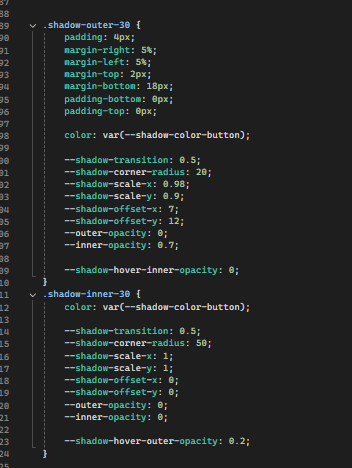
Here my version that works with the new filter blur
/* MIT License

Copyright (c) 2022 David Tattersall

Permission is hereby granted, free of charge, to any person obtaining a copy
of this software and associated documentation files (the "Software"), to deal
in the Software without restriction, including without limitation the rights
to use, copy, modify, merge, publish, distribute, sublicense, and/or sell
copies of the Software, and to permit persons to whom the Software is
furnished to do so, subject to the following conditions:
The above copyright notice and this permission notice shall be included in all
copies or substantial portions of the Software.
THE SOFTWARE IS PROVIDED "AS IS", WITHOUT WARRANTY OF ANY KIND, EXPRESS OR
IMPLIED, INCLUDING BUT NOT LIMITED TO THE WARRANTIES OF MERCHANTABILITY,
FITNESS FOR A PARTICULAR PURPOSE AND NONINFRINGEMENT. IN NO EVENT SHALL THE
AUTHORS OR COPYRIGHT HOLDERS BE LIABLE FOR ANY CLAIM, DAMAGES OR OTHER
LIABILITY, WHETHER IN AN ACTION OF CONTRACT, TORT OR OTHERWISE, ARISING FROM,
OUT OF OR IN CONNECTION WITH THE SOFTWARE OR THE USE OR OTHER DEALINGS IN THE
SOFTWARE. */
using System.Collections.Generic;
using UnityEngine;
using UnityEngine.UIElements;
using Unity.Collections;
using System;
namespace TLM.UI.Controls
{
[UxmlElement]
public partial class Shadow : VisualElement
{
private NativeArray<Vertex> k_Vertices;
private bool init = false;
private Color outerColor;
private Color innerColor;
private VisualElement targetButton;
private float outerColorTransparence = 0f;
private float innerColorTransparence = 1f;
// For keeping track of original values for unhover
private float originalSpread;
private float originalCornerRadius;
private float originalOffsetX;
private float originalOffsetY;
private float originalOuterTransparence;
private float originalInnerTransparence;
// Have changed all ints to floats because "experimental.animation.Start" can't take int
public Color shadowColor { get; set; }
[UxmlAttribute("shadow-transition")]
public float shadowTransition { get; set; }
[UxmlAttribute("shadow-corner-radius")]
public float shadowCornerRadius { get; set; } = 10;
[UxmlAttribute("shadow-spread")]
public float shadowSpread { get; set; } = 10f;
[UxmlAttribute("shadow-offset-x")]
public float shadowOffsetX { get; set; } = 0;
[UxmlAttribute("shadow-offset-y")]
public float shadowOffsetY { get; set; } = 0;
public int shadowCornerSubdivisions => 3;
// Custom style properties (base state)
private static readonly CustomStyleProperty<Color> _shadowColorProperty = new CustomStyleProperty<Color>("--shadow-color");
private static readonly CustomStyleProperty<float> _shadowTransitionProperty = new CustomStyleProperty<float>("--shadow-transition");
private static readonly CustomStyleProperty<float> _shadowCornerRadiusProperty = new CustomStyleProperty<float>("--shadow-corner-radius");
private static readonly CustomStyleProperty<float> _shadowSpreadProperty = new CustomStyleProperty<float>("--shadow-spread");
private static readonly CustomStyleProperty<float> _shadowOffsetXProperty = new CustomStyleProperty<float>("--shadow-offset-x");
private static readonly CustomStyleProperty<float> _shadowOffsetYProperty = new CustomStyleProperty<float>("--shadow-offset-y");
private static readonly CustomStyleProperty<float> _outerOpacityProperty = new CustomStyleProperty<float>("--outer-opacity");
private static readonly CustomStyleProperty<float> _innerOpacityProperty = new CustomStyleProperty<float>("--inner-opacity");
// Custom style properties (hover state)
private static readonly CustomStyleProperty<Color> _shadowHoverColorProperty = new CustomStyleProperty<Color>("--shadow-hover-color");
private static readonly CustomStyleProperty<float> _shadowHoverScaleProperty = new CustomStyleProperty<float>("--shadow-hover-scale");
private static readonly CustomStyleProperty<float> _shadowHoverCornerRadiusProperty = new CustomStyleProperty<float>("--shadow-hover-corner-radius");
private static readonly CustomStyleProperty<float> _shadowHoverOffsetXProperty = new CustomStyleProperty<float>("--shadow-hover-offset-x");
private static readonly CustomStyleProperty<float> _shadowHoverOffsetYProperty = new CustomStyleProperty<float>("--shadow-hover-offset-y");
private static readonly CustomStyleProperty<float> _shadowHoverOuterOpacityProperty = new CustomStyleProperty<float>("--shadow-hover-outer-opacity");
private static readonly CustomStyleProperty<float> _shadowHoverInnerOpacityProperty = new CustomStyleProperty<float>("--shadow-hover-inner-opacity");
public Shadow()
{
generateVisualContent += OnGenerateVisualContent;
RegisterCallback<CustomStyleResolvedEvent>(OnCustomStyleResolved);
RegisterCallback<GeometryChangedEvent>(e => Init());
}
public Shadow(VisualElement button)
{
targetButton = button;
generateVisualContent += OnGenerateVisualContent;
RegisterCallback<CustomStyleResolvedEvent>(OnCustomStyleResolved);
RegisterCallback<GeometryChangedEvent>(e => Init());
}
private void OnGenerateVisualContent(MeshGenerationContext ctx)
{
if (!init) Init();
outerColor = new(resolvedStyle.color.r, resolvedStyle.color.g, resolvedStyle.color.b, outerColorTransparence);
innerColor = new(resolvedStyle.color.r, resolvedStyle.color.g, resolvedStyle.color.b, innerColorTransparence);
Rect r = contentRect;
// The element is expanded outward by 'expand' on all sides so that
// shadow geometry stays within the element rect (required for blur filters).
float expand = shadowSpread + Mathf.Max(Mathf.Abs(shadowOffsetX), Mathf.Abs(shadowOffsetY));
// Inner rect = parent element bounds, inset by 'expand' within our expanded rect
float innerLeft = expand;
float innerRight = r.width - expand;
float innerTop = expand;
float innerBottom = r.height - expand;
float left = innerLeft;
float right = innerRight;
float top = innerTop;
float bottom = innerBottom;
float halfSpread = (shadowCornerRadius / 2f);
int curveSubdivisions = this.shadowCornerSubdivisions;
int totalVertices = 12 + ((curveSubdivisions - 1) * 4);
k_Vertices = new NativeArray<Vertex>(totalVertices, Allocator.Temp);
var vertex = k_Vertices[0];
vertex.position = new Vector3(left + halfSpread, bottom + halfSpread, Vertex.nearZ);
vertex.tint = outerColor;
k_Vertices[0] = vertex;
vertex = k_Vertices[1];
vertex.position = new Vector3(left + halfSpread, top - halfSpread, Vertex.nearZ);
vertex.tint = outerColor;
k_Vertices[1] = vertex;
vertex = k_Vertices[2];
vertex.position = new Vector3(right - halfSpread, top - halfSpread, Vertex.nearZ);
vertex.tint = outerColor;
k_Vertices[2] = vertex;
vertex = k_Vertices[3];
vertex.position = new Vector3(right - halfSpread, bottom + halfSpread, Vertex.nearZ);
vertex.tint = outerColor;
k_Vertices[3] = vertex;
vertex = k_Vertices[8];
vertex.position = new Vector3(right + halfSpread, bottom - halfSpread, Vertex.nearZ);
vertex.tint = outerColor;
k_Vertices[8] = vertex;
vertex = k_Vertices[9];
vertex.position = new Vector3(left - halfSpread, bottom - halfSpread, Vertex.nearZ);
vertex.tint = outerColor;
k_Vertices[9] = vertex;
vertex = k_Vertices[10];
vertex.position = new Vector3(left - halfSpread, top + halfSpread, Vertex.nearZ);
vertex.tint = outerColor;
k_Vertices[10] = vertex;
vertex = k_Vertices[11];
vertex.position = new Vector3(right + halfSpread, top + halfSpread, Vertex.nearZ);
vertex.tint = outerColor;
k_Vertices[11] = vertex;
// Inside rectangle
vertex = k_Vertices[4];
vertex.position = new Vector3(innerLeft, innerBottom, Vertex.nearZ);
vertex.tint = innerColor;
k_Vertices[4] = vertex;
vertex = k_Vertices[5];
vertex.position = new Vector3(innerLeft, innerTop, Vertex.nearZ);
vertex.tint = innerColor;
k_Vertices[5] = vertex;
vertex = k_Vertices[6];
vertex.position = new Vector3(innerRight, innerTop, Vertex.nearZ);
vertex.tint = innerColor;
k_Vertices[6] = vertex;
vertex = k_Vertices[7];
vertex.position = new Vector3(innerRight, innerBottom, Vertex.nearZ);
vertex.tint = innerColor;
k_Vertices[7] = vertex;
// Top right corner
for (int i = 0; i < curveSubdivisions - 1; i++)
{
int vertexId = 12 + i;
float angle = (Mathf.PI * 0.5f / curveSubdivisions) + (Mathf.PI * 0.5f / curveSubdivisions) * i;
var vert = k_Vertices[vertexId];
vert.position = new Vector3(innerRight - halfSpread + Mathf.Sin(angle) * shadowCornerRadius, innerTop + halfSpread + (-Mathf.Cos(angle) * shadowCornerRadius), Vertex.nearZ);
vert.tint = outerColor;
k_Vertices[vertexId] = vert;
}
// Bottom right corner
for (int i = 0; i < curveSubdivisions - 1; i++)
{
int vertexId = 12 + i + (curveSubdivisions - 1);
float angle = (Mathf.PI * 0.5f) + (Mathf.PI * 0.5f / curveSubdivisions) + (Mathf.PI * 0.5f / curveSubdivisions) * i;
var vert = k_Vertices[vertexId];
vert.position = new Vector3(innerRight - halfSpread + Mathf.Sin(angle) * shadowCornerRadius, innerBottom - halfSpread + (-Mathf.Cos(angle) * shadowCornerRadius), Vertex.nearZ);
vert.tint = outerColor;
k_Vertices[vertexId] = vert;
}
// Bottom left corner
for (int i = 0; i < curveSubdivisions - 1; i++)
{
int vertexId = 12 + i + (curveSubdivisions - 1) * 2;
float angle = (Mathf.PI) + (Mathf.PI * 0.5f / curveSubdivisions) + (Mathf.PI * 0.5f / curveSubdivisions) * i;
var vert = k_Vertices[vertexId];
vert.position = new Vector3(innerLeft + halfSpread + Mathf.Sin(angle) * shadowCornerRadius, innerBottom - halfSpread + (-Mathf.Cos(angle) * shadowCornerRadius), Vertex.nearZ);
vert.tint = outerColor;
k_Vertices[vertexId] = vert;
}
// Top left corner
for (int i = 0; i < curveSubdivisions - 1; i++)
{
int vertexId = 12 + i + (curveSubdivisions - 1) * 3;
float angle = (Mathf.PI * 1.5f) + (Mathf.PI * 0.5f / curveSubdivisions) + (Mathf.PI * 0.5f / curveSubdivisions) * i;
var vert = k_Vertices[vertexId];
vert.position = new Vector3(innerLeft + halfSpread + Mathf.Sin(angle) * shadowCornerRadius, innerTop + halfSpread + (-Mathf.Cos(angle) * shadowCornerRadius), Vertex.nearZ);
vert.tint = outerColor;
k_Vertices[vertexId] = vert;
}
float innerCenterX = (innerLeft + innerRight) * 0.5f;
float innerCenterY = (innerTop + innerBottom) * 0.5f;
for (int i = 0; i < k_Vertices.Length; i++)
{
// Do not scale the inner rectangle
var vert = k_Vertices[i];
vert.position = vert.position + new Vector3(shadowOffsetX, shadowOffsetY, 0);
if (i >= 4 && i <= 7)
{
// Do nothing
}
else
{
float xDirection = vert.position.x < innerCenterX + shadowOffsetX ? -shadowSpread : shadowSpread;
float yDirection = vert.position.y < innerCenterY + shadowOffsetY ? -shadowSpread : shadowSpread;
vert.position += new Vector3(xDirection, yDirection, 0);
}
// Scale verticles using scale factor
k_Vertices[i] = vert;
}
List<ushort> tris = new List<ushort>();
tris.AddRange(new ushort[]{
1,6,5,
2,6,1,
6,11,8,
6,8,7,
4,7,3,
4,3,0,
10,5,4,
10,4,9,
// 5,6,4,
// 6,7,4,
});
for (ushort i = 0; i < curveSubdivisions; i++)
{
if (i == 0)
{
tris.AddRange(new ushort[] { 2, 12, 6 });
}
else if (i == curveSubdivisions - 1)
{
tris.AddRange(new ushort[] { (ushort)(12 + i - 1), 11, 6 });
}
else
{
tris.AddRange(new ushort[] { (ushort)(12 + i - 1), (ushort)(12 + i), 6 });
}
}
for (ushort i = 0; i < curveSubdivisions; i++)
{
if (i == 0)
{
tris.AddRange(new ushort[] { 7, 8, 14 });
}
else if (i == curveSubdivisions - 1)
{
tris.AddRange(new ushort[] { (ushort)(12 + i - 1 + (curveSubdivisions - 1)), 3, 7 });
}
else
{
tris.AddRange(new ushort[] { (ushort)(12 + i - 1 + (curveSubdivisions - 1)), (ushort)(12 + i + (curveSubdivisions - 1)), 7 });
}
}
for (ushort i = 0; i < curveSubdivisions; i++)
{
if (i == 0)
{
tris.AddRange(new ushort[] { 4, 0, 16 });
}
else if (i == curveSubdivisions - 1)
{
tris.AddRange(new ushort[] { (ushort)(12 + i - 1 + 2 * (curveSubdivisions - 1)), 9, 4 });
}
else
{
tris.AddRange(new ushort[] { (ushort)(12 + i - 1 + 2 * (curveSubdivisions - 1)), (ushort)(12 + i + (2 * (curveSubdivisions - 1))), 4 });
}
}
for (ushort i = 0; i < curveSubdivisions; i++)
{
if (i == 0)
{
tris.AddRange(new ushort[] { 5, 10, 18 });
}
else if (i == curveSubdivisions - 1)
{
tris.AddRange(new ushort[] { (ushort)(12 + i - 1 + 3 * (curveSubdivisions - 1)), 1, 5 });
}
else
{
tris.AddRange(new ushort[] { (ushort)(12 + i - 1 + 3 * (curveSubdivisions - 1)), (ushort)(12 + i + 3 * (curveSubdivisions - 1)), 5 });
}
}
MeshWriteData mwd = ctx.Allocate(k_Vertices.Length, tris.Count);
mwd.SetAllVertices(k_Vertices);
mwd.SetAllIndices(tris.ToArray());
k_Vertices.Dispose();
}
// Init values here instead of constructor because there are empty on moment then class created
public void Init()
{
init = true;
shadowColor = style.color.value;
originalSpread = shadowSpread;
originalCornerRadius = shadowCornerRadius;
originalOffsetX = shadowOffsetX;
originalOffsetY = shadowOffsetY;
originalOuterTransparence = outerColorTransparence;
originalInnerTransparence = innerColorTransparence;
}
public void InnerPosition()
{
float expand = shadowSpread + Mathf.Max(Mathf.Abs(shadowOffsetX), Mathf.Abs(shadowOffsetY));
style.position = Position.Absolute;
style.overflow = Overflow.Visible;
style.left = -expand;
style.top = -expand;
style.right = -expand;
style.bottom = -expand;
style.width = StyleKeyword.Auto;
style.height = StyleKeyword.Auto;
}
public void AddHoverColor(Color hoverColor)
{
RegisterCallback<MouseEnterEvent>(evt =>
experimental.animation.Start(
from: shadowColor,
to: hoverColor,
durationMs: (int)(shadowTransition * 1000),
onValueChanged: (e, color) => { style.color = color; }
));
RegisterCallback<MouseLeaveEvent>(evt =>
experimental.animation.Start(
from: hoverColor,
to: shadowColor,
durationMs: (int)(shadowTransition * 1000),
onValueChanged: (e, color) => { style.color = color; }
));
}
public void AddScaleTransition(float spread) =>
StartAnimation(spread, () => shadowSpread, () => originalSpread, spread => shadowSpread = spread);
public void AddCornerRadiusTransition(float CornerRadius) =>
StartAnimation(CornerRadius, () => shadowCornerRadius, () => originalCornerRadius, CornerRadius => shadowCornerRadius = CornerRadius);
public void AddOffsetYTransition(float OffsetY) =>
StartAnimation(OffsetY, () => shadowOffsetY, () => originalOffsetY, OffsetY => shadowOffsetY = OffsetY);
public void AddOffsetXTransition(float OffsetX) =>
StartAnimation(OffsetX, () => shadowOffsetX, () => originalOffsetX, OffsetX => shadowOffsetX = OffsetX);
public void InnerOpacityTransition(float Inner) =>
StartAnimation(Inner, () => innerColorTransparence, () => originalInnerTransparence, Inner => innerColorTransparence = Inner);
public void OuterOpacityTransition(float Outer) =>
StartAnimation(Outer, () => outerColorTransparence, () => originalOuterTransparence, Outer => outerColorTransparence = Outer);
public void AddOffsetTransition(float OffsetX, float OffsetY)
{
AddOffsetXTransition(OffsetX);
AddOffsetYTransition(OffsetY);
}
// Without MarkDirty will not update float
public void StartAnimation(float hoverValue, Func<float> currentValue, Func<float> original, Action<float> updateField)
{
if (targetButton == null) return;
targetButton.RegisterCallback<MouseEnterEvent>(evt =>
{
if (original() != currentValue())
{
updateField(original());
MarkDirtyRepaint();
}
;
experimental.animation.Start(
from: original(),
to: hoverValue,
durationMs: (int)(shadowTransition * 1000),
onValueChanged: (e, hoverValue) =>
{
updateField(hoverValue);
InnerPosition();
MarkDirtyRepaint();
}
);
}
);
targetButton.RegisterCallback<MouseLeaveEvent>(evt =>
{
if (hoverValue != currentValue())
{
updateField(hoverValue);
MarkDirtyRepaint();
}
;
experimental.animation.Start(
from: hoverValue,
to: original(),
durationMs: (int)(shadowTransition * 1000),
onValueChanged: (e, hoverValue) =>
{
updateField(hoverValue);
InnerPosition();
MarkDirtyRepaint();
}
);
}
);
}
private void OnCustomStyleResolved(CustomStyleResolvedEvent e)
{
ICustomStyle styles = e.customStyle;
// Base properties
if (styles.TryGetValue(_shadowColorProperty, out Color color)) shadowColor = color;
if (styles.TryGetValue(_shadowTransitionProperty, out float transition)) shadowTransition = transition;
if (styles.TryGetValue(_shadowCornerRadiusProperty, out float radius)) shadowCornerRadius = radius;
if (styles.TryGetValue(_shadowSpreadProperty, out float spread)) shadowSpread = spread;
if (styles.TryGetValue(_shadowOffsetXProperty, out float offsetX)) shadowOffsetX = offsetX;
if (styles.TryGetValue(_shadowOffsetYProperty, out float offsetY)) shadowOffsetY = offsetY;
if (styles.TryGetValue(_outerOpacityProperty, out float outerOpacity)) outerColorTransparence = outerOpacity;
if (styles.TryGetValue(_innerOpacityProperty, out float innerOpacity)) innerColorTransparence = innerOpacity;
// Hover properties (apply transitions if defined)
if (styles.TryGetValue(_shadowHoverColorProperty, out Color hoverColor)) AddHoverColor(hoverColor);
if (styles.TryGetValue(_shadowHoverScaleProperty, out float hoverScale)) AddScaleTransition(hoverScale);
if (styles.TryGetValue(_shadowHoverCornerRadiusProperty, out float hoverRadius)) AddCornerRadiusTransition(hoverRadius);
if (styles.TryGetValue(_shadowHoverOffsetXProperty, out float hoverOffsetX)) AddOffsetXTransition(hoverOffsetX);
if (styles.TryGetValue(_shadowHoverOffsetYProperty, out float hoverOffsetY)) AddOffsetYTransition(hoverOffsetY);
if (styles.TryGetValue(_shadowHoverOuterOpacityProperty, out float hoverOuterOpacity)) OuterOpacityTransition(hoverOuterOpacity);
if (styles.TryGetValue(_shadowHoverInnerOpacityProperty, out float hoverInnerOpacity)) InnerOpacityTransition(hoverInnerOpacity);
}
}
}