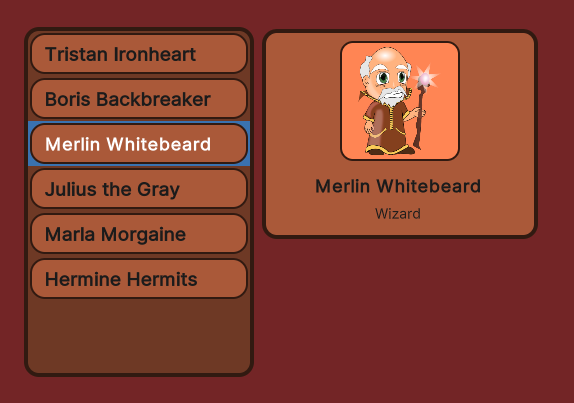
Is there a supported way to add spacing in-between elements in a ListView? There is no property on the ListView class and adding margin to items does not work either.
This seems like a pretty trivial thing to do so I’m wondering how can I achieve this?
Yes I’m sure, look how there is no spacing in between the items with the first item selected and the mouse over the second item. The .unity-collection-view__item is the VisualElement that has the styles, and as far as I’m aware there is no way to remove the background style from it and move it to a child element.
In my very first comment I advised reading few sentences from the documentation page - not out of rudeness but to help you better understand what ListView’s item height is
It is certainly my fault for not being very verbose about this from the beginning as this might be obvious to programmers and totally opaque for others:
For performance reasons item height is not influenced by style.
That being said, with enough css/uss magic skills, you can still make ListViewlook like this is not the case. I showed you part of the answer so you can know that :hover (style) and selection (programming) can be addressed as well.
Another important point:
You don’t have to use ListView here.
ListView is built for specific use cases in mind and is not suitable for all the cases people come up with. Nothing stops you from creating your own scrollable rect with bunch of 100% style-customized Buttons with spacing and :hover states working as you need them to.
Not trying to sound rude here either, but I have read that entire page.
The documentation says nothing about the height not being influenced by styles.
As far as I know, the only way to make the hover and selection style work on a child element is to completely remove the background-color from all pseudo states of .unity-collection-view__item and .unity-collection-view__item--selected and essentially reimplement the logic in C# with custom uss classes and apply them manually when appropriate. Which is a lot of work just to get some spacing in-between items. In an ideal world the ListView would just have a property to set spacing that way the built in uss classes can just be styled without having to reimplement the logic of applying custom styles for selection.
And yes I’m aware, but you then lose out on virtualization.
This does not seem to be working in the latest Unity version. Is there any alternative?
EDIT: I stand corrected. I was creating my items in code and did not notice that the content needs to be wrapped in a TemplateContainer (or probably any visual element)