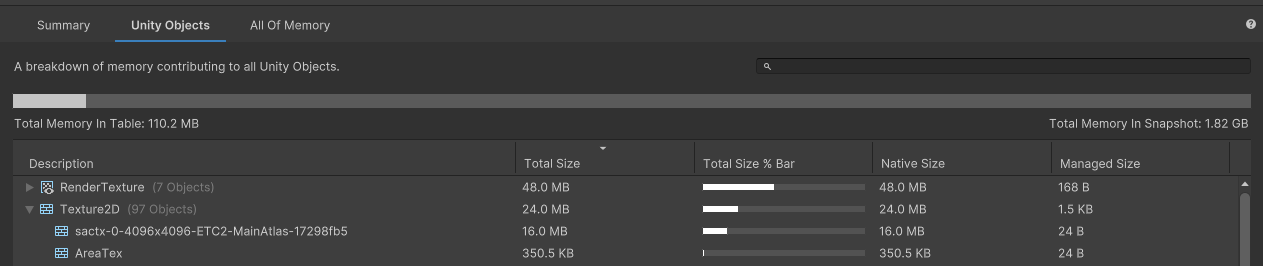
Thanks for the discussion here, guys. After reading and testing a lot about SpriteAtlas duplicated into memory, I just found this Article: https://support.unity.com/hc/en-us/articles/360000665546, and realized how to solve my specific problem.
My problem was:
- Both my SpriteAtlas A and B were getting loaded into memory in my Login scene, even when the login scene uses sprites only from Sprite Atlas A.
- At the same time, the SpriteAtlas A was duplicated into memory, using 32 MB of Ram since its size is 16 MB.
Also, when loading the next scene, which really uses both SpriteAtlases, both of them were duplicated.
To solve that issue, my setup looks like that:
- Mark the SpriteAtlas as Addressable.
- Mark all the source sprites as Addressable as well.
- They are in the Textures group, which has the
Build Mode set to Pack Separately, so that the source sprites go into bundle A and the SpriteAtlas will go into bundle B.
When building the Addressables, the SpriteAtlas need to have the Include In Build flag set to true.
When building the App, it needs to be set to false.
Now, when I use the Memory Profiler to inspect the assets loaded into memory, I do not see the SpriteAtlas duplicated anymore 
In case you find it useful, just add those Pre/Postprocess build scripts and then everything will be automatic:
using UnityEditor.Build;
using UnityEditor.Build.Reporting;
using UnityEngine;

namespace YourNamespace
{
    public class SpriteAtlasPostprocessBuild : IPostprocessBuildWithReport
    {
        public int callbackOrder { get; } = 0;

        public void OnPostprocessBuild(BuildReport report)
        {
            Debug.Log(
                "When loading the sprite atlases via Addressable, we should avoid they getting build into the app. " +
                "Otherwise, the sprite atlases will get loaded into memory twice.");

            Debug.Log("Set the `IncludeInBuild` flag to `true` for all sprite atlases after finishing the App build.");
            SpriteAtlasUtils.SetAllIncludeInBuild(true);
        }
    }
}
using UnityEditor.Build;
using UnityEditor.Build.Reporting;
using UnityEngine;

namespace YourNamespace
{
    public class SpriteAtlasPreprocessBuild : IPreprocessBuildWithReport
    {
        public int callbackOrder { get; } = int.MinValue;

        public void OnPreprocessBuild(BuildReport report)
        {
            Debug.Log("##### SpriteAtlas PreprocessBuild start ######");

            Debug.Log(
                "When loading the sprite atlases via Addressable, we should avoid they getting build into the app. " +
                "Otherwise, the sprite atlases will get loaded into memory twice.");

            Debug.Log("Set the `IncludeInBuild` flag to `false` for all sprite atlases before starting the App build.");
            SpriteAtlasUtils.SetAllIncludeInBuild(false);

            Debug.Log("##### SpriteAtlas PreprocessBuild end ######");
        }
    }
}
using System;
using System.Linq;
using UnityEditor;
using UnityEngine.U2D;

namespace YourNamespace
{
    public static class SpriteAtlasUtils
    {
        public static void SetAllIncludeInBuild(bool enable)
        {
            SpriteAtlas[] spriteAtlases = LoadSpriteAtlases();

            foreach (SpriteAtlas atlas in spriteAtlases)
            {
                SetIncludeInBuild(atlas, enable);
            }
        }

        private static void SetIncludeInBuild(SpriteAtlas spriteAtlas, bool enable)
        {
            SerializedObject so = new SerializedObject(spriteAtlas);
            SerializedProperty atlasEditorData = so.FindProperty("m_EditorData");
            SerializedProperty includeInBuild = atlasEditorData.FindPropertyRelative("bindAsDefault");
            includeInBuild.boolValue = enable;
            so.ApplyModifiedProperties();
            EditorUtility.SetDirty(spriteAtlas);
            AssetDatabase.Refresh();
        }

        private static SpriteAtlas[] LoadSpriteAtlases()
        {
            string[] findAssets = AssetDatabase.FindAssets($"t: {nameof(SpriteAtlas)}");

            if (findAssets.Length == 0)
            {
                return Array.Empty<SpriteAtlas>();
            }

            return findAssets
                .Select(AssetDatabase.GUIDToAssetPath)
                .Select(AssetDatabase.LoadAssetAtPath<SpriteAtlas>)
                .ToArray();
        }
    }
}