I would like to show you one more handy feature of the upcoming update.
With this slider you could easily set the desired scale of PolyLasso object profiles, that you are going to create.
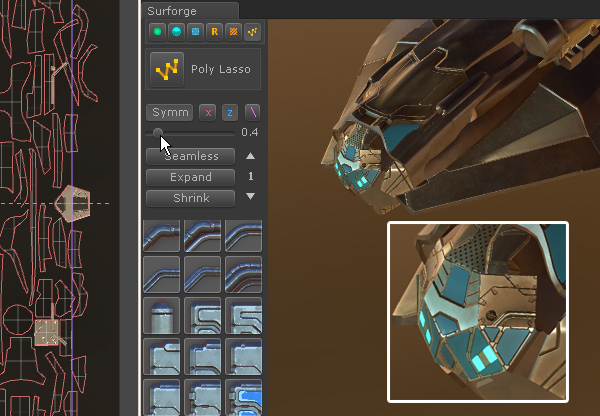
Along with profile scale step for existing objects with a hotkey, this let you create a really fine detail and work even with tiny UV islands. Hope you like it.
5 Likes
Thank you for the excellent videos keep them coming!!!
1 Like
I was hoping you would add something like this.
Thanks everyone for the positive feedback on my tutorials. Today I made a more in-depth video for the poly lasso tool. I hope you guys enjoy!
3 Likes
SniperEvan, this is amazing. Have you considered using Unity to turn this into a separate application, instead of having it as an addon in Unity?
I’m sure it would require work to create the UI within Unity, but it seems like there would be many benefits. The main ones being:
- As a separate utility, it would always work outside of Unity. You wouldn’t have to worry about compatibility between Unity versions. You could just export out the textures.
- The community wouldn’t have to be concerned about ongoing developer support, between Unity versions.
I’m not saying it would be simple, but it seems to me that this is an amazing addon worthy of its own place as separate tool.
Hey jc. I didn’t make this asset, I’m just a fan with a game dev YouTube channel (subscribe?). Sergeyv_3d is the developer! As far as creating a separate application, I’m sure it’s possible but it wouldn’t be able to take advantage of the architecture of the Unity editor that enables so many of its features. Personally, I really like that it runs in Unity. It means I can do 100% of my work within Blender and Unity. It’s also an environment that I’m incredibly comfortable with.
And since you mentioned exporting, surforge already has a built in feature for that. It outputs textures for diffuse color, specularity, normal, height, ambient occlusion, and emission. If you wanted to you could take the textures and use them in Unreal Engine or pretty much anything else with PBR shaders.
Let me know if you want to see a tutorial for something specific! I need external motivation 
3 Likes
Another great video, very detailed and clear. Thank you very much, Evan!
As you could see, Surforge need UVs with gaps between islands, for its brand “UV Grid” mode. It supports overlapping only if your overlapped islands match vertex perfect.
But, in classic UV mode with triangles you could use any UV layout you like, and create your shapes point by point, which is also very handy. You could use UV snapping in both modes. It snaps to everything: vertices, edges, other shapes your created.
Surforge was originally planned as Unity Editor extension. It opens up great opportunities for fast development. Its hard to release standalone version, it will require to write a lot from scratch.
I also don’t see the need for standalone version. Unity Editor gives so much benefits. Standalone would never have so much flexibility. You could add your own prefabs, script things. You could use other tools with Surforge, tweak everything.
2 Likes
Great tutorial! I’d like to see how parts of the faceted model can be made smooth with surforge (if possible) and also armor decoration would be fantastic since it would depart from the usual hard surface.
1 Like
Can you tell us when this update will be available?
Hey
I have set up base panel lines and objects with the lasso and detail tool.
I wanted to finish it up with some greebles noise.
I played around with the tool all over my texture space, once I figured that I understand the tool I went ahead and deleted the greebels objects in the hierarchy (“New Game Object” objects).
When I now want to continue to use the greebles I can only use the scatter feature or click where I want to spawn the firs objects. But when I want to use the grow function I get a null reference and nothing happens.
My question now is:
Is there a way to reset the greebels tool?
Or is there a way to copy the lasso & detail object to a new scene?
This is great. I was just wondering about this because for some of the models I was trying to make, like RTS buildings, the lasso profiles were too large. Like bolt panels with bolts a quarter the size of a door, and cables half the width of a door.
I’m trying to keep my suggestions to stuff within the scope of the tool. I was just skimming the manual for a way to do this. You mentioned a hotkey. Is there currently some way to change the profile sizes?
I am afraid Greeble tool is in the early development stage now. I will check the grow issue, thank you. You could use Greeble “scatter”, it should work. You could use “remove in order” button to remove your greebles.
There is no profile scale in 1.0 yet. You could adjust “root” object scale now, to make your detail smaller related to your texture.
I really hope to submit the update this week.
1 Like
Hi, I love how surforge looks!
I am very eager to try it out, but I don’t have the money yet and it may be awhile before I can buy it. I’m not asking for a free copy, but do you have any plans for a trial or basic version of this?
I don’t have much artistic ability and this looks like just the thing I need to get my models looking great!
Looking forward to a reply, thank you!
Here is a video covering Material Sets and Material Adjustments. Enjoy 

If you like my tutorials please subscribe!
2 Likes
https://www.youtube.com/watch?v=lxppqLc3LJo
Alright guys, the next tutorial is ready. This one covers greebles. Let me know if you have any questions
I’m not sure if smoothing out a faceted surface is possible with surforge. Surforge is just projecting a material onto the geometry that is in place and it doesn’t modify the geometry.
And for the armor decoration, we could definitely paint cool patterns on the armor. When you say “depart from the surface of the model” I think we are stepping outside of the capabilities of surforge. We can’t edit the model’s geometry, so for that we would want to use something like blender to actually extrude the surface.
3 Likes
Great tutorials, thank you very much, Evan! Material Sets tutorial is my favorite.
I should clarify some moments: when you tweak Detail intensity, contrast and shift for Specular and Glossines, you tweak how detail is extracted from the albedo texture. To tweak Specular/Glossiness values itself, please use Specular color box (darker colors is for less specular) and Glossiness slider. Paint layers has its own spec/gloss controls.
Just to remind: Specular is reflection intensity and reflection color tint, Glossiness is for how much reflections are glossy/brushed, low values for dielectric materials, and high values for metals.
As for adjust from Levels section (Gamma, min/max input/output): this group of sliders actually works as Levels adjustment in Photoshop, just the same algo.

About the basic or demo version - I am afraid it’s not really possible in the near future, because all my efforts aimed on main version improvements. Also separate version mean i have to update both items separately, which is just simply not possible now. Maybe I’ll do it in the future, when main version will be shiny and perfect.
Ok, thank you for replying to the question!
I did’t think about the way that would add even more to your plate from all of the updates and seperate coding it would cause. I look forward to being able to purchase your product! I guess that brings one new question to my mind. With how much you are updating this, and all of the features you will be implementing (borderlands, medieval and other styles), will you be increasing the price? I would understand if so, just curious if it will be the same when I have the funds to purchase. Thanks again!
In the future, as the asset develops, yes. I’ll write about the increase in prices in advance. In the near future it is not planned. Need to make all things to work as it should first.
1 Like

Here’s a tutorial for the Polly Lasso Arc mode. Subscribe for regular game dev tutorials!
1 Like
Wow, this just keeps getting better. Thanks for bringing these features to light Evan. And of course, thanks for making such a cool asset Sergey.
1 Like
Excellent videos, thanks Evan!