I’m fairly new to working with XR and OpenXR so the following is probably something I failed to setup correctly. Let me know where I went wrong if you can.
When attempting to toggle between the Oculus/Meta Quest 2 registering that I’m using my hands vs using the Controllers will sometimes fail to register. For instance, I’ll set the controllers down, my hands will appear, but when I pick the controllers back up the hand models will go away (Quest 2 registering that I’m no longer using my hands) the controller models don’t properly load in. Sometimes setting the controller back down will allow me to use my hands again, but the controllers will never work again during that session. Sometimes the hands won’t load back either and then I can’t do anything at all.
-Using the XR Interaction Toolkit Sample Scene as a base and the defaults provided. Started with the XR Interaction Setup Prefab and added the Hands from the HandVisualizer scene.
Hi @OverVenture ,
Upon reviewing your post, I was able to reproduce what you are seeing as well, however, upon pressing a button on the controller, the controller models will reappear. Is this what you experience as well? Or are you seeing an issue where things go away forever?
Also, when the controllers don’t come back, do you feel a vibration in the controllers, letting you know the Oculus runtime picked them back up? If so, are you seeing any other signs of tracking, such as interaction rays and whatnot?
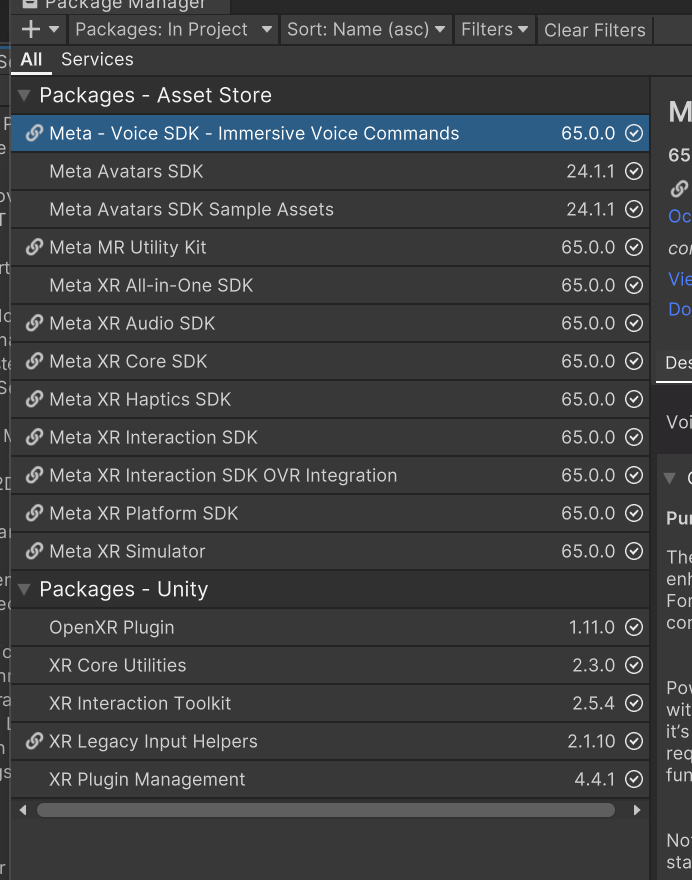
Thank you for specifying the versions of all the packages, it’s a big help.
Like Dave, I’m able to swap between hands and controllers just fine as long as I push a button on the controllers after I pick them up, which matches the behavior of the Oculus shell. Are you seeing this problem with swapping in the Unity Editor, PC standalone via Quest Link, or Android standalone? I tried all three and couldn’t reproduce.
I also verified with Window > Analysis > Input Debugger to check that OculusTouchControllerOpenXR (LeftHand) and OculusTouchControllerOpenXR1 (RightHand) reappeared under the Devices foldout when picking up the controllers and pressing a button.
To help us narrow down the problem you are experiencing, do you also have the Oculus Integration asset installed in your project? If so, what version and which subfolders did you import? (EDIT: To be clear, that asset is optional and does not need to be installed for correct controller/hand tracking, but there’s potential for conflicting configuration when both are installed which is why I asked if it was installed.)
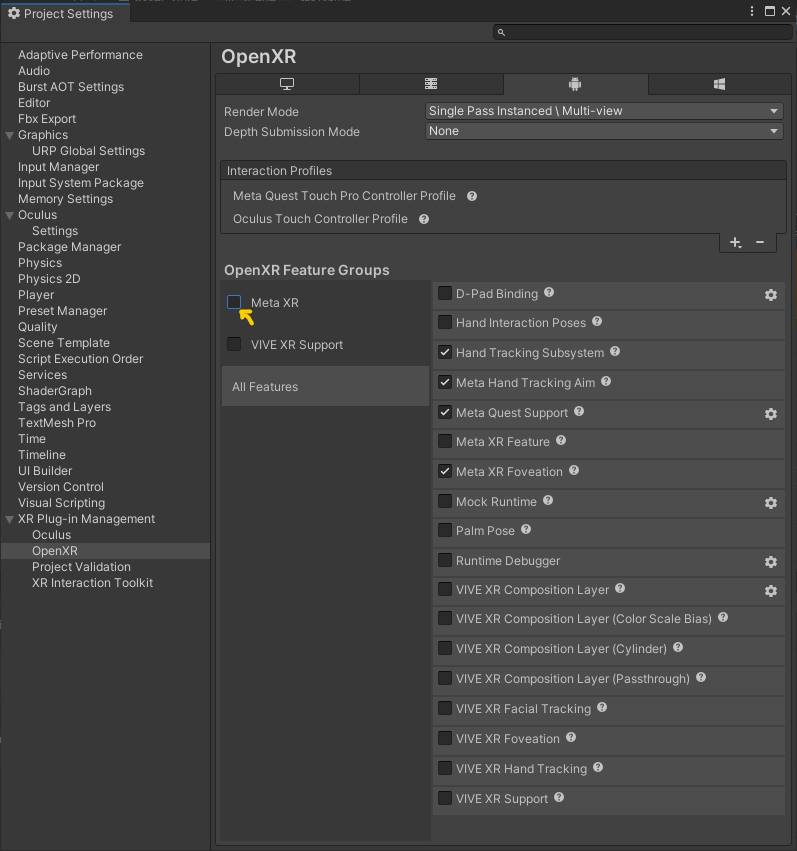
Can you also post a screenshot of your OpenXR settings in Edit > Project Settings? I would expect you to at least have Oculus Touch Controller Profile added to Interaction Profiles, and Hand Tracking Subsystem, Meta Hand Tracking Aim, and Meta Quest Support (Android only) features enabled.
-I am using the PC standalone via Quest Link.
-Whether the controllers vibrate or not varies, and they will show up under the Input Debugger if they vibrate, but not on the screen. Even if I press buttons. I changed the batteries just in case.
-I do not get any rays or any other signs of tracking. I tried swapping the prefab models just in case.
-I did not have the Oculus Integration asset installed, so I installed v56.0 and let it make its changes.
The behavior changed slightly to now have an error instead of just not appearing. In other words, possibly the original issue was solved by the updates made.
-The issue changed slightly with Oculus Integration installed, and can be accompanied by the following bug or just crashing occasionally: “Could not find active control after binding resolution”.
I edited my post, repeated here: To be clear, that Oculus Integration asset is optional and does not need to be installed for correct controller/hand tracking, but there’s potential for conflicting configuration when both are installed which is why I asked if it was installed.
There is currently an open active bug XRHB-35 where controller tracking may not work when the Meta XR Feature is enabled (which is a feature added when Meta’s Oculus Integration asset is installed). Until that is fixed while that asset is installed, you will need to disable Meta XR under OpenXR Feature Groups to disable Meta XR Features so controllers will be correctly tracked.
I see in your screenshot that there is a warning icon at least for Android build target. Can you click it or navigate to Edit > Project Settings > XR Plug-in Management > Project Validation and click to fix all issues to see if it resolves your issue? There may be others in the different tabs in that window.
Hi Chris.
Yep I can confirm that switching off the Meta XR feature will fix the issue of switching hands back to controllers. But without this I can’t set the Fixed-Foveated Rendering level which is helpful if not essential to keep a nice 72fps frame rate in my game. I assume this is also needed to handle oculus achievements and leader board integration. This post seems to believe its related to the OnDeviceChange function
This is still an issue and I do not understand why?
Surely it’s an easy find and fix bug for such an important bug.
Turning meta xr off is NOT an option if you want to use meta leaderboards or achievements
When will this be fixed???
Thanks Shogos. I’ll attempt a build with these settings. Although I think I need Meta XR Features ticked because I want to get access to Oculus achievements and leaderboards. This is where it breaks I think
I believe that bug described in that issue was only with the OpenXR package version 1.8.0 and 1.8.1 and is now fixed with 1.8.2 or above. Those versions changed how the controller devices were added and removed from input system, and was reverted back to old behavior with 1.8.2 to fix that bug. The issue with Meta XR needing to be disabled is something else, and we’ll keep this thread updated.
Meta XR Core SDK to version 62.0.0 Still does not fix this issue. How do we get this fixed? I seems like such a simple bug to find and fix yet Unity appears to be ignoring our pleas???
Just ran into this issue myself. It works fine if I disable Meta XR Feature but then I can’t use anything from Meta XR and it also keeps telling me to turn it on when I press play in the editor…
Starting with controllers and switching from controllers to hands works fine, the issue happens only when going from hands to controllers (like when starting with hands and then picking up the controllers, or switching from controllers to hands and then trying to go back)
@chris-massie is there any update to enabling metaxr issue yet ? I just ran into it myself and its very frustrating that we can’t track controllers when metaxr is enabled with steamvr as the active runtime.
When I enable metaxr under openxr options it breaks controller tracking and if I disable it I can’t use anything from oculus. here’s all the xr related packages I’m using atm :
Looks like NO is the answer.
Nice one whoever you are Ashley Matheson
CASE IN-61698 Thank you again for your bug report. Your bug report IN-61698: [Meta XR All-in-One SDK] Controllers are not being tracked after using Hand Tracking when Meta XR All-in-One SDK is installed has been closed with the resolution Won’t Fix. Resolver: Ashley Matheson Resolution Notes: There are no fixes planned for this Bug