Hi there,
I have an editor script using System.Serializable, to allow me to use a 2D array in a custom script, where I can manipulate the settings of the 2D array in the editor.
Gernally it works, but no matter what I do, despite the Length of each axis of the 2D array being what ever I set it to be in code (* with the proper results showing in the editor), at run, at print to console, the Length of each axis prints as 11. This, as such is causing some “funkiness” in my results.
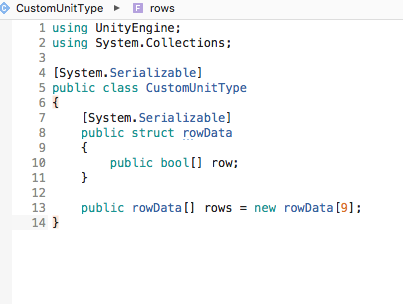
This is perplexing and I cant figure out why. I have attached images of the two scripts that should be all, that is relevant.
If the array has a fixed width, you can “simulate” a 2D array rather easily with an 1D array like below (a 2d array is pretty much this in memory anyway):
As for posting the runtime code, you mean the console log?
edit.
Here is current code also code that I am using to layout out tiles, in a grid. A implemented a hack solution to end the process at a set int value.
Thanks
Editor Script.
using UnityEngine;
using UnityEditor;
using System.Collections;

[CustomPropertyDrawer(typeof(CustomUnitType))]
public class CustomTileData : PropertyDrawer
{
    public override void OnGUI(Rect position, SerializedProperty property, GUIContent label)
    {
        EditorGUI.PrefixLabel(position, label);

        Rect newPosition = position;
        newPosition.y += 20f;
        SerializedProperty rows = property.FindPropertyRelative("rows");

        int LengthOfArray = 7;

        for(int i = 0; i < LengthOfArray; i++)
        {
            //Debug.Log("-------------- ED: i " + i);
            SerializedProperty row = rows.GetArrayElementAtIndex(i).FindPropertyRelative("row");
            newPosition.height = 20;

            if (row.arraySize != LengthOfArray){
                //Debug.Log("row array size != Length of Array... in is/ " + row.arraySize);
            }

            newPosition.width = 20;

            for(int j=0; j < LengthOfArray; j++)
            {
                //Debug.Log("ED: j " + j);
                EditorGUI.PropertyField(newPosition, row.GetArrayElementAtIndex(j), GUIContent.none);
                newPosition.x += newPosition.width;
            }

            newPosition.x = position.x;
            newPosition.y += 20;
        }
    }

    public override float GetPropertyHeight(SerializedProperty property, GUIContent label)
    {
        return 20 * 9;
    }
}
Reference to editor script (much of these two scripts are copy pasted from online references)
using UnityEngine;
using System.Collections;

[System.Serializable]
public class CustomUnitType
{
    [System.Serializable]
    public struct rowData
    {
        public bool[] row;
    }

    public rowData[] rows = new rowData[7];
}
The script I am using in game to create the floor tiles.
using System.Collections;
using System.Collections.Generic;
using UnityEngine;

public class GroundsUnit : MonoBehaviour {


    public GameObject tilePrefab;
    [Space]
    public CustomUnitType customUnitType;
    /// <summary>
    /// hack value to lock the tile layout at xLengthLimit x aLengthLimit.
    /// </summary>
    int xLengthLimit = 7;


    float x_factor = 2;
    float z_factor = 1.8f;


    // Use this for initialization
    void Start () {

        Invoke("setUnit", 1);


    }


    void setUnit(){

        for (int i = 0; i < customUnitType.rows.Length; i++)
        {

            if (i < xLengthLimit)
            {
                //print(" --===  rows legth (i = " + i + ")  ====--");
                for (int j = 0; j < customUnitType.rows[i].row.Length; j++)
                {
                    if (j < xLengthLimit)
                    {
                        createUnit(i, j);
                    }
                }
            }
        }

    }

    void createUnit(int x, int z){

        bool unit = customUnitType.rows[x].row[z];
        if(unit){

            return;

        }
        else{


            //create prefab.
            GameObject gm = Instantiate(tilePrefab, transform);

            //get and set local position.
            float xPos = ((float)x * x_factor) - (3 * x_factor);
            float zPos = ((float)z * z_factor)  -(3 * z_factor);
            Vector3 pos = new Vector3(xPos, 0, zPos);
            gm.transform.localPosition = pos;

        }

    }
}