I’m generating a new AssetTableCollection and and AssetTable for each locale with generated voiceover AudioClips based on a StringTable and I’m running into a strange issue.
When I change any script and Unity reloads the domain 2 things can happen:
Either the script is missing from my AssetTable.

Or the table no longer belongs to a collection.
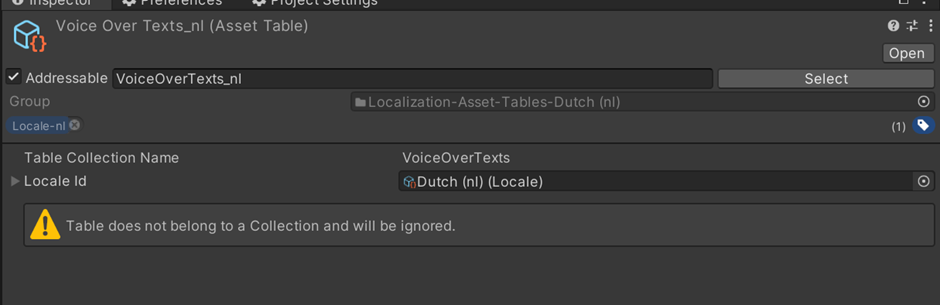
I’m completely at a loss as to why this is happening. Is this a bug or am I doing something wrong?
I have also noticed that the icons of my generated AssetTables are different from the ones created using the Localization Tables editor window.
I’m using Unity 2022.3.23 and Localization 1.5.2
And generating the tables like this:
        private static AssetTableCollection GetOrCreateAssetTableCollection(string tableCollectionName)
        {
            AssetTableCollection newAssetTableCollection = LocalizationEditorSettings.GetAssetTableCollection(tableCollectionName);
            if (newAssetTableCollection == null)
            {
                Debug.Log($"Creating new AssetTableCollection: {tableCollectionName}");
                newAssetTableCollection = LocalizationEditorSettings.CreateAssetTableCollection(tableCollectionName, Path.Combine(BUTXRConstants.Paths.Localization, tableCollectionName), LocalizationSettings.AvailableLocales.Locales);
                if (newAssetTableCollection == null)
                {
                    Debug.LogError($"Failed to create AssetTableCollection: {tableCollectionName}");
                }
                else
                {
                    EditorUtility.SetDirty(newAssetTableCollection);
                    AssetDatabase.SaveAssets();
                    AssetDatabase.Refresh();
                }
            }
            else
            {
                Debug.Log($"Using existing AssetTableCollection: {tableCollectionName}");
            }
            return newAssetTableCollection;
        }
        private static AssetTable GetOrCreateAssetTable(string tableName, Locale locale)
        {
            AssetTable assetTable = _assetTableCollection.GetTable(locale.Identifier) as AssetTable;

            if (assetTable == null)
            {
                Debug.Log($"AssetTable not found. Creating new AssetTable for {tableName} and locale {locale.Identifier.Code}");

                assetTable = _assetTableCollection.AddNewTable(locale.Identifier) as AssetTable;

                if (assetTable == null)
                {
                    Debug.LogError($"Failed to create new AssetTable for {tableName} and locale {locale.Identifier.Code}");
                    return null;
                }

                SaveTable(assetTable);
            }
            else
            {
                Debug.Log($"Using existing AssetTable for {tableName} and locale {locale.Identifier.Code}");
            }

            return assetTable;
        }
private static void SaveTable(AssetTable assetTable)
{
    EditorUtility.SetDirty(assetTable);
    EditorUtility.SetDirty(assetTable.SharedData);
    EditorUtility.SetDirty(_assetTableCollection);

    AssetDatabase.SaveAssets();
    AssetDatabase.Refresh();

LocalizationEditorSettings.EditorEvents.RaiseCollectionModified(null, _assetTableCollection);
}