Hi all,
I am trying to localize my game and I realized for the Russian language I need a fallback font, so all the “special” characters will be displayed. And it works fine on the technical side but it is looking bad sometimes, because only the cyrillic characters are replaced of course.
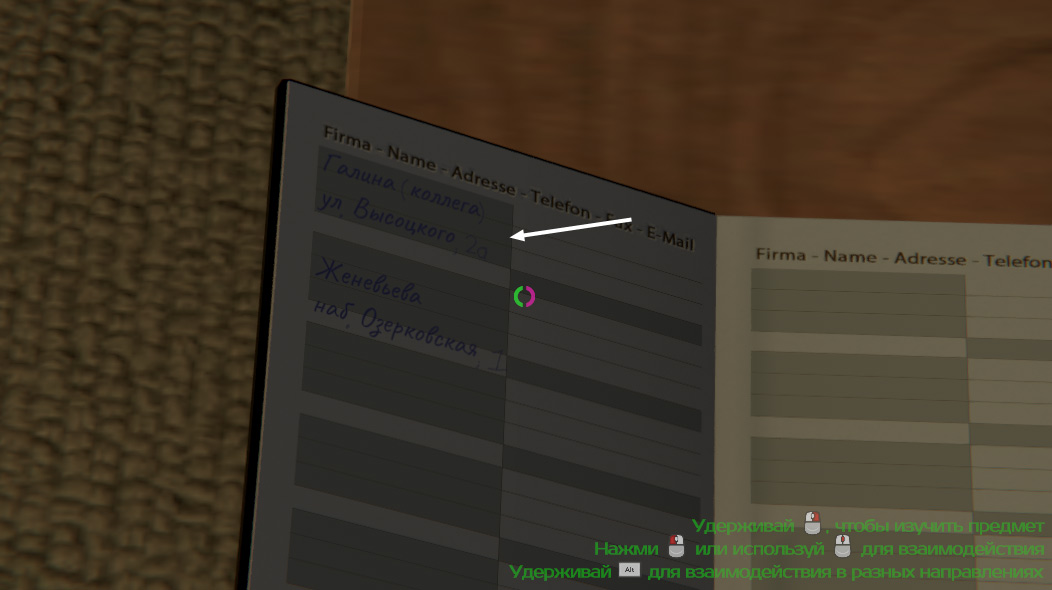
As an example I got an address like:
Bleeker Street 2a
Localized to
xxxxxxxx, 2a (can’t post the characters in the forum for some reason, see image below)
The original font is of a handwriting type and I looked for something similar for the Russian fallback font but of course, they don’t match exactly. The result is, that the street name is displayed in the Russian font and the “2a” house number is displayed in the original font which is looking a bit odd.
A solution would be only to rely on fonts that have all the characters I need but that is a limitation I don’t want to be honest. Another idea would be to have font objects for every language and toggle them depending on the user language but then I have every string on GameObjects and not in one single resource file for example.
So what I would expect and maybe there is a setting or maybe this is a bad idea and I just don’t see it yet:
if a TextMesh object has to fall back to a certain font then the whole object should be rendered in that font.
How is that problem solved in general? I think it is very common and should have a solution so I would be very glad if you could point me onto that