Hello, fellow Unity developers and everyone in general.
I’ve recently started a new project using the Unity’s Particle System, but came across with a little problem. I’m currently struggling to create animated particles of bats that shoot towards my player. I’ve used the Particle System before to create normal particles with great success. But somehow I can’t get the Texture Sheet Animation feature to work. I want my bats to animate and flap their wings as they move towards the screen, increasing in size until they disappear.
First I have created a 512x512 pixels PNG image with Alpha channel to work as an animated texture sheet, thus having a total of 2x2 sprites, each with 256x256 pixels.

I have then imported the texture to Unity using the Multiple Sprite Mode. I even used the Sprite Editor to draw rectangles around each sprite individually.
And finally used the texture image to create a particle Material, using Mobile/Particles/Alpha Blended as Shader type (I’m developing for Android).
I set the Texture Sheet Animation on the Particle System and used Whole Sheet and 2 x 2 Tiles settings.
I’ve also set the Frame over Time to Curve, instead of Constant (default).
But I’m getting the whole sheet displaying with all the 4 sprites at once (even when I set max particles to 1) instead of a single animated sprite, as it was supposed.
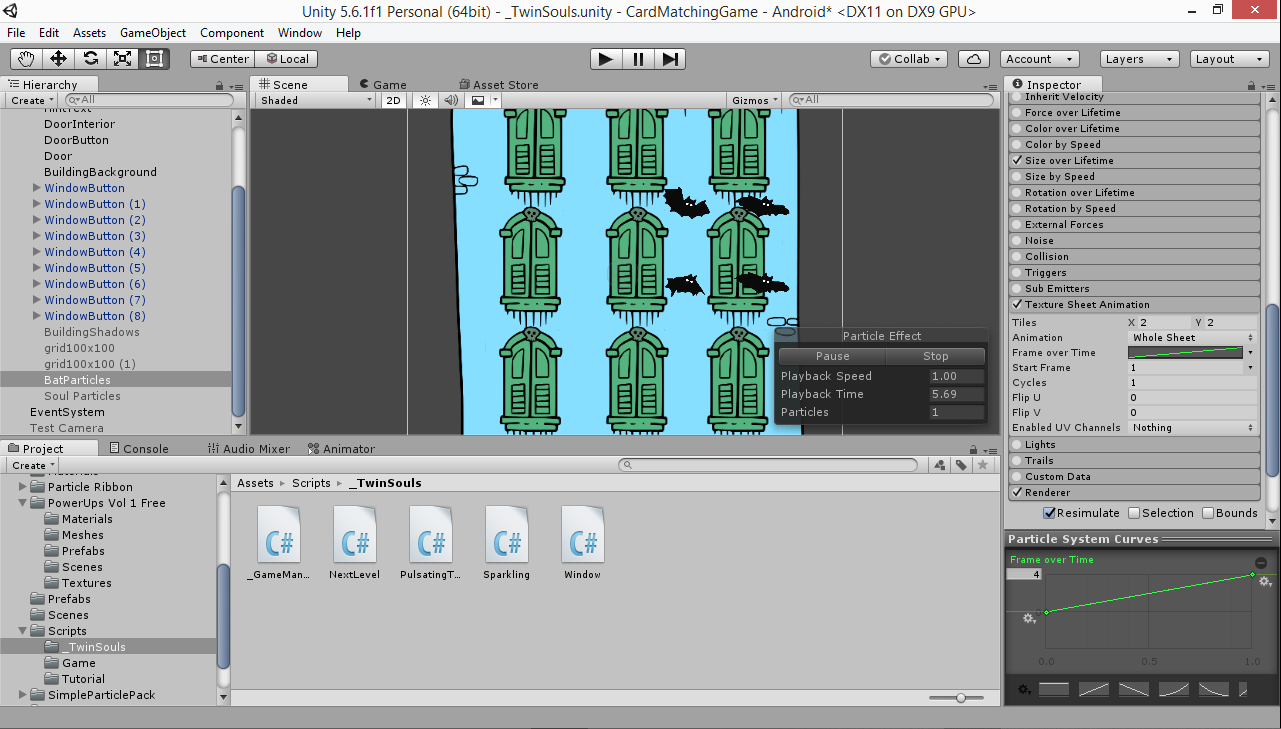
Am I missing anything here?! Or is this possibly a bug? I’ve looked everywhere for answer and feel I’ve tried everything already and I can’t come up with a solution. I’ve even tried to change the texture to Single Row with a 1024x256 4x1 sprite sheet. Would anyone kindly point me in a direction here?
Thanks in advance for your time and effort to help us all newbies around here.
The setting seems right. Maybe you can recreate the issue in a much simpler scene with dummy texture (replace each bat sprite with just a number), export and upload it to somewhere like Google Drive and share for us to inspect.
– ifurkend