So I created this in Maya 2014:

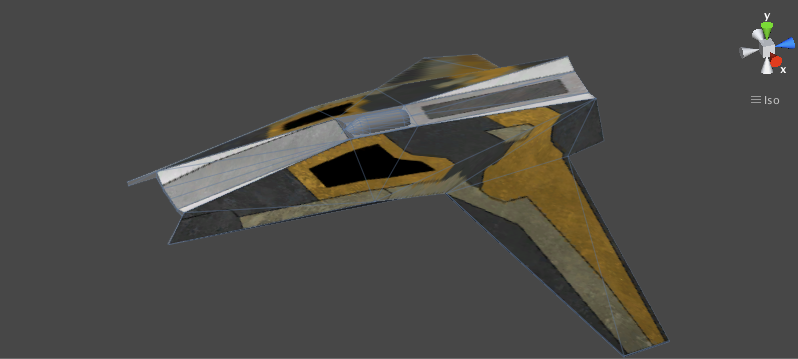
But when I put it into Unity, it looks like this:

The texture is getting warped and stretched when I put it into unity, especially around the curve in the wing. How do you fix this?
So I created this in Maya 2014:
But when I put it into Unity, it looks like this:
The texture is getting warped and stretched when I put it into unity, especially around the curve in the wing. How do you fix this?
Would you be able to post an image with the wireframe shaded over the model? I would like to see more detailed Geometry to get an idea of what’s happening.
Certainly:
Maya

Unity
Doing this seems to identify the problem, possibly: I had removed some of the lines on the wing (turning multiple flat faces into one essentially curved face) in maya so it would be easier to texture; Unity appears to be inserting its own lines to break the one face into multiple flat faces, which is messing up my UV mapping I presume.
Is this the case, and if so, how the heck do I fix that without starting over :neutral:
Anyways I put the model on google drive here:
https://drive.google.com/file/d/0B5Dakxno0tzvSWlCd0pWeXZ5MGc/edit?usp=sharing
Any difference if you use the fbx format?
Nah, mesh and therefore stretching still look exactly the same.
It looks like the texture is warping along the triangulated edges in Unity. Maybe adding a couple more edge loops on the model and checking your UV’s might help?
dont use N-gones* ( faces with more than 4 vertices ) while modelling. Try to stick with Quads ( 4 vertices ) or Triangles. As Auore suggested insert some edges you schould be able to do it without starting all over again
*N-gones have there place and are nice if you know how to use them but in the end, befor you export it, you should always get rid of them
I agree with Aurore and element_wsc. You have polys with more than 4 sides. When they are converted to tris, they are causing your UVs to stretch.
You could try converting to tris in your software (make a copy first) and then tweak any strecthed UVs you discover there and then bringing the model into Unity
Thx everybody for the tips, I assume Unity converts everything to triangles since 3 points defines a plane? (Or face in this case)
It does get converted to triangles… unfortunately maya is converting the triangles along different verts on the face. So you might want to do the triangles yourself first to make sure it looks good in maya… then export.
Anyways using Maya’s triangulate command on the mesh works perfectly, thanks ronalmb for the idea, and everyone else for contributing.