I’ve just about got the hang of the input setup screen where you assign keys, but I can’t get any input from a controller working at all, I can with the old system, although that’s a pain as well.
I’ve downloaded a load of “Simple” samples, simple my arse! Why make these samples do so much? I just want a VERY simple sample that shows getting an input. Also the samples I’ve downloaded all seem to use LowLevel, none of the tubes I’ve found use LowLevel.
Could we please, please have the most simple of simplest examples of getting an input from a controller? I don’t want graphs, I don’t want flashy boxes, I don’t want moment, just please put a value in a variable!!
Rant over.
I must admit I’m pretty new to unity and c#.
Does anyone have a sample as simple as this I could have a look at? Please!!
i had similar problems and am using old system, but in truth i have not tried new system properly. There is someone called ‘brackeys’ who may be able to help with tutorial.
The following code assumes you’ve created and attached an input action asset to the script in the Inspector, and that the asset has an action map named “Gameplay” and that it has the actions “Movement” and “Fire”.
Line 25’s ReadValue<Vector2>() is essentially the same as GetAxis("Horizontal") and GetAxis("Vertical").
using UnityEngine;
using UnityEngine.InputSystem;

public class Player : MonoBehaviour
{
    public InputActionAsset playerControls;

    private InputAction movement;
    private InputAction fire;

    private void Awake()
    {
        var gameplayActionMap = playerControls.FindActionMap("Gameplay");

        movement = gameplayActionMap.FindAction("Movement");
        movement.performed += OnMovementChanged;
        movement.canceled += OnMovementChanged;
        movement.Enable();

        fire = gameplayActionMap.GetAction("Fire");
        fire.performed += OnFireChanged;
        fire.Enable();
    }

    private void OnMovementChanged(InputAction.CallbackContext context)
    {
        var direction = context.ReadValue<Vector2>();

        // Code that moves the player based on the direction
    }

    private void OnFireChanged(InputAction.CallbackContext context)
    {
        // Code that fires a projectile
    }
}
There are no benefits to learning the old system at this point in time. Everything that you were able to do with it can be done with the new input system, and unlike the new input system the old one has no advanced functionality for when you need more it. Want rebinding on the old system? You’ll have to build your own rebinding framework on top of it.
Ready for some more? There are at least four major ways of accessing input data. My first post showed the most complex method. Unity themselves show one of the intermediate methods in a blog post (first link) with the second intermediate method being the option for the input action asset to generate a C# class (second link).
“So we decided to address that and took inspiration from simplicity of japanese writing system.”
I didn’t dive in very far, but on surface this seems to be horrible and worse than EventSystem for GUI.
Few scenarios off the top of my head:
Let’s say the user is using korean keyboard and I want to detect keypress of “ㅂ”. Now what?
The user is utilizing unbranded usb clone of Sega Genesis gamepad. Which button is which?
My gamepad has 4 analog sticks and 28 buttons. How do I access them?
I understand the need for low level API and polling, and abstraction for input device makes sense. But, I don’t dig the layer at the very top with limited enums.
One of the features I like about Rewired is the huge number of controllers that are supported. The most important part of the number of controllers supported is that the developer has hands on experience with 98% of the controllers. That makes it so much easier when you ask a support question and get a informed response on the controller.
“A bit more hassle” is a bit of an understatement, because you eventually will likely need to purchase those controllers (especially ones that aren’t xinput derived, especially if you’re not only targeting Steam with its internal controller compatibility helpers) to test them in the first place. You can not rely on the idea (nor should you bank on the possibility at all) that you can collect this data from the userbase. There is a monetary and technical cost that comes with having to manually add controller support outside of the most baseline.
So… what do you all expect them to do with “unsupported” controllers? Clearly the more they can support the better, but they probably can’t get 100% coverage and still need to do something for the rest.
Assuming that functionality is present to allow runtime custom mappings then isn’t that the solution? Ask the user to map what buttons they want for each action?
I like Rewired too, and only moved away from it while cutting down on 3rd party dependencies. I had a pretty big project ported over to use the new Input System instead in less than a work day, having never looked at it before. So far my main gripe is with the documentation. The system is straightforward enough to use, but figuring out which bits are relevant to you is a bit of a pain the first time through, because they provide multiple ways to do things and no clear “approach X is best for cases where Y”.
Honestly? There’s not a lot of them to worry about.
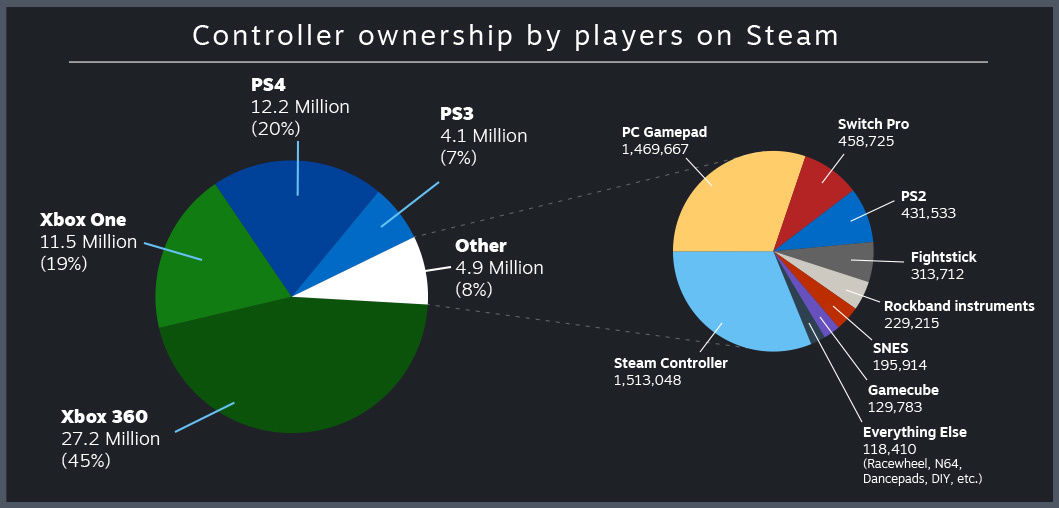
Xbox 360 and One support is just Xinput. PS4 is handled through the Steam controller system on that front and the most common drivers for it and PS3 both effectively work as Xinput emulators. That’s 92% immediately covered even if you’re not targeting Steam as a platform. 2.15%ish of the “other” is the Steam Controller, which is already effectively user mapped.
We can rule out, generally, Rockband instruments and “everything else.”
The only real concern here is the 2.15%ish using “PC gamepads,” which is a broad scale compatibility nightmare because it includes any manner of HID gamepad setups, often with very little standardization and, at last check, are often not at all easy to detect with the new input system.
Also important to note is that this graph (from 2018) is not exclusive ownership. Many people in the edge case categories likely also own other controllers, as the amount of gamepad using accounts (at time of article) was “over 30,000,000,” but there’s 27,200,000 using 360 pads.
That said, the big thing about Rewired is that it’ll get you that extra compatibility for essentially free (you still have to buy it and use the automapper), while the new input system is putting that onus on the developer in a more direct way. Rewired also has the benefit of a lot of fantastic documentation alongside its active development. Even with the new input system being free, there are other costs to consider and I firmly believe that Rewired handles those very well.
I’d also be concerned about people with custom designed “accessibility” controllers. I’ve only seen a couple in the wild, and both happened to be based on Xbox gamepads, but I don’t know how commonly that’s the case. If relevant that’s the kind of thing where an engine vendor handling things centrally can give a direct, positive impact to often overlooked minority groups.