Hi there!
First post, how exciting. I’m very new to Unity, and have jumped into the deep end making a top-down game (think retro Pokémon.) I seem to be having trouble with the TileMapCollider2D component though.
I’ve developed an old-fashioned collision check system that checks the tiles in front of the player’s direction (Up Down Left or Right). This was working fine with a Tilemap (named Collisions for ease) with TileMapCollider2D attached, and I had no issues getting stuck or rotating against an obstacle etc as I’m not using Unity’s 2D physics engine.
However, during my tests I added a second and third obstacle into the Collisions Tilemap, and something strange happened- it was as if the TileMapCollider2D was grouping all of the obstacles together, and encapsulating them within one huge collision box. This meant that there were collisions where there should be free roam 
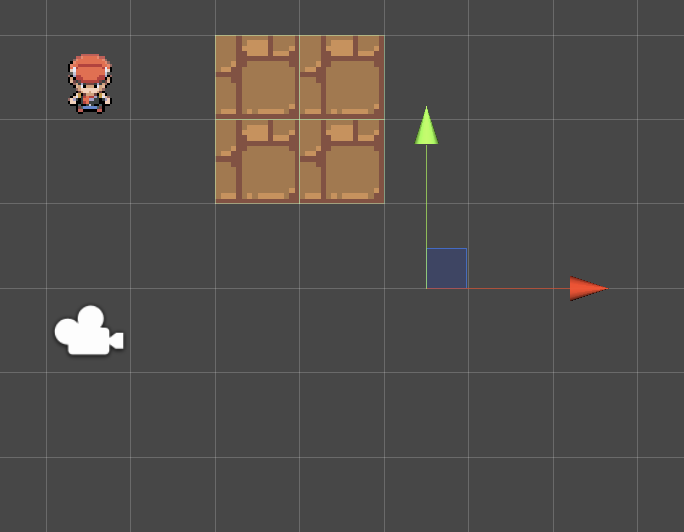
(^ This is fine. No problems, collisions work as intended)
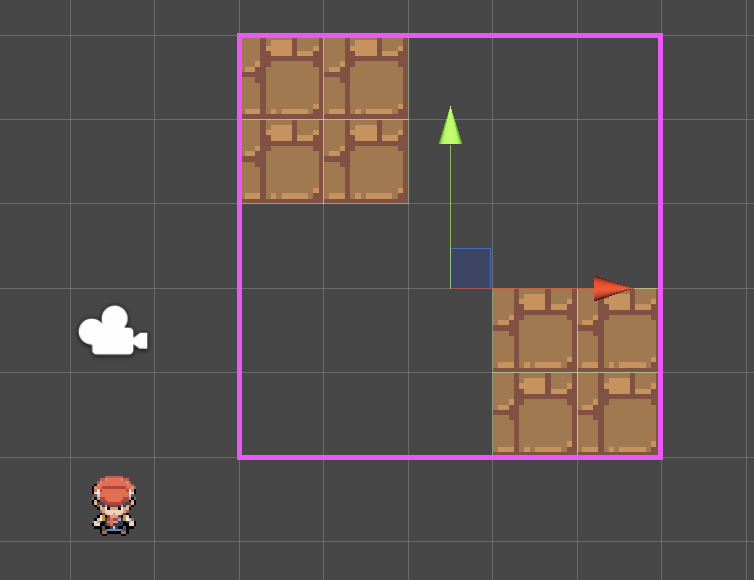
(^ This makes me sad. The player can’t move anywhere past that pink line!)
Does anyone have any ideas on how to make the component keep the obstacles separate??
Cheers!!
 I have a feeling it’s to do with the intersect code I’m using for collisions.