I’m running into trouble getting local multiplayer UI controls to work.
I have a player prefab with the PlayerInput on it using InputSystem_Actions Input Action Asset, I’ve added a MultiplayerEventSystem and InputSystemUIInputModule on a child underneath this player prefab. The InputSystemUIInputModule is pointed at the same action asset as the PlayerInput component. The mappings are set up correctly (Point → UI/Point, Left Click → UI/Click, etc…). The PlayerInput component has the UIInputModule pointing at the child that contains the InputSystemUIInputModule.
When the game starts up and players spawn they can control their own objects just fine. The issue is that the second player cannot control their UI navigation.
They can select the first selected object which is just a button, but they can’t navigate around to other buttons. The first player can navigate and select. The device doesn’t matter, I can start first on a controller (player 1), and then keyboard (player 2), the second player won’t be able to navigate. And I can do it the other way around, keyboard then controller, and the second player can’t navigate. I can see the second player that is spawned has their InputSystemUIInputModule’s Action Asset point to the same Cloned Input Action Asset that the PlayerInput has.
I’m really not sure what else to try at this point.
Here’s some pictures:
Player1


Player2

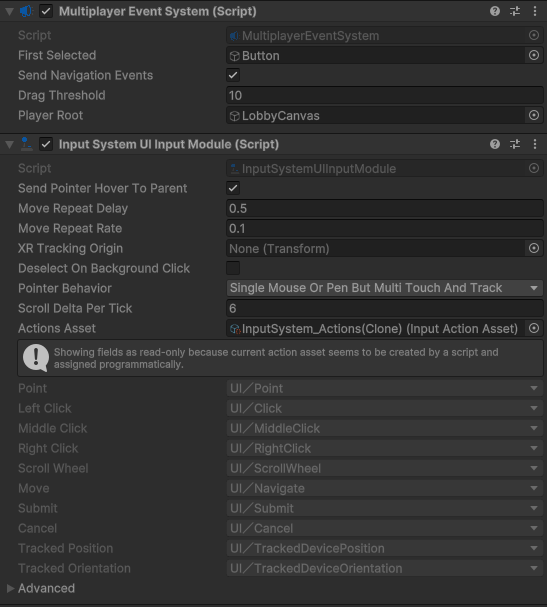
LobbyCanvas is the MultiplayerEventSystem’s PlayerRoot, I’ve also tried it with the Player itself as the root:

Neither work.
I’ve also tried it without linking the same ActionsAsset on InputSystemUIInputModule and PlayerInput, I’ve also tried without pointing the PlayerInput to the InputSystemUIInputModule, obviously neither of those worked. Has anyone had success with this?