Ideally, I would like to be able to use a ‘unlit’ shader (so that the screen is always perfectly displayed) AND use a meta pass with a intensity slider to be able to boost emission power over 1 !
Is this possible or is it a total non sense? (shader noob here )
simple way, you could use a unlit shader to render your TV and use a second mesh to render your emission. The second mesh would be in a layer that is not rendered by your camera, this way you can crank up the emission and the TV would not change, only the light emitted.
more complex way, make a custom shader that changes the value only in the meta pass, look at the built in standard shader, it has a meta pass you could use.
Unfortunately, I’m new to all this (including Unity ;)) I’ve already this piece of code, just missing a slider to boost emission power over 1 ! (as one can do for ‘emission’ power in the standard shader)
Shader "Custom/metaPassShader"{

    Properties {
        _Color ("Color", Color)=(1,1,1,1)
        _MainTex ("Albedo (RGB)",2D)="white"{}
        _Glossiness ("Smoothness", Range(0,1))=0.5
        _Metallic ("Metallic", Range(0,1))=0.0

        _GIAlbedoColor ("Color Albedo (GI)", Color)=(1,1,1,1)
        _GIAlbedoTex ("Albedo (GI)",2D)="white"{}
    }

    SubShader {
    // ------------------------------------------------------------------
    // Extracts information for lightmapping, GI (emission, albedo, ...)
    // This pass is not used during regular rendering.
        Pass
        {
            Name "META"
            Tags {"LightMode"="Meta"}
            Cull Off
            CGPROGRAM

            #include"UnityStandardMeta.cginc"

            sampler2D _GIAlbedoTex;
            fixed4 _GIAlbedoColor;
            float4 frag_meta2 (v2f_meta i): SV_Target
            {
                // We're interested in diffuse & specular colors
                // and surface roughness to produce final albedo.

                FragmentCommonData data = UNITY_SETUP_BRDF_INPUT (i.uv);
                UnityMetaInput o;
                UNITY_INITIALIZE_OUTPUT(UnityMetaInput, o);
                fixed4 c = tex2D (_GIAlbedoTex, i.uv);
                o.Albedo = fixed3(c.rgb * _GIAlbedoColor.rgb);
                o.Emission = Emission(i.uv.xy);
                return UnityMetaFragment(o);
            }

            #pragma vertex vert_meta
            #pragma fragment frag_meta2
            #pragma shader_feature _EMISSION
            #pragma shader_feature _METALLICGLOSSMAP
            #pragma shader_feature ___ _DETAIL_MULX2
            ENDCG
        }

        Tags {"IgnoreProjector"="True" "RenderType"="Opaque"}
        LOD 200

        CGPROGRAM
        // Physically-based Standard lighting model, and enable shadows on all light types
        #pragma surface surf Standard fullforwardshadows nometa
        // Use Shader model 3.0 target, to get nicer looking lighting
        #pragma target 3.0

        sampler2D _MainTex;

        struct Input {
            float2 uv_MainTex;
        };

        half _Glossiness;
        half _Metallic;
        fixed4 _Color;

        void surf (Input IN,inout SurfaceOutputStandard o){
            // Albedo comes from a texture tinted by color
            fixed4 c = tex2D (_MainTex, IN.uv_MainTex)* _Color;
            o.Albedo = c.rgb;
            // Metallic and smoothness come from slider variables
            o.Metallic = _Metallic;
            o.Smoothness = _Glossiness;
            o.Alpha = c.a;
        }
        ENDCG
    }

    FallBack "Diffuse"
}

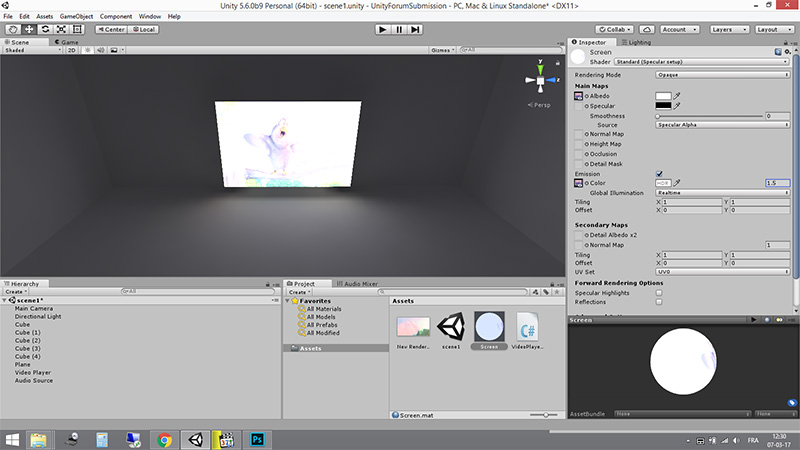
 )
)