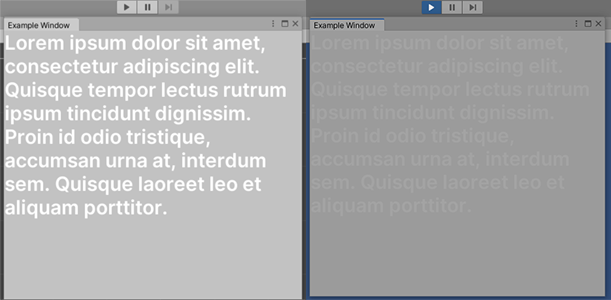
I’ve also got a response from the QA stuff, stating that this behavior is by design. It didn’t happen in the previous Unity versions, but I guess that’s due to the new skin and the fact that the text is now also tinted in play mode. It’s still debatable whether such behavior is ok; after all, any light text is unreadable in play mode when using light skin (dark one has another default tint, which is not affecting light text that much). Additionally, only text is affected with this tint: borders, for example, are not, and look fine even when they have the same color as text.
It is unclear from your screenshot, but if this is text in an Editor Window then yes I would expect it to change and be tinted by playmode just like anything else in the editor. If it is a runtime UI though, then that would not be expected behaviour.
That’s an editor window, right. But the text is not tinted as everything else, but much more. For example, if I’d add a border to the label with those text with the same color, it’d be much lighter when in play mode. I guess they’re tinting the text separately from other graphics and the tint is too aggressive.