Hello,
I’m new with unity.
But I don’t know to how to change the opacity of a 2D sprite.
Thanks.
Hello,
I’m new with unity.
But I don’t know to how to change the opacity of a 2D sprite.
Thanks.
Change the color.
Color(R,G,B,A). A is the alpha.
So:
SpriteRenderer.color = new Color(1f,1f,1f,1f) is a normal sprite
SpriteRenderer.color = new Color(1f,1f,1f,.5f) is about 50% transparent
SpriteRenderer.color = new Color(1f,1f,1f,0f) is about 100% transparent (Cant be seen at all, but still active)
Thank you!
Thanks a lot for this.
Hrm…
I’m trying the same thing, but placing a float in the location and getting an error:
public class Darkness : MonoBehaviour {

    float alphaLevel;
    float alphaFactor;
    public float totallyDarkHeight = 1000f;

    // Use this for initialization
    void Start () {
        alphaFactor = 1 / totallyDarkHeight;
    }

    // Update is called once per frame
    void FixedUpdate () {
        alphaLevel = alphaFactor * transform.position.y;
        if (alphaLevel > 1){
            alphaLevel = 1;
        }
        SpriteRenderer.color = new Color (1f, 1f, 1f, alphaLevel);
    }
}
It’s supposed to becoming more opaque as the object goes higher.
But when I try it, it give back this:
“An object reference is required to access non-static member”
Am I just screwing up the C# code?
I’ve been switching to it from JS.
EDIT: Shouldn’t it read:
gameObject.SpriteRenderer.color = new Color (1f, 1f, 1f, alphaLevel);
???
And why do I get the same error when I do?
You need to use GetComponent. Also, FixedUpdate is only for physics; use Update.
–Eric
Ah man, why am I struggling so much…
Thank you Eric!
Finally! this worked
ty!
Thank you so much!
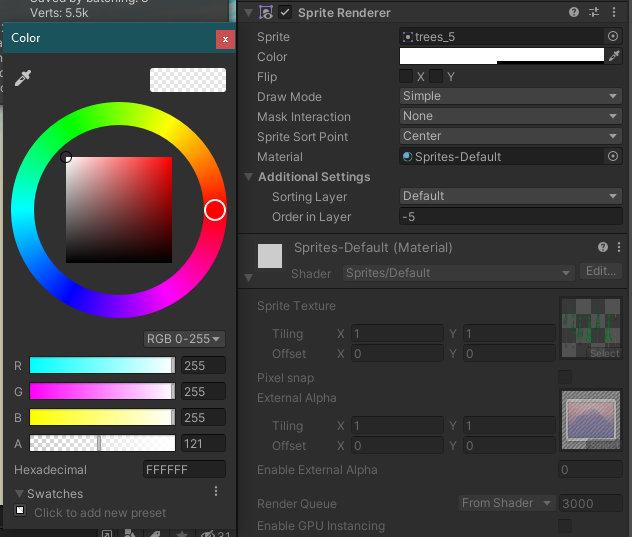
Is able to set it without code?
Yes, in the color selector on the sprite in the inspector. There are four sliders, the last one is the alpha.
This is gonna be an odd addition to this question, but is it possible to make parts of a sprite transparent without affecting the rest? As if I were dragging an x-ray lens over part of the sprite so that whatever was under the lens would be transparent but the rest was still opaque?
Thank you so much!
Sorry for necroing, but you can use Sprite Masks to do this. Set Mask Interaction on the sprite to Visible Outside Mask to make the mask apply to your sprite.